Hi All
Brand new to Proxmox and mid first install, have used VMware for many years with out issues, so having a few teething issues with Proxmox, assume born from stupidity and trying to implement beyond my current level of understanding... So here goes
We have a 6 node Proxmox cluster, 32 Core/256GB ram each. Each host has 5 x 3.2tb NVMe's. Now here was my first attempt to do something funky in regards to resilience within Ceph. So using crush maps (Device Classes) with the "Host" bucket option, i have split these drives in to 3 pools. Pool 1 has drives 1,2,3 from the first 3 hosts, Pool 2 has drive 1,2,3 from the last 3 hosts, and Pool 3 has the remaining 2 drives from all 6 hosts. All the pools use a replication factor of 3 and a minimum of 2. From what i can tell this should be valid. The reasoning for this was around VM's that had pairs, AD, SQL Always on Nodes etc would live on Pool 1 and 2 respectively for the partners, and HA is configured to run the VM's on the same hosts as the pools live and then Pool 3 was for VM's that are only single copies.
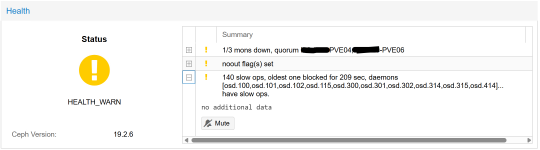
When we shut down any single host, the VMs migrate to hosts specified in the HA config, we then see slow ops in Ceph, as we have OSD's missing from the powered off host and we loose access to some VM's (still testing to see how far spread this issue is) that live on the pools controlled by that host (console and network access), even though we still have the minimum 2 replication requirement for Ceph to function. It make no difference if we set "No Out" or not. Access to the VM's returns instantly once the host comes back online. The VM's do not reboot during this time as we don't get the unclean shutdown messages, they appear to cease functioning and "pause", for the duration.
Please can any one shed any light of why this is the case? or suggest any troubleshooting steps we can take?
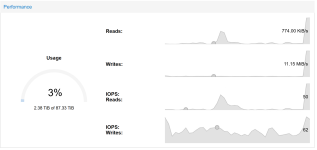
As a note we are only using <3% of each pool currently, so space is not an issue, and we are running 4 x 25GB dedicated nics in LACP for the backend Ceph networking, so storage IO should also be good here.
We have allocated 3 Mons (Nodes 2/4/6) and 3 Mgrs (Nodes 1/3/5) to the cluster also.
Thanking you in advance for the assistance
Brand new to Proxmox and mid first install, have used VMware for many years with out issues, so having a few teething issues with Proxmox, assume born from stupidity and trying to implement beyond my current level of understanding... So here goes
We have a 6 node Proxmox cluster, 32 Core/256GB ram each. Each host has 5 x 3.2tb NVMe's. Now here was my first attempt to do something funky in regards to resilience within Ceph. So using crush maps (Device Classes) with the "Host" bucket option, i have split these drives in to 3 pools. Pool 1 has drives 1,2,3 from the first 3 hosts, Pool 2 has drive 1,2,3 from the last 3 hosts, and Pool 3 has the remaining 2 drives from all 6 hosts. All the pools use a replication factor of 3 and a minimum of 2. From what i can tell this should be valid. The reasoning for this was around VM's that had pairs, AD, SQL Always on Nodes etc would live on Pool 1 and 2 respectively for the partners, and HA is configured to run the VM's on the same hosts as the pools live and then Pool 3 was for VM's that are only single copies.
When we shut down any single host, the VMs migrate to hosts specified in the HA config, we then see slow ops in Ceph, as we have OSD's missing from the powered off host and we loose access to some VM's (still testing to see how far spread this issue is) that live on the pools controlled by that host (console and network access), even though we still have the minimum 2 replication requirement for Ceph to function. It make no difference if we set "No Out" or not. Access to the VM's returns instantly once the host comes back online. The VM's do not reboot during this time as we don't get the unclean shutdown messages, they appear to cease functioning and "pause", for the duration.
Please can any one shed any light of why this is the case? or suggest any troubleshooting steps we can take?
As a note we are only using <3% of each pool currently, so space is not an issue, and we are running 4 x 25GB dedicated nics in LACP for the backend Ceph networking, so storage IO should also be good here.
We have allocated 3 Mons (Nodes 2/4/6) and 3 Mgrs (Nodes 1/3/5) to the cluster also.
Thanking you in advance for the assistance