

Issues Migrating Home Assistan OS/VM to Home Assistant in LXC on Proxmox

Feb 21, 2023
45
0
11
Hi,

I am running Home Assistant OS as a virtual machine on Proxmox, and while it works fine, I’ve experienced some performance drawbacks. To improve efficiency, I decided to migrate it to an LXC container.

  1. Set up a new Privileged LXC using this script: Proxmox VE Helper-Scripts.
  2. Created a manual backup of my VM-based Home Assistant and then shut down the VM.
  3. Started the new Home Assistant Core Privileged LXC, created an account, uploaded the backup, and restored it.
  4. After reboot, Home Assistant runs fine except for Zigbee.
Zigbee is not working after migration.
1741105719040.png
  • I tried restoring a Zigbee backup, but that didn’t resolve the issue.
  • I also renamed /root/.homeassistant/zigbee.db to zigbee.old to check if the database was the problem, but there was no change. Is this file still in use?
What steps should I take to get my Zigbee setup working again in the LXC container?

Any guidance would be greatly appreciated!

Thanks!
 
The issue is likely due to LXC permissions or missing device passthrough for the Zigbee dongle. Try the following:

1️ Ensure the USB device is correctly passed through to LXC

Run the following command on Proxmox:

bash
Code:
lsusb

If the Sonoff Zigbee USB Dongle is missing, you need to manually pass it through.

2️ Add USB passthrough to LXC
Edit the LXC config file (/etc/pve/lxc/<container-id>.conf):

bash
Code:
lxc.cgroup2.devices.allow = c 188:* rwm
lxc.mount.entry = /dev/serial/by-id/usb-ITead_Sonoff_Zigbee_3.0-if00 dev/serial/by-id/usb-ITead_Sonoff_Zigbee_3.0-if00 none bind,optional,create=file


Restart the container:
bash
Code:
pct restart <container-id>
3️ Check Home Assistant Logs for Zigbee Issues
Inside the LXC:
bash
Code:
ha core logs | grep zigbee
This may give more insights into the exact error.

4️ Ensure Proper Permissions for Zigbee Database
If zigbee.db is still in use, stop Home Assistant and delete the file:

bash
Code:
systemctl stop home-assistant
rm /root/.homeassistant/zigbee.db
systemctl start home-assistant
 
The issue is likely due to LXC permissions or missing device passthrough for the Zigbee dongle. Try the following:

1️ Ensure the USB device is correctly passed through to LXC

Run the following command on Proxmox:

bash
Code:
lsusb

If the Sonoff Zigbee USB Dongle is missing, you need to manually pass it through.

2️ Add USB passthrough to LXC
Edit the LXC config file (/etc/pve/lxc/&lt;container-id&gt;.conf):

bash
Code:
lxc.cgroup2.devices.allow = c 188:* rwm
lxc.mount.entry = /dev/serial/by-id/usb-ITead_Sonoff_Zigbee_3.0-if00 dev/serial/by-id/usb-ITead_Sonoff_Zigbee_3.0-if00 none bind,optional,create=file


Restart the container:
bash
Code:
pct restart <container-id>
3️ Check Home Assistant Logs for Zigbee Issues
Inside the LXC:
bash
Code:
ha core logs | grep zigbee
This may give more insights into the exact error.

4️ Ensure Proper Permissions for Zigbee Database

If zigbee.db is still in use, stop Home Assistant and delete the file:

bash
Code:
systemctl stop home-assistant
rm /root/.homeassistant/zigbee.db
systemctl start home-assistant
1) lsusb

lsusb
Bus 002 Device 001: ID 1d6b:0003 Linux Foundation 3.0 root hub
Bus 001 Device 004: ID 10c4:ea60 Silicon Labs CP210x UART Bridge
Bus 001 Device 008: ID 1a86:7523 QinHeng Electronics CH340 serial converter
Bus 001 Device 002: ID 04fa:2490 Dallas Semiconductor DS1490F 2-in-1 Fob, 1-Wire adapter
Bus 001 Device 007: ID 045e:0040 Microsoft Corp. Wheel Mouse Optical
Bus 001 Device 006: ID 046d:c309 Logitech, Inc. Y-BF37 [Internet Navigator Keyboard]
Bus 001 Device 005: ID 0bda:2838 Realtek Semiconductor Corp. RTL2838 DVB-T
Bus 001 Device 001: ID 1d6b:0002 Linux Foundation 2.0 root hub


LXC:

lsusb
Bus 001 Device 001: ID 1d6b:0002 Linux Foundation 2.0 root hub
Bus 001 Device 002: ID 04fa:2490 Dallas Semiconductor DS1490F 2-in-1 Fob, 1-Wire adapter

Bus 001 Device 004: ID 10c4:ea60 Silicon Labs CP210x UART Bridge
Bus 001 Device 005: ID 0bda:2838 Realtek Semiconductor Corp. RTL2838 DVB-T
Bus 001 Device 006: ID 046d:c309 Logitech, Inc. Y-BF37 [Internet Navigator Keyboard]
Bus 001 Device 007: ID 045e:0040 Microsoft Corp. Wheel Mouse Optical
Bus 001 Device 008: ID 1a86:7523 QinHeng Electronics CH340 serial converter
Bus 002 Device 001: ID 1d6b:0003 Linux Foundation 3.0 root hub


2)
arch: amd64
cores: 4
features: nesting=1
hostname: homeassistant-core
memory: 4096
net0: name=eth0,bridge=vmbr0,hwaddr=BC:24:11:7D:18:CB,ip=dhcp,type=veth
onboot: 1
ostype: ubuntu
rootfs: M2-2:vm-118-disk-0,size=30G
swap: 512
tags: automation;smarthome;ubuntu
lxc.cgroup2.devices.allow: a
lxc.cap.drop:
lxc.cgroup2.devices.allow: c 188:* rwm
lxc.cgroup2.devices.allow: c 189:* rwm
lxc.mount.entry%3A /dev/serial/by-id dev/serial/by-id none bind,optional,create=dir
lxc.mount.entry%3A /dev/ttyUSB0 dev/ttyUSB0 none bind,optional,create=file
lxc.mount.entry%3A /dev/ttyUSB1 dev/ttyUSB1 none bind,optional,create=file
lxc.mount.entry%3A /dev/ttyACM0 dev/ttyACM0 none bind,optional,create=file
lxc.mount.entry%3A /dev/ttyACM1 dev/ttyACM1 none bind,optional,create=file

This is my config...

3)

ha core logs | grep zigbee
-bash: ha: command not found

4)

systemctl stop home-assistant
Failed to stop home-assistant.service: Unit home-assistant.service not loaded.

systemctl | grep assistant
homeassistant.service loaded active running Home Assistant
 
Last edited:
1) lsusb

lsusb
Bus 002 Device 001: ID 1d6b:0003 Linux Foundation 3.0 root hub
Bus 001 Device 004: ID 10c4:ea60 Silicon Labs CP210x UART Bridge
Bus 001 Device 008: ID 1a86:7523 QinHeng Electronics CH340 serial converter
Bus 001 Device 002: ID 04fa:2490 Dallas Semiconductor DS1490F 2-in-1 Fob, 1-Wire adapter
Bus 001 Device 007: ID 045e:0040 Microsoft Corp. Wheel Mouse Optical
Bus 001 Device 006: ID 046d:c309 Logitech, Inc. Y-BF37 [Internet Navigator Keyboard]
Bus 001 Device 005: ID 0bda:2838 Realtek Semiconductor Corp. RTL2838 DVB-T
Bus 001 Device 001: ID 1d6b:0002 Linux Foundation 2.0 root hub


LXC:

lsusb
Bus 001 Device 001: ID 1d6b:0002 Linux Foundation 2.0 root hub
Bus 001 Device 002: ID 04fa:2490 Dallas Semiconductor DS1490F 2-in-1 Fob, 1-Wire adapter

Bus 001 Device 004: ID 10c4:ea60 Silicon Labs CP210x UART Bridge
Bus 001 Device 005: ID 0bda:2838 Realtek Semiconductor Corp. RTL2838 DVB-T
Bus 001 Device 006: ID 046d:c309 Logitech, Inc. Y-BF37 [Internet Navigator Keyboard]
Bus 001 Device 007: ID 045e:0040 Microsoft Corp. Wheel Mouse Optical
Bus 001 Device 008: ID 1a86:7523 QinHeng Electronics CH340 serial converter
Bus 002 Device 001: ID 1d6b:0003 Linux Foundation 3.0 root hub


2)
arch: amd64
cores: 4
features: nesting=1
hostname: homeassistant-core
memory: 4096
net0: name=eth0,bridge=vmbr0,hwaddr=BC:24:11:7D:18:CB,ip=dhcp,type=veth
onboot: 1
ostype: ubuntu
rootfs: M2-2:vm-118-disk-0,size=30G
swap: 512
tags: automation;smarthome;ubuntu
lxc.cgroup2.devices.allow: a
lxc.cap.drop:
lxc.cgroup2.devices.allow: c 188:* rwm
lxc.cgroup2.devices.allow: c 189:* rwm
lxc.mount.entry%3A /dev/serial/by-id dev/serial/by-id none bind,optional,create=dir
lxc.mount.entry%3A /dev/ttyUSB0 dev/ttyUSB0 none bind,optional,create=file
lxc.mount.entry%3A /dev/ttyUSB1 dev/ttyUSB1 none bind,optional,create=file
lxc.mount.entry%3A /dev/ttyACM0 dev/ttyACM0 none bind,optional,create=file
lxc.mount.entry%3A /dev/ttyACM1 dev/ttyACM1 none bind,optional,create=file

This is my config...

3)

ha core logs | grep zigbee
-bash: ha: command not found

4)

systemctl stop home-assistant
Failed to stop home-assistant.service: Unit home-assistant.service not loaded.

systemctl | grep assistant
homeassistant.service loaded active running Home Assistant
Your Zigbee USB dongle is not being passed through correctly to the LXC container. Let's troubleshoot and fix it step by step.


1. Issue: USB Device Not Visible in LXC

Your Sonoff Zigbee 3.0 USB Dongle is missing in lsusb inside LXC. Only the Silicon Labs CP210x UART Bridge is visible, meaning Proxmox is not passing the device correctly.

Fix:

Run this on Proxmox host to find the correct USB device path:
Bash:
ls -l /dev/serial/by-id/

Look for the Sonoff Zigbee dongle (e.g., usb-ITead_Sonoff_Zigbee_3.0-if00).

Then, edit your LXC config (/etc/pve/lxc/&lt;container-id&gt;.conf) and add:
Bash:
lxc.mount.entry = /dev/serial/by-id/usb-ITead_Sonoff_Zigbee_3.0-if00 dev/serial/by-id/usb-ITead_Sonoff_Zigbee_3.0-if00 none bind,optional,create=file
lxc.cgroup2.devices.allow = c 188:* rwm
lxc.cgroup2.devices.allow = c 189:* rwm

Then restart the container:
Bash:
pct restart <container-id>


2. Issue: ha Command Not Found

You are using Home Assistant Core, so ha CLI is not available. Instead, check the logs with:
Bash:
docker logs homeassistant 2>&1 | grep zigbee

If Home Assistant is installed as a Python package, try:
Bash:
journalctl -u homeassistant -f | grep zigbee


3. Issue: Home Assistant Service Name Incorrect

The correct service name is likely homeassistant.service, not home-assistant.service.
Stop and restart Home Assistant:
Bash:
systemctl stop homeassistant
rm /root/.homeassistant/zigbee.db
systemctl start homeassistant


Final Steps

After applying these changes, restart the LXC container and check if the Zigbee dongle is detected:
Bash:
ls /dev/serial/by-id/

If you still have issues, check the Home Assistant logs for more details.
 
Last edited:
Your Zigbee USB dongle is not being passed through correctly to the LXC container. Let's troubleshoot and fix it step by step.


1. Issue: USB Device Not Visible in LXC

Your Sonoff Zigbee 3.0 USB Dongle is missing in lsusb inside LXC. Only the Silicon Labs CP210x UART Bridge is visible, meaning Proxmox is not passing the device correctly.

Fix:

Run this on Proxmox host to find the correct USB device path:
Bash:
ls -l /dev/serial/by-id/

Look for the Sonoff Zigbee dongle (e.g., usb-ITead_Sonoff_Zigbee_3.0-if00).

Then, edit your LXC config (/etc/pve/lxc/&lt;container-id&gt;.conf) and add:
Bash:
lxc.mount.entry = /dev/serial/by-id/usb-ITead_Sonoff_Zigbee_3.0-if00 dev/serial/by-id/usb-ITead_Sonoff_Zigbee_3.0-if00 none bind,optional,create=file
lxc.cgroup2.devices.allow = c 188:* rwm
lxc.cgroup2.devices.allow = c 189:* rwm

Then restart the container:
Bash:
pct restart <container-id>


2. Issue: ha Command Not Found

You are using Home Assistant Core, so ha CLI is not available. Instead, check the logs with:
Bash:
docker logs homeassistant 2>&1 | grep zigbee

If Home Assistant is installed as a Python package, try:
Bash:
journalctl -u homeassistant -f | grep zigbee


3. Issue: Home Assistant Service Name Incorrect

The correct service name is likely homeassistant.service, not home-assistant.service.
Stop and restart Home Assistant:
Bash:
systemctl stop homeassistant
rm /root/.homeassistant/zigbee.db
systemctl start homeassistant


Final Steps

After applying these changes, restart the LXC container and check if the Zigbee dongle is detected:
Bash:
ls /dev/serial/by-id/

If you still have issues, check the Home Assistant logs for more details.
host:
ls -l /dev/serial/by-id/
total 0
lrwxrwxrwx 1 root root 13 Mar 3 15:58 usb-1a86_USB_Serial-if00-port0 -> ../../ttyUSB0
lrwxrwxrwx 1 root root 13 Mar 5 15:06 usb-ITead_Sonoff_Zigbee_3.0_USB_Dongle_Plus_d0556f610d86ec119b3d5b1719c2d21c-if00-port0 -> ../../ttyUSB1


arch: amd64
cores: 4
features: nesting=1
hostname: homeassistant-core
memory: 4096
net0: name=eth0,bridge=vmbr0,hwaddr=BC:24:11:7D:18:CB,ip=dhcp,type=veth
onboot: 1
ostype: ubuntu
rootfs: M2-2:vm-118-disk-0,size=30G
swap: 512
tags: automation;smarthome;ubuntu
lxc.cgroup2.devices.allow: a
lxc.cap.drop:
lxc.cgroup2.devices.allow: c 188:* rwm
lxc.cgroup2.devices.allow: c 189:* rwm
#lxc.mount.entry: /dev/serial/by-id/usb-ITead_Sonoff_Zigbee_3.0-if00 dev/serial/by-id/usb-ITead_Sonoff_Zigbee_3.0-if00 none bind,optional,create=file
lxc.mount.entry: /dev/serial/by-id/usb-ITead_Sonoff_Zigbee_3.0_USB_Dongle_Plus_d0556f610d86ec119b3d5b1719c2d21c-if00-port0 none bind,optional,create=file

error:

mount_entry: 2213 No such file or directory - Failed to mount "/dev/serial/by-id/usb-ITead_Sonoff_Zigbee_3.0_USB_Dongle_Plus_d0556f610d86ec119b3d5b1719c2d21c-if00-port0" on "/usr/lib/x86_64-linux-gnu/lxc/rootfs/none"
[B]lxc_setup: 3915 Failed to setup mount entries[/B]
do_start: 1273 Failed to setup container "118"
sync_wait: 34 An error occurred in another process (expected sequence number 3)
__lxc_start: 2114 Failed to spawn container "118"
TASK ERROR: startup for container '118' failed
 
Last edited:
주인:
ls -l /dev/serial/by-id/
total 0
lrwxrwxrwx 1 root root 13 Mar 3 15:58 usb-1a86_USB_Serial-if00-port0 -> ../../ttyUSB0
lrwxrwxrwx 1 root root 13 Mar 5 15:06 usb-ITead_Sonoff_Zigbee_3.0_USB_Dongle_Plus_d0556f610d86ec119b3d5b1719c2d21c-if00-port0 -> ../../ttyUSB1


arch: amd64
cores: 4
features: nesting=1
hostname: homeassistant-core
memory: 4096
net0: name=eth0,bridge=vmbr0,hwaddr=BC:24:11:7D:18:CB,ip=dhcp,type=veth
onboot: 1
ostype: ubuntu
rootfs: M2-2:vm-118-disk-0,size=30G
swap: 512
tags: automation;smarthome;ubuntu
lxc.cgroup2.devices.allow: a
lxc.cap.drop:
lxc.cgroup2.devices.allow: c 188:* rwm
lxc.cgroup2.devices.allow: c 189:* rwm
#lxc.mount.entry: /dev/serial/by-id/usb-ITead_Sonoff_Zigbee_3.0-if00 dev/serial/by-id/usb-ITead_Sonoff_Zigbee_3.0-if00 none bind,optional,create=file
lxc.mount.entry: /dev/serial/by-id/usb-ITead_Sonoff_Zigbee_3.0_USB_Dongle_Plus_d0556f610d86ec119b3d5b1719c2d21c-if00-port0 none bind,optional,create=file

오류:

mount_entry: 2213 No such file or directory - Failed to mount "/dev/serial/by-id/usb-ITead_Sonoff_Zigbee_3.0_USB_Dongle_Plus_d0556f610d86ec119b3d5b1719c2d21c-if00-port0" on "/usr/lib/x86_64-linux-gnu/lxc/rootfs/none"
[B]lxc_setup: 3915 Failed to setup mount entries[/B]
do_start: 1273 Failed to setup container "118"
sync_wait: 34 An error occurred in another process (expected sequence number 3)
__lxc_start: 2114 Failed to spawn container "118"
TASK ERROR: startup for container '118' failed
"해당 파일 또는 디렉토리 없음 - 마운트 실패" 오류는 USB 장치 경로가 변경되었거나 Proxmox에서 일관되게 사용할 수 없음을 나타냅니다 . 다음 문제 해결 단계를 시도하세요.


1️ 마운트하기 전에 USB 장치가 있는지 확인하세요

Proxmox 호스트에서 다음 명령을 실행하세요.
[코드=bash]ls -l /dev/serial/by-id/[/코드]

Sonoff Zigbee 동글 경로가 누락된 경우 해당 장치가 /dev/ttyUSB*에 나열되어 있는지 확인하세요.
[코드=bash]ls -l /dev/ttyUSB*[/코드]

/dev/ttyUSB1이 존재하는 경우 /etc/pve/lxc/118.conf의 긴 /dev/serial/by-id 경로 대신 이것을 사용하세요.
[코드=bash]lxc.mount.entry: /dev/ttyUSB1 dev/ttyUSB1 없음 bind,optional,create=file[/코드]

그런 다음 컨테이너를 다시 시작합니다.
Bash:
pct 재시작 118


2️ USB 장치를 Proxmox에 강제로 다시 연결

USB 장치가 없는 경우 다시 연결해보세요.
[코드=bash]echo -n "1-1" | tee /sys/bus/usb/drivers/usb/unbind
echo -n "1-1" | tee /sys/bus/usb/drivers/usb/bind[/CODE]
ls -l /dev/serial/by-id/로 다시 확인하세요.


3️ 지속적인 USB 매핑 활성화

장치 가 /dev/ttyUSB0에서 /dev/ttyUSB1로 무작위로 변경되는 경우 영구 이름을 지정하기 위한 udev 규칙을 만듭니다 .
Bash:
나노 /etc/udev/rules.d/99-zigbee.rules

다음 줄을 추가하세요:
Bash:
하위 시스템=="tty", ATTRS{idVendor}=="1a86", ATTRS{idProduct}=="7523", SYMLINK+="zigbee"

그런 다음 규칙을 다시 로드합니다.
Bash:
udevadm 제어 --reload-rules && udevadm 트리거
이제 ttyUSB* 대신 /dev/zigbee로 LXC 설정에 마운트하세요.


마지막 단계:

1️ /dev/ttyUSB1이 있는지 확인하고 LXC 설정에서 바로 사용합니다.
2️ USB 장치가 없으면 다시 연결하세요.
3️ 경로 변경을 방지하기 위해 udev 규칙을 사용하여 지속적인 USB 매핑을 만듭니다 .
4️ 변경 사항을 적용한 후 Proxmox와 컨테이너를 다시 시작합니다 .

이 답변이 도움이 되었으면 좋겠습니다.:)
 
Last edited:
1)
ls -l /dev/serial/by-id/
total 0
lrwxrwxrwx 1 root root 13 Mar 3 15:58 usb-1a86_USB_Serial-if00-port0 -> ../../ttyUSB0
lrwxrwxrwx 1 root root 13 Mar 6 10:02 usb-ITead_Sonoff_Zigbee_3.0_USB_Dongle_Plus_d0556f610d86ec119b3d5b1719c2d21c-if00-port0 -> ../../ttyUSB1
root@pve1:~#

Inst "usb-ITead_Sonoff_Zigbee_3.0_USB_Dongle_Plus_d0556f610d86ec119b3d5b1719c2d21c-if00-port0" the dongle?

ls -l /dev/ttyUSB*
crw-rw---- 1 root dialout 188, 0 Mar 4 17:06 /dev/ttyUSB0
crw-rw---- 1 root dialout 188, 1 Mar 6 10:02 /dev/ttyUSB1

2)

ls -l /dev/serial/by-id
total 0
lrwxrwxrwx 1 root root 13 Mar 3 15:58 usb-1a86_USB_Serial-if00-port0 -> ../../ttyUSB0
lrwxrwxrwx 1 root root 13 Mar 6 10:02 usb-ITead_Sonoff_Zigbee_3.0_USB_Dongle_Plus_d0556f610d86ec119b3d5b1719c2d21c-if00-port0 -> ../../ttyUSB1


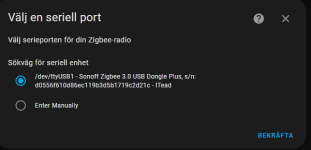
HA:
1741252230549.png
Looks like the donge are avalible in HA... but?

But it fails with the same error::

1741252291012.png

"unable to open database file"
 
1)
ls -l /dev/serial/by-id/
total 0
lrwxrwxrwx 1 root root 13 Mar 3 15:58 usb-1a86_USB_Serial-if00-port0 -> ../../ttyUSB0
lrwxrwxrwx 1 root root 13 Mar 6 10:02 usb-ITead_Sonoff_Zigbee_3.0_USB_Dongle_Plus_d0556f610d86ec119b3d5b1719c2d21c-if00-port0 -> ../../ttyUSB1
root@pve1:~#

Inst "usb-ITead_Sonoff_Zigbee_3.0_USB_Dongle_Plus_d0556f610d86ec119b3d5b1719c2d21c-if00-port0" the dongle?

ls -l /dev/ttyUSB*
crw-rw---- 1 root dialout 188, 0 Mar 4 17:06 /dev/ttyUSB0
crw-rw---- 1 root dialout 188, 1 Mar 6 10:02 /dev/ttyUSB1

2)

ls -l /dev/serial/by-id
total 0
lrwxrwxrwx 1 root root 13 Mar 3 15:58 usb-1a86_USB_Serial-if00-port0 -> ../../ttyUSB0
lrwxrwxrwx 1 root root 13 Mar 6 10:02 usb-ITead_Sonoff_Zigbee_3.0_USB_Dongle_Plus_d0556f610d86ec119b3d5b1719c2d21c-if00-port0 -> ../../ttyUSB1


HA:
View attachment 83343
Looks like the donge are avalible in HA... but?

But it fails with the same error::

View attachment 83344

"unable to open database file"
The error "unable to open database file" in HA could be caused by permission issues or a corrupted database. Try the following:
  1. Ensure that Home Assistant has access to the database file (check file ownership and permissions).
  2. Restart Home Assistant and clear any existing Zigbee2MQTT database files.
  3. Check if another service is using the serial port (lsof /dev/ttyUSB1).
  4. Ensure the Zigbee integration is properly configured and the path /dev/serial/by-id/... is used instead of /dev/ttyUSB1.
 
The error "unable to open database file" in HA could be caused by permission issues or a corrupted database. Try the following:
  1. Ensure that Home Assistant has access to the database file (check file ownership and permissions).
  2. Restart Home Assistant and clear any existing Zigbee2MQTT database files.
  3. Check if another service is using the serial port (lsof /dev/ttyUSB1).
  4. Ensure the Zigbee integration is properly configured and the path /dev/serial/by-id/... is used instead of /dev/ttyUSB1.
The file zigbee.db
-rw-rw-rw- 1 homeassistant homeassistant 1507328 Mar 3 21:02 zigbee.db

If I rename this file, I still get the error. Could another file be used by HA instead?