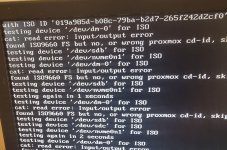
I'm trying to install proxmox ve 9.* and I'm having issues. I've done all the usual suggestions secure boot off, boot orders that sorta thing. I've tried these 3 methods Ventoy, Balana etcher and Dd command. Installation with ventoy causes the loop error seen in picture. I can't even get balana etcher to show up to install it and same with DD command. I've not tried installing proxmox onto a different machine I will probably try that later when I'm done at work.
Mint, Debian, Ubuntu all install fine on machine I'm trying to install proxmox onto. They all work so other os seem not to have a problem using ventoy or balana etcher flashed os installs.
I don't really want to install a basic Debian os then install proxmox on top. It sounds like it comes with it's own set of issues.
I've installed proxmox on my other 3 machines ok and have a cluster up n running so it's not my first rodeo either. Any help would be greatly appreciated.
Acer Aspire XC-885
Alias: fb_pc
CPU: Intel Core i5-9400
RAM: 16 GB
GPU: Intel UHD 630
Storage: 512gb ssd + 16gb nvme previously used asfast swap drive to speed up slow hdd
Firmware: UEFI
OS: Mint xfce soon to be proxmox
Mint, Debian, Ubuntu all install fine on machine I'm trying to install proxmox onto. They all work so other os seem not to have a problem using ventoy or balana etcher flashed os installs.
I don't really want to install a basic Debian os then install proxmox on top. It sounds like it comes with it's own set of issues.
I've installed proxmox on my other 3 machines ok and have a cluster up n running so it's not my first rodeo either. Any help would be greatly appreciated.
Acer Aspire XC-885
Alias: fb_pc
CPU: Intel Core i5-9400
RAM: 16 GB
GPU: Intel UHD 630
Storage: 512gb ssd + 16gb nvme previously used asfast swap drive to speed up slow hdd
Firmware: UEFI
OS: Mint xfce soon to be proxmox