

Currently running proxmox 9.1.6 on a 5 node cluster. The cluster is connect to an iscsi Dell san.
When I delete a vm (ex. vm141), I tick both boxes to purge from job configurations and destroy unreferenced disked owned by the guest. If I then create a new vm and reuse the 141 vm id and then attempt to boot into the iso, I will get the previous vms disk still. For example, I originally had a Windows vm running on vmid 141. I no longer needed that vm and deleted as mentioned above. I then needed to create a linux vm. When I clicked to create a new vm, vm id 141 was automatically populated, so I simply rolled with that ID. I had no reason to change it. Created my disk (different size. Windows was 200gb and linux was 50gb). Upon Starting the vm and expecting to boot to iso or stall (boot order), I was given a recovery for windows. I've tested this a couple times and I can recreate.
Anyone had this issue? Any ideas?
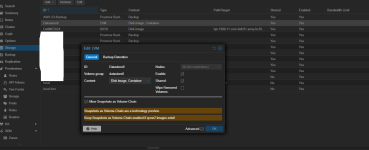
Not sure if this matters, but it also appears I have a setting enabled that could cause issues that I may not need to have enabled. Under DataCenter>Storage>DellME5024 (Iscsi)>Use Luns directly is ticked.
Should Use luns directly be ticked? Also if no vms are using the luns directly is there any risk disabling this?
Also if I run qm rescan I get the following
root@mypve01:~# qm rescan
rescan volumes...
failed to stat '/dev/datastore0/vm-110-disk-0.qcow2'
failed to stat '/dev/datastore0/vm-105-disk-0.qcow2'
failed to stat '/dev/datastore0/vm-117-disk-0.qcow2'
failed to stat '/dev/datastore0/vm-104-disk-1.qcow2'
failed to stat '/dev/datastore0/vm-123-disk-1.qcow2'
failed to stat '/dev/datastore0/vm-109-disk-1.qcow2'
failed to stat '/dev/datastore0/vm-108-disk-0.qcow2'
failed to stat '/dev/datastore0/vm-116-disk-1.qcow2'
failed to stat '/dev/datastore0/vm-102-disk-1.qcow2'
failed to stat '/dev/datastore0/vm-116-disk-0.qcow2'
failed to stat '/dev/datastore0/vm-102-disk-0.qcow2'
failed to stat '/dev/datastore0/vm-109-disk-0.qcow2'
failed to stat '/dev/datastore0/vm-123-disk-0.qcow2'
failed to stat '/dev/datastore0/vm-117-disk-1.qcow2'
failed to stat '/dev/datastore0/vm-104-disk-0.qcow2'
failed to stat '/dev/datastore0/vm-111-disk-0.qcow2'
failed to stat '/dev/datastore0/vm-105-disk-1.qcow2'
failed to stat '/dev/datastore0/vm-110-disk-1.qcow2'
failed to stat '/dev/datastore0/vm-122-disk-0.qcow2'
failed to stat '/dev/datastore0/vm-136-disk-1.qcow2'
failed to stat '/dev/datastore0/vm-129-disk-0.qcow2'
failed to stat '/dev/datastore0/vm-128-disk-1.qcow2'
failed to stat '/dev/datastore0/vm-103-disk-0.qcow2'
failed to stat '/dev/datastore0/vm-124-disk-0.qcow2'
failed to stat '/dev/datastore0/vm-130-disk-0.qcow2'
failed to stat '/dev/datastore0/vm-137-disk-0.qcow2'
failed to stat '/dev/datastore0/vm-137-disk-1.qcow2'
failed to stat '/dev/datastore0/vm-125-disk-0.qcow2'
failed to stat '/dev/datastore0/vm-124-disk-1.qcow2'
failed to stat '/dev/datastore0/vm-131-disk-0.qcow2'
failed to stat '/dev/datastore0/vm-130-disk-1.qcow2'
failed to stat '/dev/datastore0/vm-136-disk-0.qcow2'
failed to stat '/dev/datastore0/vm-129-disk-1.qcow2'
failed to stat '/dev/datastore0/vm-128-disk-0.qcow2'
failed to stat '/dev/datastore0/vm-122-disk-1.qcow2'
failed to stat '/dev/datastore0/vm-100-disk-1.qcow2'
failed to stat '/dev/datastore0/vm-115-disk-1.qcow2'
failed to stat '/dev/datastore0/vm-200-disk-0.qcow2'
failed to stat '/dev/datastore0/vm-101-disk-0.qcow2'
failed to stat '/dev/datastore0/vm-114-disk-0.qcow2'
failed to stat '/dev/datastore0/vm-119-disk-0.qcow2'
failed to stat '/dev/datastore0/vm-118-disk-1.qcow2'
failed to stat '/dev/datastore0/vm-112-disk-0.qcow2'
failed to stat '/dev/datastore0/vm-133-disk-0.qcow2'
failed to stat '/dev/datastore0/vm-119-disk-1.qcow2'
failed to stat '/dev/datastore0/vm-118-disk-0.qcow2'
failed to stat '/dev/datastore0/vm-114-disk-1.qcow2'
failed to stat '/dev/datastore0/vm-107-disk-0.qcow2'
failed to stat '/dev/datastore0/vm-115-disk-0.qcow2'
failed to stat '/dev/datastore0/vm-100-disk-0.qcow2'
failed to stat '/dev/datastore0/vm-200-disk-1.qcow2'
failed to stat '/dev/datastore0/vm-110-disk-2.qcow2'
failed to stat '/dev/datastore0/vm-101-disk-1.qcow2'
failed to stat '/dev/datastore0/vm-138-disk-1.qcow2'
failed to stat '/dev/datastore0/vm-139-disk-0.qcow2'
failed to stat '/dev/datastore0/vm-132-disk-0.qcow2'
failed to stat '/dev/datastore0/vm-113-disk-1.qcow2'
failed to stat '/dev/datastore0/vm-128-disk-2.qcow2'
failed to stat '/dev/datastore0/vm-127-disk-0.qcow2'
failed to stat '/dev/datastore0/vm-121-disk-1.qcow2'
failed to stat '/dev/datastore0/vm-134-disk-0.qcow2'
failed to stat '/dev/datastore0/vm-120-disk-0.qcow2'
failed to stat '/dev/datastore0/vm-121-disk-0.qcow2'
failed to stat '/dev/datastore0/vm-134-disk-1.qcow2'
failed to stat '/dev/datastore0/vm-120-disk-1.qcow2'
failed to stat '/dev/datastore0/vm-127-disk-1.qcow2'
failed to stat '/dev/datastore0/vm-135-disk-0.qcow2'
failed to stat '/dev/datastore0/vm-113-disk-0.qcow2'
failed to stat '/dev/datastore0/vm-126-disk-0.qcow2'
failed to stat '/dev/datastore0/vm-139-disk-1.qcow2'
failed to stat '/dev/datastore0/vm-138-disk-0.qcow2'
root@mypve01:~#
When I delete a vm (ex. vm141), I tick both boxes to purge from job configurations and destroy unreferenced disked owned by the guest. If I then create a new vm and reuse the 141 vm id and then attempt to boot into the iso, I will get the previous vms disk still. For example, I originally had a Windows vm running on vmid 141. I no longer needed that vm and deleted as mentioned above. I then needed to create a linux vm. When I clicked to create a new vm, vm id 141 was automatically populated, so I simply rolled with that ID. I had no reason to change it. Created my disk (different size. Windows was 200gb and linux was 50gb). Upon Starting the vm and expecting to boot to iso or stall (boot order), I was given a recovery for windows. I've tested this a couple times and I can recreate.
Anyone had this issue? Any ideas?
Not sure if this matters, but it also appears I have a setting enabled that could cause issues that I may not need to have enabled. Under DataCenter>Storage>DellME5024 (Iscsi)>Use Luns directly is ticked.
Should Use luns directly be ticked? Also if no vms are using the luns directly is there any risk disabling this?
Also if I run qm rescan I get the following
root@mypve01:~# qm rescan
rescan volumes...
failed to stat '/dev/datastore0/vm-110-disk-0.qcow2'
failed to stat '/dev/datastore0/vm-105-disk-0.qcow2'
failed to stat '/dev/datastore0/vm-117-disk-0.qcow2'
failed to stat '/dev/datastore0/vm-104-disk-1.qcow2'
failed to stat '/dev/datastore0/vm-123-disk-1.qcow2'
failed to stat '/dev/datastore0/vm-109-disk-1.qcow2'
failed to stat '/dev/datastore0/vm-108-disk-0.qcow2'
failed to stat '/dev/datastore0/vm-116-disk-1.qcow2'
failed to stat '/dev/datastore0/vm-102-disk-1.qcow2'
failed to stat '/dev/datastore0/vm-116-disk-0.qcow2'
failed to stat '/dev/datastore0/vm-102-disk-0.qcow2'
failed to stat '/dev/datastore0/vm-109-disk-0.qcow2'
failed to stat '/dev/datastore0/vm-123-disk-0.qcow2'
failed to stat '/dev/datastore0/vm-117-disk-1.qcow2'
failed to stat '/dev/datastore0/vm-104-disk-0.qcow2'
failed to stat '/dev/datastore0/vm-111-disk-0.qcow2'
failed to stat '/dev/datastore0/vm-105-disk-1.qcow2'
failed to stat '/dev/datastore0/vm-110-disk-1.qcow2'
failed to stat '/dev/datastore0/vm-122-disk-0.qcow2'
failed to stat '/dev/datastore0/vm-136-disk-1.qcow2'
failed to stat '/dev/datastore0/vm-129-disk-0.qcow2'
failed to stat '/dev/datastore0/vm-128-disk-1.qcow2'
failed to stat '/dev/datastore0/vm-103-disk-0.qcow2'
failed to stat '/dev/datastore0/vm-124-disk-0.qcow2'
failed to stat '/dev/datastore0/vm-130-disk-0.qcow2'
failed to stat '/dev/datastore0/vm-137-disk-0.qcow2'
failed to stat '/dev/datastore0/vm-137-disk-1.qcow2'
failed to stat '/dev/datastore0/vm-125-disk-0.qcow2'
failed to stat '/dev/datastore0/vm-124-disk-1.qcow2'
failed to stat '/dev/datastore0/vm-131-disk-0.qcow2'
failed to stat '/dev/datastore0/vm-130-disk-1.qcow2'
failed to stat '/dev/datastore0/vm-136-disk-0.qcow2'
failed to stat '/dev/datastore0/vm-129-disk-1.qcow2'
failed to stat '/dev/datastore0/vm-128-disk-0.qcow2'
failed to stat '/dev/datastore0/vm-122-disk-1.qcow2'
failed to stat '/dev/datastore0/vm-100-disk-1.qcow2'
failed to stat '/dev/datastore0/vm-115-disk-1.qcow2'
failed to stat '/dev/datastore0/vm-200-disk-0.qcow2'
failed to stat '/dev/datastore0/vm-101-disk-0.qcow2'
failed to stat '/dev/datastore0/vm-114-disk-0.qcow2'
failed to stat '/dev/datastore0/vm-119-disk-0.qcow2'
failed to stat '/dev/datastore0/vm-118-disk-1.qcow2'
failed to stat '/dev/datastore0/vm-112-disk-0.qcow2'
failed to stat '/dev/datastore0/vm-133-disk-0.qcow2'
failed to stat '/dev/datastore0/vm-119-disk-1.qcow2'
failed to stat '/dev/datastore0/vm-118-disk-0.qcow2'
failed to stat '/dev/datastore0/vm-114-disk-1.qcow2'
failed to stat '/dev/datastore0/vm-107-disk-0.qcow2'
failed to stat '/dev/datastore0/vm-115-disk-0.qcow2'
failed to stat '/dev/datastore0/vm-100-disk-0.qcow2'
failed to stat '/dev/datastore0/vm-200-disk-1.qcow2'
failed to stat '/dev/datastore0/vm-110-disk-2.qcow2'
failed to stat '/dev/datastore0/vm-101-disk-1.qcow2'
failed to stat '/dev/datastore0/vm-138-disk-1.qcow2'
failed to stat '/dev/datastore0/vm-139-disk-0.qcow2'
failed to stat '/dev/datastore0/vm-132-disk-0.qcow2'
failed to stat '/dev/datastore0/vm-113-disk-1.qcow2'
failed to stat '/dev/datastore0/vm-128-disk-2.qcow2'
failed to stat '/dev/datastore0/vm-127-disk-0.qcow2'
failed to stat '/dev/datastore0/vm-121-disk-1.qcow2'
failed to stat '/dev/datastore0/vm-134-disk-0.qcow2'
failed to stat '/dev/datastore0/vm-120-disk-0.qcow2'
failed to stat '/dev/datastore0/vm-121-disk-0.qcow2'
failed to stat '/dev/datastore0/vm-134-disk-1.qcow2'
failed to stat '/dev/datastore0/vm-120-disk-1.qcow2'
failed to stat '/dev/datastore0/vm-127-disk-1.qcow2'
failed to stat '/dev/datastore0/vm-135-disk-0.qcow2'
failed to stat '/dev/datastore0/vm-113-disk-0.qcow2'
failed to stat '/dev/datastore0/vm-126-disk-0.qcow2'
failed to stat '/dev/datastore0/vm-139-disk-1.qcow2'
failed to stat '/dev/datastore0/vm-138-disk-0.qcow2'
root@mypve01:~#


 atastore0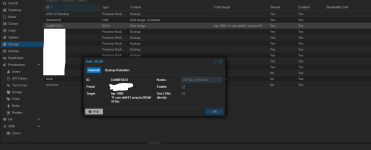
 If you need a more deterministic answer - purchasing a support subscription and opening the case with your Hypervisor vendor is the way to go.