

Issue with attached ISO, cannot migrate VM to second host

richie086

New Member
Oct 14, 2025
4
0
1
HI,

I have a 2 node proxmox cluster and I have a VM on the first proxmox host. It had a ubuntu ISO image mounted from when I installed the VM. I have removed the ISO image from the VMs config but when I go to move it between hosts it tells me its still mounted. How do I go about removing the ISO from this VM so I can move it? I do have a few snapshots on this VM, would snapshots have anything to do with the fact that i cannot see it in the hardware tab?
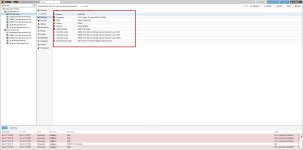
2025-12-01_16-27-02.jpg
as you can see, no mounted ISOS are showing up in the hardware tab.

But here is the error i get when i try to move the VM between hosts
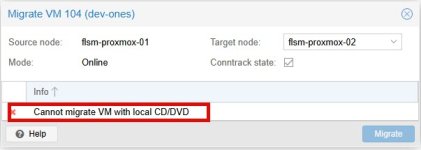
2025-12-01_16-30-53.jpg

Any ideas?
 
Last edited:
would snapshots have anything to do with the fact that i cannot see it in the hardware tab?
Yes. You see only the current state.

The .iso is referenced in those snapshots. The clean way is to remove the snapshots. If you're brave enough you can make a backup(!) of ".../qemu-server/104.conf" and edit it "under the hood" to remove those lines in each stanza.

Disclaimer: not tested and potentially dangerous!
 
  • Like
Reactions: news
This situation seems to me as a candidate for improvement. An ISO reference in snapshot should not prevent HA/manual migration, or require snapshot deletion.
When/if the system rolls back to that snapshot - there is no guarantee that ISO is there, so the VM will fail to boot until user intervention.


Blockbridge : Ultra low latency all-NVME shared storage for Proxmox - https://www.blockbridge.com/proxmox
 
Last edited:
  • Like
Reactions: richie086 and UdoB
This situation seems to me as a candidate for improvement. An ISO reference in snapshot should not prevent HA/manual migration, or require snapshot deletion.
When/if the system rolls back to that snapshot - there is no guarantee that ISO is there, so the VM will fail to boot until user intervention.


Blockbridge : Ultra low latency all-NVME shared storage for Proxmox - https://www.blockbridge.com/proxmox
Yeah I totally agree!
 
Yeah I totally agree!
It may be worth filing a detailed bug/enhancement here https://bugzilla.proxmox.com/ where it will get evaluated by developers and accepted/rejected.

I would first confirm the behavior - create a test VM, attach ISO, take a snapshot, remove/detach ISO, cold start VM - check that issue actually exists. Then remove the snapshot and retry the migration. Entering more information into the bug is better than less.


Blockbridge : Ultra low latency all-NVME shared storage for Proxmox - https://www.blockbridge.com/proxmox