Issue of memory for a container

Ernie95

Member
Sep 1, 2025
65
3
8
Hi All

I have a LX container with Immich.

I see this error linked potentially to memory issue :

Code:
Jan 22 15:12:16 pve kernel: immich-api invoked oom-killer: gfp_mask=0xcc0(GFP_KERNEL), order=0, oom_score_adj=0
Jan 22 15:12:16 pve kernel: CPU: 2 UID: 100999 PID: 2133645 Comm: immich-api Tainted: P           O        6.17.4-2-pve #1 PREEMPT(voluntary)
Jan 22 15:12:16 pve kernel: Tainted: [P]=PROPRIETARY_MODULE, [O]=OOT_MODULE
Jan 22 15:12:16 pve kernel: Call Trace:
Jan 22 15:12:16 pve kernel:  <TASK>
Jan 22 15:12:16 pve kernel:  dump_stack_lvl+0x5f/0x90
Jan 22 15:12:16 pve kernel:  dump_stack+0x10/0x18
Jan 22 15:12:16 pve kernel:  dump_header+0x48/0x1be
Jan 22 15:12:16 pve kernel:  oom_kill_process.cold+0x8/0x87
Jan 22 15:12:16 pve kernel:  out_of_memory+0x22f/0x4d0
Jan 22 15:12:16 pve kernel:  mem_cgroup_out_of_memory+0x100/0x120
Jan 22 15:12:16 pve kernel:  try_charge_memcg+0x42b/0x6e0
Jan 22 15:12:16 pve kernel:  charge_memcg+0x34/0x90
Jan 22 15:12:16 pve kernel:  __mem_cgroup_charge+0x2d/0xa0
Jan 22 15:12:16 pve kernel:  do_anonymous_page+0x389/0x990
Jan 22 15:12:16 pve kernel:  ? ___pte_offset_map+0x1c/0x180
Jan 22 15:12:16 pve kernel:  __handle_mm_fault+0xb55/0xfd0
Jan 22 15:12:16 pve kernel:  handle_mm_fault+0x119/0x370
Jan 22 15:12:16 pve kernel:  do_user_addr_fault+0x2f8/0x830
Jan 22 15:12:16 pve kernel:  exc_page_fault+0x7f/0x1b0
Jan 22 15:12:16 pve kernel:  asm_exc_page_fault+0x27/0x30
Jan 22 15:12:16 pve kernel: RIP: 0033:0x7aa9317080f4
Jan 22 15:12:16 pve kernel: Code: 49 14 00 48 8d 0c 1e 49 39 d0 49 89 48 60 0f 95 c2 48 29 d8 0f b6 d2 48 83 c8 01 48 c1 e2 02 48 09 da 48 83 ca 01 48 89 56 08 <48> 89 41 08 >
Jan 22 15:12:16 pve kernel: RSP: 002b:00007fffe8d3deb0 EFLAGS: 00010206
Jan 22 15:12:16 pve kernel: RAX: 00000000000088f1 RBX: 0000000000002010 RCX: 00000001b9cf0710
Jan 22 15:12:16 pve kernel: RDX: 0000000000002011 RSI: 00000001b9cee700 RDI: 0000000000000004
Jan 22 15:12:16 pve kernel: RBP: fffffffffffffe48 R08: 00007aa93184cac0 R09: 0000000000000001
Jan 22 15:12:16 pve kernel: R10: 00007aa93184cd10 R11: 00000000000001ff R12: 0000000000002000
Jan 22 15:12:16 pve kernel: R13: 0000000000000000 R14: 00000000000001ff R15: 00007aa93184cb20
Jan 22 15:12:16 pve kernel:  </TASK>
Jan 22 15:12:16 pve kernel: Memory cgroup out of memory: Killed process 2133645 (immich-api) total-vm:26518312kB, anon-rss:7737848kB, file-rss:45788kB,shmem-rss:0kB, UID:100-api) total-vm:26518312kB, anon-rss:7737848kB, file-rss:45788kB, shmem-rss:0kB, UID:100999 pgtables:60420kB oom_score_adj:0

Arc_summari gives :
Code:
ZFS Subsystem Report                            Thu Jan 22 21:47:31 2026
Linux 6.17.4-2-pve                                            2.3.4-pve1
Machine: pve (x86_64)                                         2.3.4-pve1

ARC status:
        Total memory size:                                     125.7 GiB
        Min target size:                                3.1 %    3.9 GiB
        Max target size:                                5.0 %    6.3 GiB
        Target size (adaptive):                        99.9 %    6.3 GiB
        Current size:                                  99.9 %    6.3 GiB
        Free memory size:                                       40.2 GiB
        Available memory size:                                  35.9 GiB

ARC structural breakdown (current size):                         6.3 GiB
        Compressed size:                               80.7 %    5.1 GiB
        Overhead size:                                  7.7 %  496.5 MiB
        Bonus size:                                     1.9 %  119.3 MiB
        Dnode size:                                     5.7 %  367.9 MiB
        Dbuf size:                                      2.3 %  145.4 MiB
        Header size:                                    1.4 %   92.6 MiB
        L2 header size:                                 0.0 %    0 Bytes
        ABD chunk waste size:                           0.2 %   14.5 MiB

Any advice is welcome
 
Looks like your CT needs more RAM. You could also set up ZRAM and give it some SWAP. What's pct config CTIDOFIMMICHHERE look like? Also check top -co%MEM inside the CT.
Note that memory for CTs is more like a quota. It can make sense to give them a lot more than you would give a VM as it doesn't steal it all for cache like a VM would.
 
Last edited:
  • Like
Reactions: Johannes S
How much RAM did you give to immich? My instance under CasaOS has access to 8GB but I'm sure there's a lower limit for it

Also, what is the memory pressure on the host?
 
Thanks for your input.

Immich LXC :
- memory : 8GB
- Swap : 512 Mo
- Core : 4

Results of pct config numberLXC
Code:
arch: amd64
cores: 4
description: <div align='center'>%0A  <a href='https%3A//Helper-Scripts.com' target='_blank' rel='noopener noreferrer'>%0A    <img src='https%3A//raw.githubusercontent.com/community-scripts/ProxmoxVE/main/misc/images/logo-81x112.png' alt='Logo' style='width%3A81px;height%3A112px;'/>%0A  </a>%0A%0A  <h2 style='font-size%3A 24px; margin%3A 20px 0;'>immich LXC</h2>%0A%0A  <p style='margin%3A 16px 0;'>%0A    <a href='https%3A//ko-fi.com/community_scripts' target='_blank' rel='noopener noreferrer'>%0A      <img src='https%3A//img.shields.io/badge/&#x2615;-Buy us a coffee-blue' alt='spend Coffee' />%0A    </a>%0A  </p>%0A%0A  <span style='margin%3A 0 10px;'>%0A    <i class="fa fa-github fa-fw" style="color%3A #f5f5f5;"></i>%0A    <a href='https%3A//github.com/community-scripts/ProxmoxVE' target='_blank' rel='noopener noreferrer' style='text-decoration%3A none; color%3A #00617f;'>GitHub</a>%0A  </span>%0A  <span style='margin%3A 0 10px;'>%0A    <i class="fa fa-comments fa-fw" style="color%3A #f5f5f5;"></i>%0A    <a href='https%3A//github.com/community-scripts/ProxmoxVE/discussions' target='_blank' rel='noopener noreferrer' style='text-decoration%3A none; color%3A #00617f;'>Discussions</a>%0A  </span>%0A  <span style='margin%3A 0 10px;'>%0A    <i class="fa fa-exclamation-circle fa-fw" style="color%3A #f5f5f5;"></i>%0A    <a href='https%3A//github.com/community-scripts/ProxmoxVE/issues' target='_blank' rel='noopener noreferrer' style='text-decoration%3A none; color%3A #00617f;'>Issues</a>%0A  </span>%0A</div>%0A
features: nesting=1,keyctl=1
hostname: immich
memory: 8192
mp0: /mnt/apple/,mp=/mnt/apple
mp1: /mnt/immich/,mp=/mnt/immich
mp2: /mnt/photos/,mp=/mnt/photos
net0: name=eth0,bridge=vmbr1,gw=192.168.150.50,hwaddr=BXXXXXXXXX,ip=192.168.150.23/24,type=veth
onboot: 1
ostype: debian
protection: 1
rootfs: vmdata:subvol-123-disk-0,size=20G
startup: order=5
swap: 512
tags: community-script;photos
timezone: Europe/Paris
unprivileged: 1

And : top -co%MEM
Code:
top - 08:58:37 up  9:55,  0 users,  load average: 0.40, 0.37, 0.47
Tasks:  38 total,   1 running,  37 sleeping,   0 stopped,   0 zombie
%Cpu(s):  3.5 us,  2.9 sy,  0.0 ni, 93.6 id,  0.0 wa,  0.0 hi,  0.0 si,  0.0 st
MiB Mem :   8192.0 total,   5665.9 free,   1766.7 used,    900.5 buff/cache     
MiB Swap:    512.0 total,    512.0 free,      0.0 used.   6425.3 avail Mem

How to identify memory pressure at the same time than the issue ?

thnaks
 
I actually wanted to see the processes inside the CT too. Hence why I made the top command sort by memory usage.
The node/CT Summary has graphs for memory usage and pressure statistics.
 
Last edited:
Thanks

Here the total view of top
Code:
top - 10:07:20 up 11:04,  0 users,  load average: 0.40, 0.33, 0.38
Tasks:  29 total,   1 running,  28 sleeping,   0 stopped,   0 zombie
%Cpu(s):  2.4 us,  1.6 sy,  0.0 ni, 96.0 id,  0.0 wa,  0.0 hi,  0.0 si,  0.0 st
MiB Mem :   8192.0 total,   5693.4 free,   1739.2 used,    899.2 buff/cache    
MiB Swap:    512.0 total,    512.0 free,      0.0 used.   6452.8 avail Mem

    PID USER      PR  NI    VIRT    RES    SHR S  %CPU  %MEM     TIME+ COMMAND                                      
    325 immich    20   0   18.6g   1.0g  46576 S   0.0  12.2   0:23.16 immich-api                                    
     95 immich    20   0   18.7g 423508  52268 S   0.3   5.0   1:40.27 immich                                        
    310 immich    20   0  898236 198448  47136 S   0.0   2.4   0:36.68 python -m gunicorn immich_ml.main:app -k immi+
    304 immich    20   0  241348  52440  14552 S   0.0   0.6   0:02.92 python -m gunicorn immich_ml.main:app -k immi+
    125 immich    20   0  241100  51636  14452 S   0.0   0.6   0:00.42 python3 -m immich_ml                          
    156 postgres  20   0 1271384  28016  23336 S   0.0   0.3   0:00.70 /usr/lib/postgresql/16/bin/postgres -D /var/l+
     48 root      20   0   47828  21400  20224 S   0.0   0.3   0:00.12 /usr/lib/systemd/systemd-journald            
     98 redis     20   0  105500  19796   8240 S   0.0   0.2   1:26.37 /usr/bin/redis-server 127.0.0.1:6379          
   3123 postgres  20   0 1273780  19264  13356 S   0.0   0.2   0:00.00 postgres: 16/main: immich immich 127.0.0.1(57+
    171 postgres  20   0 1271524  16580  11828 S   0.0   0.2   0:00.35 postgres: 16/main: background writer          
    170 postgres  20   0 1271540  13932   9156 S   0.0   0.2   0:00.04 postgres: 16/main: checkpointer              
    175 postgres  20   0 1271524  12100   7372 S   0.0   0.1   0:00.24 postgres: 16/main: walwriter                  
      1 root      20   0   23352  11444   8068 S   0.0   0.1   0:00.22 /sbin/init                                    
    176 postgres  20   0 1273008  11396   6404 S   0.0   0.1   0:00.18 postgres: 16/main: autovacuum launcher        
   2861 root      20   0   15468  11268   2544 S   0.0   0.1   0:00.01 -bash                                        
    177 postgres  20   0 1272988   9496   4504 S   0.0   0.1   0:00.00 postgres: 16/main: logical replication launch+
    211 systemd+  20   0   20572   8260   6872 S   0.0   0.1   0:00.06 /usr/lib/systemd/systemd-networkd            
    101 root      20   0   18384   6864   5740 S   0.0   0.1   0:00.06 /usr/lib/systemd/systemd-logind

I will come back with pressure memory info
 
Last edited:
And the memory graph for the CT. I'm curious if the memory usage slowly rises (perhaps leaking) or if it's triggered by an event. Perhaps a nightly cronjob or similar that just needs more than 8G of memory to do its thing. Right now the memory usage looks okay.
Note that this is mostly a immich issue so they might be able to tell you much better why that process would use so much memory and how much it should use. According to their docs 6G is recommended but if you use AI and many other features I assume it can go higher.
 
Last edited:
Hi

Concerning the memory pressure :

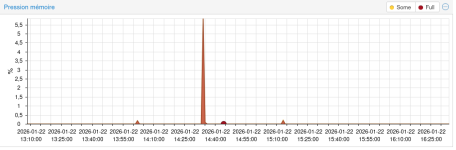
On the node, memory pressure :
5,5% at 2:35 pm (lower than 1 minute) / January 22nd => about 45 min before the issue in the log
0,14% at 3:13 pm (lower than 1 minute)

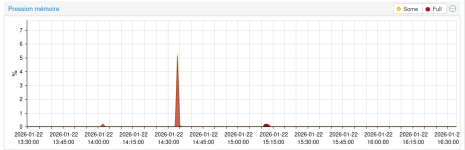
On the Immich LXC :
6,14% at 2:35 pm (lower than 1 minute) / January 22nd => about 45 min before the issue in the log
0,2% at 3:13 pm (lower than 1 minute)

Thanks for your help
 
Hi
The memory use :

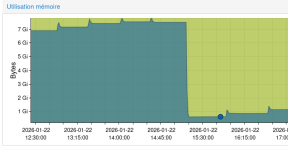
Immich LXC

ImmichLXC-Memory-Use.png

The big decrease of used memory is at 3:12pm.

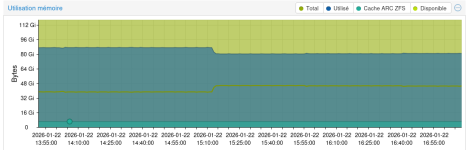
Node


Node-Memory-Use.png


The small decrease of used memory is at 3:12 pm
 
In the LXC, no cron for Immich.
In the node, there is cron for zfs snapshot but not at 3 pm or 3:12 pm. (later)
And first time that I have this message in my log.
 
Okay so it just steadily climbs until it reaches the 8G limit. On a ZFS install you don't have SWAP so the 512M given to the CT won't do anything.
What you can do is to set up ZRAM on the node (5-15% or so) and give the CT 2G or so SWAP. Give the CT more memory. Perhaps 12-16G. If it still happens I'd contact the immich authors for help debugging the memory usage. Keep us updated though :)
 
Last edited:
Thanks. I have swap on a specific disk for node :

root@pve:~# cat /etc/fstab
# <file system> <mount point> <type> <options> <dump> <pass>
proc /proc proc defaults 0 0
UUID=7ed966f1-89b3-4c76-a017-651a460d3683 none swap sw 0 0

I will setup more memory for test.

Can I put more swap for Immich LXC ?
 
In this case I'd recommend ZSWAP then to get more speed and mileage out of it. Depends how much SWAP you have. What's free -h and swapon say?
Does the CT even SWAP? it might not help here. Depends a lot of how the memory is used exactly.
 
Last edited:
Thanks again for your help.

Node :
Code:
root@pve:~# free -h
               total        used        free      shared  buff/cache   available
Mem:           125Gi        81Gi       1.5Gi       218Mi        45Gi        44Gi
Swap:          111Gi        52Ki       111Gi

root@pve:~# swapon
NAME     TYPE        SIZE USED PRIO
/dev/sdj partition 111.8G  52K   -2

Immich LXC (I have setup memory to 16g)

Code:
root@immich:/etc/cron.yearly# free -h
               total        used        free      shared  buff/cache   available
Mem:            16Gi       1.7Gi        13Gi       145Mi       907Mi        14Gi
Swap:          512Mi          0B       512Mi
root@immich:/etc/cron.yearly# swapon
NAME TYPE    SIZE USED PRIO
none virtual 512M   0B    0
 
That's a lot of SWAP.You can definitely give the CT 2G or so but note that SWAP is not a replacement for RAM and without ZSWAP it's slow too.
You only have one SWAP file/partition so the priority shouldn't matter. Right now I'äd try with the 16G of memory and 2G of SWAP and see what happens in the net 24-48 hours. After that let's check the CT's Summary and memory graph again.
 
Last edited: