Is there a fix for the cursor disappearing in virt-viewer ?

shodan

Well-Known Member
Sep 1, 2022
298
72
48
Hi,

I'm running VirtViewer v11.0-256
And when I move my cursor to a specific location on the left side, the cursor consistently disappears.

I have made a video screenshot of this, ignore the bad colors, those are caused by an hdr problem in my screenshot software

https://youtu.be/F_Wf18IfwGA
 
I'am running here a Windows Server 2025 and use VirtViewer 11.0 on Kubuntu 26.04.
I can't reproduce the behavior here.
Here's my VMconfig as well:

Code:
agent: 1
audio0: device=ich9-intel-hda,driver=spice
bios: ovmf
boot: order=scsi0;ide0
cores: 6
cpu: host
efidisk0: D-static-fullbackup:117/vm-117-disk-1.qcow2,efitype=4m,ms-cert=2023k,pre-enrolled-keys=1,size=528K
hotplug: disk,network,usb
ide0: none,media=cdrom
machine: pc-q35-11.0+pve2
memory: 16384
meta: creation-qemu=9.0.2,ctime=1736270603
name: win2025
net0: virtio=BA:14:11:A6:21:BF,bridge=vmbr0,firewall=1
numa: 1
ostype: win11
rng0: source=/dev/urandom
scsi0: D-static-fullbackup:117/vm-117-disk-2.qcow2,discard=on,iothread=1,size=60G,ssd=1
scsihw: virtio-scsi-single
sockets: 1
tags: Microsoft
tpmstate0: D-static-fullbackup:117/vm-117-disk-0.qcow2,size=4M,version=v2.0
vga: qxl,memory=256

I use Virtio ISO 0.1.302 from here: https://fedorapeople.org/groups/vir...ownloads/archive-virtio/virtio-win-0.1.302-1/

What OS Version do you use in your VM exactly?
What VirtIO Version is used?
Post your VMconfig with:

Code:
qm config <vmid>
 
proxmox 8.4.14
windows 10 22h2 client
windows 10 22h2 guest

redhat qxl driver 10.0.0.18000
virtviewer 11.0-256
spice guest tools 0.10
VM config

Code:
root@proxmox:~# cat /etc/pve/nodes/proxmox/qemu-server/845.conf
audio0: device=ich9-intel-hda,driver=none
bios: ovmf
boot: order=virtio0;net0
cores: 16
cpu: host
efidisk0: local-14tb-lvm:vm-845-disk-0,efitype=4m,pre-enrolled-keys=1,size=4M
machine: pc-q35-9.2+pve1
memory: 16000
meta: creation-qemu=9.2.0,ctime=1785629727
name: bcd2
net0: virtio=DE:AD:BE:EF:42:68,bridge=vmbr0,firewall=1
numa: 0
ostype: win10
scsi0: local-14tb-lvm:vm-845-disk-2,size=32G
scsi1: local-14tb-lvm:vm-845-disk-3,size=32G
scsi10: local-14tb-lvm:vm-845-disk-12,size=64G
scsi11: local-14tb-lvm:vm-845-disk-13,size=64G
scsi12: local-14tb-lvm:vm-845-disk-14,size=64G
scsi13: local-14tb-lvm:vm-845-disk-15,size=64G
scsi14: local-14tb-lvm:vm-845-disk-16,size=64G
scsi15: local-14tb-lvm:vm-845-disk-17,size=64G
scsi16: local-14tb-lvm:vm-845-disk-18,size=64G
scsi17: local-14tb-lvm:vm-845-disk-19,size=64G
scsi18: local-14tb-lvm:vm-845-disk-20,size=64G
scsi19: local-14tb-lvm:vm-845-disk-21,size=64G
scsi2: local-14tb-lvm:vm-845-disk-4,size=32G
scsi20: local-14tb-lvm:vm-845-disk-22,size=64G
scsi21: local-14tb-lvm:vm-845-disk-23,size=64G
scsi22: local-14tb-lvm:vm-845-disk-24,size=64G
scsi23: local-14tb-lvm:vm-845-disk-25,size=64G
scsi24: local-14tb-lvm:vm-845-disk-26,size=64G
scsi25: local-14tb-lvm:vm-845-disk-27,size=64G
scsi26: local-14tb-lvm:vm-845-disk-28,size=64G
scsi27: local-14tb-lvm:vm-845-disk-29,size=64G
scsi28: local-14tb-lvm:vm-845-disk-30,size=64G
scsi29: local-14tb-lvm:vm-845-disk-31,size=64G
scsi3: local-14tb-lvm:vm-845-disk-5,size=64G
scsi30: local-14tb-lvm:vm-845-disk-32,size=64G
scsi4: local-14tb-lvm:vm-845-disk-6,size=64G
scsi5: local-14tb-lvm:vm-845-disk-7,size=64G
scsi6: local-14tb-lvm:vm-845-disk-8,size=64G
scsi7: local-14tb-lvm:vm-845-disk-9,size=64G
scsi8: local-14tb-lvm:vm-845-disk-10,size=64G
scsi9: local-14tb-lvm:vm-845-disk-11,size=64G
scsihw: virtio-scsi-single
smbios1: uuid=b3c5d5a7-bd92-4110-af23-59528757cb8c
sockets: 1
vga: qxl,memory=128
virtio0: local-14tb-lvm:vm-845-disk-1,cache=writeback,discard=on,iothread=1,size=64G
vmgenid: 6d86ebb5-f247-4bdf-8e34-ef1b2400065d
root@proxmox:~#

 
Last edited:
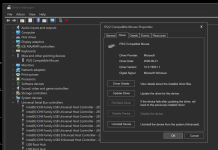
I suspect it might have to do with "tablet"

even though I have it turned on
1789676926660.png
It shows up as generic PS/2 Compatible mouse

1789676885711.png
 
proxmox 8.4.14
windows 10 22h2 client
windows 10 22h2 guest
Please also keep in mind that Proxmox 8.x is EOL; you should plan to upgrade, since you will no longer receive new features, bug fixes, or security updates for version 8.
However, I don't think your issue is related to the Proxmox version, since I've been using Spice in Windows VMs for many years and have never observed the behavior you're describing.

Just out of curiosity... may I ask why the VM has so many drives?

It shows up as generic PS/2 Compatible mouse
Yes, that's normal and okay.

I don't have a real Windows 10/11 client here. Maybe someone who still uses a Windows client would like to test this?
 
Yes I think I am hitting a virtviewer 0.11 but, I am setting the build environement for virtviewer to inspect the code.
Also I notice that virtviewer will sometimes capture keyboard focus when it should not so I have two things to fix.

Just out of curiosity... may I ask why the VM has so many drives?
I am making a linux based windows installer (installing from original .wim not a partition flasher)
One of the last obstacle I have is that the two linux ntfs drivers cannot re-apply NTFS file property/metadata like "dosname" "softlink" and the ACLs.
So I made software I call "NTFS Hospital" to discover how to fix that, and then I will insert a script in the new install first boot, that restores all such NTFS attributes.

SO the reason I have so many drives is, I have pcbios and efi before-first-boot installation and
I have about a dozen fresh disk before-first-boot installation of my linux-based installer (which I call "limstall")

And I have a script that applies the "NTFS metadata policy file" to each of these drives.

I have solved all the issues with doing that, now I'm just speeding it up, as it used to take 12 hours but it still takes 2 hours to do each file one attribute at a time (there are 12 kinds of attributes, some have multiple values).