

I just recently created a Windows VM in Proxmox VE.
I also installed QEMU Guest Agent and VirtIO Drivers on the Windows VM.
At first, it used minimal RAM like 2-4GB out of 32GB in Task Manager.
and it showed the same amount in the Proxmox VE dashboard.
And then I added the "SATA Controller" PCI Device to the Windows VM.
I noticed it takes much longer to boot up, from 30-40 seconds to like 3 minutes.
I understand that this would happen when adding a PCI device, it is okay.
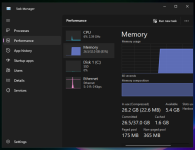
After it boots up, it shows the RAM usage of 26GB out of 32GB (around 80%) in Task Manager.
It shows the same amount in the Proxmox VE dashboard as well.
It doesn't matter if I enable the Ballooing Device option or not, it results in the same.
The weird part is even though I removed the PCI device, this problem still persisted.
I have noticed that if I run any software for a while,
the memory usage will be decreased over time to the point of 3-6GB out of 32GB.
I also installed QEMU Guest Agent and VirtIO Drivers on the Windows VM.
At first, it used minimal RAM like 2-4GB out of 32GB in Task Manager.
and it showed the same amount in the Proxmox VE dashboard.
And then I added the "SATA Controller" PCI Device to the Windows VM.
I noticed it takes much longer to boot up, from 30-40 seconds to like 3 minutes.
I understand that this would happen when adding a PCI device, it is okay.
After it boots up, it shows the RAM usage of 26GB out of 32GB (around 80%) in Task Manager.
It shows the same amount in the Proxmox VE dashboard as well.
It doesn't matter if I enable the Ballooing Device option or not, it results in the same.
The weird part is even though I removed the PCI device, this problem still persisted.
I have noticed that if I run any software for a while,
the memory usage will be decreased over time to the point of 3-6GB out of 32GB.