

IPv6 auf Hetzner Dedi mit virtualisierter pfSense in Proxmox

NoFloXx

Active Member
Jun 10, 2021
54
6
28
41
Servus,
ja, ich nerve euch mal wieder.

Bekomme es einfach nicht geschissen, auf dem Hetzner-Dedi das IPv6 zu aktivieren mit einer virtualisierten pfSense in Proxmox.

Habe es nach dieser Anleitung versucht ( https://schroederdennis.de/pfsense/pfsense-ipv6-wan-config-router-advertisement-dhcpv6-dhcp-server/ ) und auch mit dieser Interfaces-Config:
Code:
# network interface settings; autogenerated
# Please do NOT modify this file directly, unless you know what
# you're doing.
#
# If you want to manage parts of the network configuration manually,
# please utilize the 'source' or 'source-directory' directives to do
# so.
# PVE will preserve these directives, but will NOT read its network
# configuration from sourced files, so do not attempt to move any of
# the PVE managed interfaces into external files!

source /etc/network/interfaces.d/*

auto lo
iface lo inet loopback

iface lo inet6 loopback

auto enp0s31f6
iface enp0s31f6 inet static
        address 138.xxx.xxx.xxx/26
        gateway 138.201.127.193
        post-up echo 1 > /proc/sys/net/ipv4/ip_forward
        post-up iptables -t nat -A PREROUTING -i enp0s31f6 -p tcp -m multiport ! --dport 22,8006 -j DNAT --to 10.0.0.2
        post-up iptables -t nat -A PREROUTING -i enp0s31f6 -p udp -j DNAT --to 10.0.0.2
        post-up echo 1 > /proc/sys/net/ipv6/conf/all/forwarding
        post-up ip -6 route add default via fe80::1 dev enp0s31f6
# Alle TCP-Ports zur pfSense, außer Port 22 und 8006 & Alle UDP-Ports zur pfSense

auto vmbr0
iface vmbr0 inet static
        address 10.0.0.1/30
        bridge-ports none
        bridge-stp off
        bridge-fd 0
        post-up iptables -t nat -A POSTROUTING -s '10.0.0.0/30' -o enp0s31f6 -j MASQUERADE
        post-down iptables -t nat -D POSTROUTING -s '10.0.0.0/30' -o enp0s31f6 -j MASQUERADE
        post-up ip -6 route add 2a01:xxx:xxx:xxx3::/64 via fe80::921b:eff:fe95:d788 dev vmbr0
        post-up ip address add fe80::1/64 dev vmbr0
# OPNSense WAN - Proxmox LAN

auto vmbr1
iface vmbr1 inet manual
        bridge-ports none
        bridge-stp off
        bridge-fd 0
# VM-Netzwerk

###
iface enp0s31f6 inet6 static
        address 2a01:xxx:xxx:xxx3::2/64
        gateway fe80::1
###

iface eth0 inet manual


Aber auf der pfSense bekomme ich einfach keine IPv6 und die LXC-Container bzw. VMs ziehen sich keine v6.

Kann mir jemand helfen?
 
  • Like
Reactions: rainca
Servus,
ja, ich nerve euch mal wieder.

Bekomme es einfach nicht geschissen, auf dem Hetzner-Dedi das IPv6 zu aktivieren mit einer virtualisierten pfSense in Proxmox.

Habe es nach dieser Anleitung versucht ( https://schroederdennis.de/pfsense/pfsense-ipv6-wan-config-router-advertisement-dhcpv6-dhcp-server/ ) und auch mit dieser Interfaces-Config:
Code:
# network interface settings; autogenerated
# Please do NOT modify this file directly, unless you know what
# you're doing.
#
# If you want to manage parts of the network configuration manually,
# please utilize the 'source' or 'source-directory' directives to do
# so.
# PVE will preserve these directives, but will NOT read its network
# configuration from sourced files, so do not attempt to move any of
# the PVE managed interfaces into external files!

source /etc/network/interfaces.d/*

auto lo
iface lo inet loopback

iface lo inet6 loopback

auto enp0s31f6
iface enp0s31f6 inet static
        address 138.xxx.xxx.xxx/26
        gateway 138.201.127.193
        post-up echo 1 > /proc/sys/net/ipv4/ip_forward
        post-up iptables -t nat -A PREROUTING -i enp0s31f6 -p tcp -m multiport ! --dport 22,8006 -j DNAT --to 10.0.0.2
        post-up iptables -t nat -A PREROUTING -i enp0s31f6 -p udp -j DNAT --to 10.0.0.2
        post-up echo 1 > /proc/sys/net/ipv6/conf/all/forwarding
        post-up ip -6 route add default via fe80::1 dev enp0s31f6
# Alle TCP-Ports zur pfSense, außer Port 22 und 8006 & Alle UDP-Ports zur pfSense

auto vmbr0
iface vmbr0 inet static
        address 10.0.0.1/30
        bridge-ports none
        bridge-stp off
        bridge-fd 0
        post-up iptables -t nat -A POSTROUTING -s '10.0.0.0/30' -o enp0s31f6 -j MASQUERADE
        post-down iptables -t nat -D POSTROUTING -s '10.0.0.0/30' -o enp0s31f6 -j MASQUERADE
        post-up ip -6 route add 2a01:xxx:xxx:xxx3::/64 via fe80::921b:eff:fe95:d788 dev vmbr0
        post-up ip address add fe80::1/64 dev vmbr0
# OPNSense WAN - Proxmox LAN

auto vmbr1
iface vmbr1 inet manual
        bridge-ports none
        bridge-stp off
        bridge-fd 0
# VM-Netzwerk

###
iface enp0s31f6 inet6 static
        address 2a01:xxx:xxx:xxx3::2/64
        gateway fe80::1
###

iface eth0 inet manual


Aber auf der pfSense bekomme ich einfach keine IPv6 und die LXC-Container bzw. VMs ziehen sich keine v6.

Kann mir jemand helfen?
Schaum mal hier
https://www.youtube.com/watch?v=GhaGO83VIz0
 
Habe ich schon gesehen, klappt aber leider auch nicht.
Deshalb bin ich ja mit meinem Latein am Ende.
hallo nofloxx es geht immer aber richtig konfi ist zu schwer
hast die
PHP:
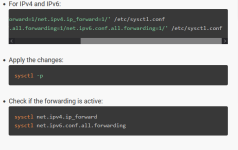
sed -i 's/#net.ipv4.ip_forward=1/net.ipv4.ip_forward=1/' /etc/sysctl.conf
sed -i 's/#net.ipv6.conf.all.forwarding=1/net.ipv6.conf.all.forwarding=1/' /etc/sysctl.conf
frei geben

bei nano /etc/hosts muss du zuest vorändrren

nach dem vor muss zum bei spiel die genza einfach noch vier zahlen mehr 1122::2 und dann ansteht hinter ::2 macht du eine nummer zbs 1122
und dann nimmst du bei interfaces xxxx:xxx:xxxx:xxxx:xxxx:xxxx::/1122
 

Attachments

  • Screenshot_6.png
    Screenshot_6.png
    17.3 KB · Views: 5
Last edited:
Punkt 1: In vmbr0 den "bridge-mcsnoop 0" setzen, siehe: https://forum.proxmox.com/threads/ipv6-neighbor-solicitation-not-forwarded-to-vm.96758/

Punkt 2: IPv6 läuft aber nach kurzer Zeit ist die Route zum Gateway kaputt. Ich setze ein Skript ein, das alle paar Sekunden den Neighbor Cache löscht und dann einen Ping absetzt, um ihn neu auzubauen:

Code:
#!/usr/bin/env bash

# check given action

if [[ "${1}" != "start" && "${1}" != "stop" ]]
then
  echo -e "Please call:\n\n\t$(basename ${0}) <start | stop> <device> <target to ping>\n"
  exit 1
fi

ACTION=${1}

# check given network device

if [[ "${2}" == "" ]]
then
  echo "You have to define a network device for watchdog!"
  exit 1
fi

ifconfig ${2} >/dev/null 2>&1

if [[ "$?" != "0" ]]
then
  echo "Device ${2} ist not configured!"
  exit 1
fi

DEVICE=${2}

# define a pid file

NOHUP_PID_FILE="/var/run/$(basename ${0}).${DEVICE}.pid"

# check target address

if [[ "${ACTION}" == "start" && "${3}" == "" ]]
then
  echo "You have to define an IPv6 target to re-open the communication"
  exit 1
fi

NEXTHOP=${3}

# on any action stop existing watchdog

LAST_NOHUP_PID=$(cat "${NOHUP_PID_FILE}" 2>/dev/null)

if [[ "${LAST_NOHUP_PID}" != "" ]]
then
  kill -9 ${LAST_NOHUP_PID} >/dev/null 2>&1
fi

# handle action start

if [[ "${ACTION}" == "start" ]]
then
#  ip -6 neigh change fe80::1 lladdr d4:5a:3f:xx:xx:xx nud permanent router dev vmbr1
  nohup bash -c 'while true; do sleep 30; ip -family inet6 neigh flush fe80::1; ping6 -c 5
 '${NEXTHOP}'; done' &>/dev/null 2>&1 &
  NOHUP_PID=$!

  if [[ "${NOHUP_PID}" == "" || ${NOHUP_PID} -lt 100 ]]
  then
    echo "Failed! Could not start the watchdog!"
    exit 1
  fi

  echo -e "$NOHUP_PID\c" > "$NOHUP_PID_FILE"
fi

exit 0

Und das wird dann in der Interface-Konfiguration gestartet:

post-up /usr/local/sbin/watchdog_ipv6_spoofed_mac_interface start vmbr1 2001:4860:4860::8888
post-up ip -6 neigh change fe80::1 lladdr d4:5a:3f:xx:xx:xx nud permanent router dev vmbr1

das braucht man insbesondere, wenn das Interface eine gespoofte MAC-Adresse hat. Ich verwende nur eine IPv4 und lege die direkt auf meine Firewall, deswegen muss ich die MAC spoofen.

Ich will ja, dass das System im Rescue-Modus direkt auf die IP reagiert, im Normalmodus soll aber die Firewall die MAC "kapern".
 
Servus,
ja, ich nerve euch mal wieder.

Bekomme es einfach nicht geschissen, auf dem Hetzner-Dedi das IPv6 zu aktivieren mit einer virtualisierten pfSense in Proxmox.

Habe es nach dieser Anleitung versucht ( https://schroederdennis.de/pfsense/pfsense-ipv6-wan-config-router-advertisement-dhcpv6-dhcp-server/ ) und auch mit dieser Interfaces-Config:
Code:
# network interface settings; autogenerated
# Please do NOT modify this file directly, unless you know what
# you're doing.
#
# If you want to manage parts of the network configuration manually,
# please utilize the 'source' or 'source-directory' directives to do
# so.
# PVE will preserve these directives, but will NOT read its network
# configuration from sourced files, so do not attempt to move any of
# the PVE managed interfaces into external files!

source /etc/network/interfaces.d/*

auto lo
iface lo inet loopback

iface lo inet6 loopback

auto enp0s31f6
iface enp0s31f6 inet static
        address 138.xxx.xxx.xxx/26
        gateway 138.201.127.193
        post-up sysctl -w net.ipv4.ip_forward=1
        post-up sysctl -w net.ipv6.conf.all.forwarding=1
        post-up iptables -t nat -A PREROUTING -i enp0s31f6 -p tcp -m multiport ! --dports 22,8006 -j DNAT --to 10.0.0..1
        post-up iptables -t nat -A PREROUTING -i enp0s31f6 -p udp -m multiport ! --dports -j DNAT --to 10.0.0.1
# Alle TCP-Ports zur pfSense, außer Port 22 und 8006 & Alle UDP-Ports zur pfSense


iface enp0s31f6 inet6 static
            address ipv6     /64
             gateway fe80::1

iface vmbr0 inet6 static
           address deine ipv6 mit subnet  /127
           up ip route add xxxx.x.x.x.x..xx.x.x via xxxx.x.x.x.x..xx.x.x

auto vmbr0
iface vmbr0 inet static
        address 10.0.0.0/30
        bridge-ports none
        bridge-stp off
        bridge-fd 0
        post-up iptables -t nat -A POSTROUTING -s '10.0.0.1/30' -o enp0s31f6 -j MASQUERADE
        post-down iptables -t nat -D POSTROUTING -s '10.0.0.1/30' -o enp0s31f6 -j MASQUERADE
#Proxmox - OPNSense Bridge for Main Public IPOPNSensen WAN - Proxmox Lan

auto vmbr1
iface vmbr1 inet manual
        ovs_type OVSBridge
#VM Net

l


Aber auf der pfSense bekomme ich einfach keine IPv6 und die LXC-Container bzw. VMs ziehen sich keine v6.

Kann mir jemand helfen?
so probier jetzt noch chli rum bom bom