io delay 90% - its norm, or bad?

inomaratadeath

Renowned Member
Mar 17, 2016
24
1
68
43
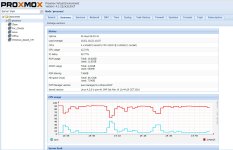
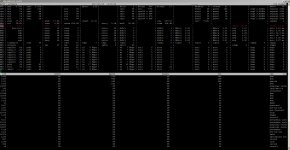
The image shows a mirror image between the CPU load and IOwait in grapg - is this normal? But in status IOdelay -- 90%. Are they (IOwait and IOdelay ) not inversely proportional?

And another question - why is the swap file used, if even more than 7 gigabytes of RAM is free?
 

Attachments

  • 2017-05-29 14 47 24.jpg
    2017-05-29 14 47 24.jpg
    408.5 KB · Views: 32
  • 2017-05-29 14 58 29.jpg
    2017-05-29 14 58 29.jpg
    726.8 KB · Views: 27
I have once hdd for system, 2 hdd (for VMs and backups ) combined in RAID-1 by mdadm.
root@proxmox:~# pveperf
CPU BOGOMIPS: 19201.04
REGEX/SECOND: 1045794
HD SIZE: 56.72 GB (/dev/dm-0)
BUFFERED READS: 31.33 MB/sec
AVERAGE SEEK TIME: 15.26 ms
FSYNCS/SECOND: 26.44
DNS EXT: 108.70 ms
DNS INT: 0.78 ms (hal.local)
root@proxmox:~#

root@proxmox:~# df -T
Файловая система Тип 1K-блоков Использовано Доступно Использовано% Cмонтировано в
udev devtmpfs 10240 0 10240 0% /dev
tmpfs tmpfs 4110272 202908 3907364 5% /run
/dev/dm-0 ext3 59474060 7907088 48539212 15% /
tmpfs tmpfs 10275672 43680 10231992 1% /dev/shm
tmpfs tmpfs 5120 0 5120 0% /run/lock
tmpfs tmpfs 10275672 0 10275672 0% /sys/fs/cgroup
/dev/sdd1 ext4 480589544 212588452 243565432 47% /hdd2tb
/dev/md0 ext3 1922600632 771352312 1053579156 43% /storage
/dev/sda1 ext3 498532 56948 415421 13% /boot
/dev/mapper/pve-data ext3 158549756 67256812 91292944 43% /var/lib/vz
//192.168.0.102/install/ISO/Proxmox_Install cifs 894019393 144673003 749346390 17% /hdd2tb/template/iso
tmpfs tmpfs 100 0 100 0% /run/lxcfs/controllers
cgmfs tmpfs 100 0 100 0% /run/cgmanager/fs
/dev/fuse fuse 30720 40 30680 1% /etc/pve
192.168.0.127:/mnt/pool/servers/proxmox nfs 6395954176 3387623296 3008330880 53% /mnt/pve/nfs
tmpfs tmpfs 2055136 0 2055136 0% /run/user/0

root@proxmox:~# cat /proc/mdstat
Personalities : [raid1]
md0 : active raid1 sdb1[0] sdc1[1]
1953383296 blocks super 1.2 [2/2] [UU]

unused devices: <none>
 
Ok, yes this is normal. The system have not enough power. 2 Disk and backup on same machine, that can't go fine.
BUFFERED READS: 31.33 MB/sec
AVERAGE SEEK TIME: 15.26 ms
FSYNCS/SECOND: 26.44
31,33 MB/s is not really much. And fsync should me much more higher. A good value is about 3000 upward. For example here two servers.

Littel HP with 4 SATA Disks in Raid10
Code:
CPU BOGOMIPS:      24742.04
REGEX/SECOND:      1524866
HD SIZE:           9.72 GB (/dev/dm-0)
BUFFERED READS:    188.50 MB/sec
AVERAGE SEEK TIME: 7.78 ms
FSYNCS/SECOND:     5259.39
DNS EXT:           44.98 ms

Or an Supermicro with 6 SATA Disk in ZFS Raid10
Code:
CPU BOGOMIPS:      40002.00
REGEX/SECOND:      2686294
HD SIZE:           1920.82 GB (v-machines)
FSYNCS/SECOND:     6812.31
DNS EXT:           61.02 ms
The Systems Performance is not always depending on these values, but you read that you can have problem with your hardware. Or
not enough / to little harddrives.
And the last thing: Softraid with mdadm is not supportet... but yes should also work ;) with more disks, or some Enterprise SSD's.
I recommend, that you upgrade to newest PVEversion too In the course of the hardware change / upgrade.

Please Post the details of your HDD's
Code:
smartctl -a /dev/sda
smartctl -a /dev/sdb
smartctl -a /dev/sdc