Hi all,
I am experiencing a recurring and frustrating issue with Windows 10 VMs (both Pro and Enterprise editions) when deploying them via the WHMCS Proxmox Addon.
The Setup:
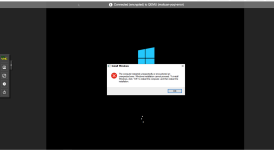
Out of every 10 VMs cloned from the same template, about 1 or 2 VMs consistently fail. These VMs get stuck/frozen during the initial boot-up process (as shown in the attached screenshots). Once this freeze occurs, the VM becomes unusable, and a complete re-installation is the only way to recover.
We previously used Proxmox 8.3, and this issue was extremely rare. Since upgrading to PVE 9.1.1, the failure rate has increased significantly to roughly 10-20% of all clones.
I am experiencing a recurring and frustrating issue with Windows 10 VMs (both Pro and Enterprise editions) when deploying them via the WHMCS Proxmox Addon.
The Setup:
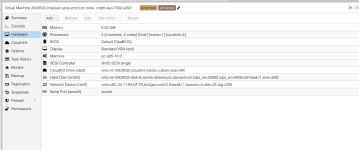
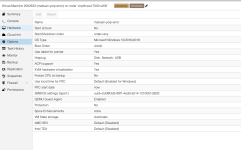
- Proxmox Version: pve-manager/9.1.1/42db4a6cf33dac83 (Running kernel: 6.17.2-1-pve)
- OS: Windows 10 (Pro/Enterprise)
- Template Status: Sysprep has been successfully completed on the gold image.
- Deployment Method: Cloned via WHMCS Proxmox Addon API.
Out of every 10 VMs cloned from the same template, about 1 or 2 VMs consistently fail. These VMs get stuck/frozen during the initial boot-up process (as shown in the attached screenshots). Once this freeze occurs, the VM becomes unusable, and a complete re-installation is the only way to recover.
We previously used Proxmox 8.3, and this issue was extremely rare. Since upgrading to PVE 9.1.1, the failure rate has increased significantly to roughly 10-20% of all clones.