

Intel B50pro passthrough.
- Thread starter ComfySofa
- Start date
You are using an out of date browser. It may not display this or other websites correctly.
You should upgrade or use an alternative browser.
You should upgrade or use an alternative browser.
Right well in that case no....no matter what the setting when windows is running native on the hardware no matter what the setting the intel graphics app says it disabled....as per that screenshot back at the start of the thread....that being said, ive not tried it since the proxmox side has been fixed....so i could plug the windows ssd back in and check tonight...
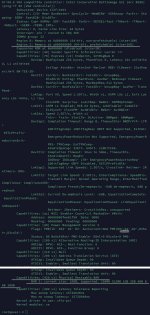
The prompt displays Rebar's functionality as shown in the image result, along with the current value.
Excerpt from my PVE's lspci -vvvs
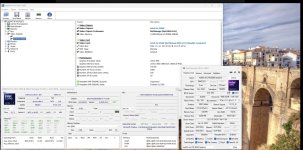
This display, along with GPU-Z or HWinfo on my Windows VM showing the same values, should confirm this.
You can see that this matches the results shown in the images of GPU-Z and HWinfo on Windows above.
*Sorry for the awkward phrasing since it's a translation.
Excerpt from my PVE's lspci -vvvs
Code:
Capabilities: [420 v1] Physical Resizable BAR
                BAR 2: current size: 16GB ★, supported: 256MB 512MB 1GB 2GB 4GB 8GB 16GB
This display, along with GPU-Z or HWinfo on my Windows VM showing the same values, should confirm this.
You can see that this matches the results shown in the images of GPU-Z and HWinfo on Windows above.
*Sorry for the awkward phrasing since it's a translation.
Last edited:
Hi there. had a bit of a breakthrough for the strangest reason. I keep a, what i call, a base windows vm that i copy and then use for different jobs....this one was giving me the code 43 error....on the off chance i thought id create a fresh one...which works!!
And, i might add its not giving the rebar error - ive not put the windows ssd back in to see if its still an issue but thats not really something that bothers me as its staying as Proxmox.
So all i needed to do, is to create fresh VM's - which im going to do now.
Just for the info if i paste that command in i get an error saying the switch is wrong.
Finally just to thank you for sticking with me and getting me through it.! on the plus side totally unrelated ive been pushing to use ProxMox in my workplace for years (i work in IT) - you wouldnt have thought so after all this...but it looks like we're going to start using it.!
And, i might add its not giving the rebar error - ive not put the windows ssd back in to see if its still an issue but thats not really something that bothers me as its staying as Proxmox.
So all i needed to do, is to create fresh VM's - which im going to do now.
Just for the info if i paste that command in i get an error saying the switch is wrong.
Finally just to thank you for sticking with me and getting me through it.! on the plus side totally unrelated ive been pushing to use ProxMox in my workplace for years (i work in IT) - you wouldnt have thought so after all this...but it looks like we're going to start using it.!