Installing Proxmox on an old machine: HP Z620 Workstation woes

odhiambo

Member
Jun 4, 2023
20
2
8
Hello friends,

I have this HP Z620 that has been doing a lot of nothing and so I decided I could use it for Proxmox. It has 64GB RAM and 32 CPU threads, good enough for a HomeLab scenario.
However, for three days I struggled to install Proxmox v9.1 without success.
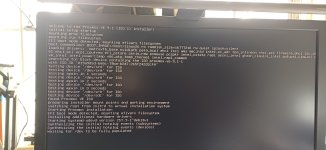
On boot, I'd see the splash screen for PVE but it would soon disappear and recede to a console type screen where for a few minutes, I'd see some data displayed, and then everything would go blank. Even the display itself would show there is no signal from the computer. I have attached a photo of where it ended before everything went dark.

Google didn't help when I searched for 'problems installing Proxmox on HP Z620'. Well, perhaps bad Google-foo, but I encountered some posts where people were running PVE on this hardware.

On a second thought, I decided to try an older version of Proxmox. So I downloaded the ISO for v7.4-1 and that installed without any issue.

Now I am scared stiff even thinking of doing an update on this machine, but the thought of getting stuck on older versions isn't encouraging either. New features are always good.

Does someone know why I wasn't able to install PVE 9.1 as easily on this hardware as easily as I could do the v7.4? Is it hardware support?

Thanking you all in advance for any insights.
 

Attachments

  • Proxmox-error.jpg
    Proxmox-error.jpg
    981.9 KB · Views: 8
Hi odhiambo,

can you try to boot v9.1 ISO with modified command? Remove splash=silent and add nomodeset .

R.
 
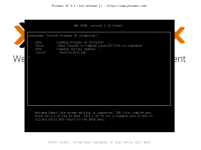
When you boot from ISO the first menu appear with options:
Install Proxmox VE (Graphical)
Install Proxmox VE (Terminal UI)
Advanced options

On this menu you select the first item by arrow keys and press [e] key. Actually is should be selected by default.

A black screen appear in front and here you modify the line staring with "linux" here you can modify the command better say kernel parameters.

You should start with removing quiet splash=silent and if it not helps next try add nomodeset.

Then pres [Ctrl] + [x] to boot the installer. Have you tried "Terminal UI"?

R.
 

Attachments

  • Snímek obrazovky pořízený 2025-11-28 11-53-41.png
    Snímek obrazovky pořízený 2025-11-28 11-53-41.png
    22.7 KB · Views: 3
I will try this next time.
I have some news on this: I was able to upgrade from bullseye (7.4) to bookworm (8.4) and upon reboot, the screen again went blank!
Now I am beginning to think that this has got something to do with the graphics card on the machine not being supported by Proxmox.
I was still able to SSH to the machine. I was also able to access the Proxmox webUI.

Next, I decided to update from 8.4.14 to trixie. I did everything via SSH. Once completed, the machine refused to boot into Proxmox.
I changed the video out device to a different one, also installed in the box. This other one uses VGA instead of DP.

So my question seems to be: Might it be that the hardware is not supported?
 
I expect some problem with graphics card...that's the reason for changing command. You can change this in already installed system - look in file
/etc/default/grub change parameter GRUB_CMDLINE_LINUX_DEFAULT . And then execute update-grub .

Try to boot from ISO with nomodeset.

Not all hardware is supported by linux and like in Windows sometimes there may by problem with generally supported system.

R.
 
Last edited:
  • Like
Reactions: odhiambo
I will try this next time.
I have some news on this: I was able to upgrade from bullseye (7.4) to bookworm (8.4) and upon reboot, the screen again went blank!
Now I am beginning to think that this has got something to do with the graphics card on the machine not being supported by Proxmox.
I was still able to SSH to the machine. I was also able to access the Proxmox webUI.

Next, I decided to update from 8.4.14 to Trixie. I did everything via SSH. Once completed, the machine refused to boot into Proxmox.
I changed the video out device to a different one, also installed in the box. This other one uses VGA instead of DP.

So my question seems to be: Might it be that the hardware is not supported?
Update: I installed PVE-9.1.1 using the ISO via the Terminal UI successfully.
There is an issue that I need to address: Force the Z620 to use UEFI boot from the BIOS.
I have struggled with that. Disabling Legacy boot in favor of UEFI option leads to the machine not booting normally. It get's into an error mode in which it beeps 6x, stops for a second or 2, then repeats over and over.
I have seen PVE-9 struggling to boot because of this reason.
Anyone has a cure??
 
Six beeps should be again graphics card.

I can recommend only general steps...
1. If you have dedicated graphics remove it and try in another system
2. reset BIOS to defaults.
3. update BIOS

At which point PVE-9 stops booting process?

R.
 
Six beeps should be again graphics card.

I can recommend only general steps...
1. If you have dedicated graphics remove it and try in another system
2. reset BIOS to defaults.
3. update BIOS

At which point PVE-9 stops booting process?

R.
I'll see if I can update the BIOS from the BIOS itself, or if I have to temporarily run Windows to do that.