

Hi all
I want to install Let's Encrypt on Proxmox and Proxmox Backup Server, i follow this procedure:
https://pbs.proxmox.com/wiki/index.php/HTTPS_Certificate_Configuration#Let.27s_Encrypt_using_acme.sh
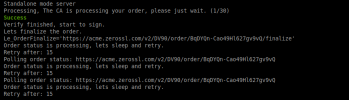
But when i put the command is stuck here:
UPDATE:
I'm try to use this guide:
https://pve.proxmox.com/wiki/Certificate_Management#sysadmin_certs_acme_http_challenge
And use HTTP Challenge Plugin but there is no server web listen on port 80 on the Proxmox backup server i have install on top of Debian 11
How can i fix that?
I can't use DNS API Challenge i think because my provider cheapnet.it is not in the list of ACME DNS Plugin
I want to install Let's Encrypt on Proxmox and Proxmox Backup Server, i follow this procedure:
https://pbs.proxmox.com/wiki/index.php/HTTPS_Certificate_Configuration#Let.27s_Encrypt_using_acme.sh
But when i put the command is stuck here:
UPDATE:
I'm try to use this guide:
https://pve.proxmox.com/wiki/Certificate_Management#sysadmin_certs_acme_http_challenge
And use HTTP Challenge Plugin but there is no server web listen on port 80 on the Proxmox backup server i have install on top of Debian 11
How can i fix that?
I can't use DNS API Challenge i think because my provider cheapnet.it is not in the list of ACME DNS Plugin
Last edited: