Install fail on HP ProLiant DL380 Gen9

nivmizz7

New Member
Mar 31, 2026
4
0
1
Hi everyone, I try to installed Proxmox VE on my HP Proliant DL380 Gen9, but when I install (with graphical), when its create LVs its crash; linux panic, and its reboot. I boot with and USB key, with directly the ISO in them with Rufus (not Ventoy). I remove the 8 SAS 300GB before the install to configure it in RAID6 after the install with PVE. And I have 128GB of DDR4. (I try to install PVE in the intern SD card of 128GB, not on a SAS/HDD/SSD)

Anyone know why it do this? Secure Boot issue (I desactivated it), but I must think its a RAM/CPU/Boot problem in the BIOS, but isk wich one/how to resolve it.. I had VMware ESXi before.

btw, sorry for my poor english, I am french,
Best regards,
Niv.
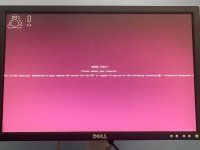
 

Attachments

  • image.jpg
    image.jpg
    251.8 KB · Views: 9
A NMI usually indicates a hardware error (or old motherboard BIOS). Did your HP Proliant DL380 Gen9 work fine before with (Ubuntu) Linux? Maybe check for a BIOS update and test the hardware, like memtest.

EDIT: Anything in the IPMI around the time of the error?
 
Last edited:
A NMI usually indicates a hardware error (or old motherboard BIOS). Did your HP Proliant DL380 Gen9 work fine before with (Ubuntu) Linux? Maybe check for a BIOS update and test the hardware, like memtest.

EDIT: Anything in the IPMI around the time of the error?
I know I have a problem with a battery, but I change it it persist.
But I dont check time or if there is other error, I will check the iLO if I get any other informations.

edit: I think the RAM is okay, but, for me, it can be 2 problem; the first is the issue with the battery; the second is an issue with old BIOS..
 
Last edited:
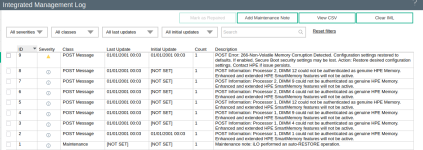
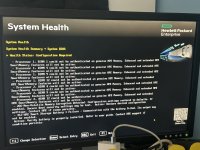
Update: I check the iLO interface and its say I have an BIOS/HARDWARE problem..

And there is log from the server directly.
1775048540394.png
 

Attachments

  • IMG_0074.jpeg
    IMG_0074.jpeg
    735.1 KB · Views: 4
Last edited: