

We've recently switched from our old mail-gateway to PMG 9.0.6 and I noticed in the syslog that there are a few entries where remote mailservers seem to sucessfully connect to PMG and instantly disconnect again. The syslog always contains 4 lines for every connection attemp of this kind:
where
a.b.c.d is the ip of the remote mailserver hostname.your-server.de
x.y.z.v is the private ip of PMG in our internal network
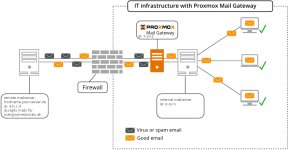
(I rendered the log-entries anonymous to protect privacy but provide an illustration at the end of my post that hopefully clarifies the situation. Apologies for the inconvenience.)
I tracked down one of these instances to someone we correspond with and emails we send are actually received. The corresponding syslogs are like so:
Where p.q.r.s is the private ip of our internal mailserver.
At first I thought putting a.b.c.d and somedomain.at on the welcomelists:
Mail Filter -> Who Objects -> Welcomelist
Configuration -> Mail Proxy -> Welcomelist
would remedy the situation. But this only changed the syslog entry from postfix/postscreen: PASS OLD to postfix/postscreen: ALLOWLISTED:
If I read the logs correctly hostname.your-server.de connects to PMG and tries to initiate esmtp protocol by sending an ehlo command and then immediately sends a quit command. How can I go about debugging this problem?
With our previous mail gateway (trendmicro imsva) sending/receiving these mails worked flawlessly, so I have to assume that something is not right with my PMG configuration.
Additional information:
The mx record of somedomain.at is:
Where both names resolve to the same ip:
And hostname.your-server.de is hosted at Hetzner and I don't have access to that server.
Here's an illustration of the situation:
Code:
Apr 09 12:55:18 pmg postfix/postscreen[57708]: CONNECT from [a.b.c.d]:52688 to [x.y.z.v]:25
Apr 09 12:55:18 pmg postfix/postscreen[57708]: PASS OLD [a.b.c.d]:52688
Apr 09 12:55:18 pmg postfix/smtpd[57711]: connect from hostname.your-server.de[a.b.c.d]
Apr 09 12:55:18 pmg postfix/smtpd[57711]: disconnect from hostname.your-server.de[a.b.c.d] ehlo=1 quit=1 commands=2
where
a.b.c.d is the ip of the remote mailserver hostname.your-server.de
x.y.z.v is the private ip of PMG in our internal network
(I rendered the log-entries anonymous to protect privacy but provide an illustration at the end of my post that hopefully clarifies the situation. Apologies for the inconvenience.)
I tracked down one of these instances to someone we correspond with and emails we send are actually received. The corresponding syslogs are like so:
Code:
Apr 08 13:58:09 pmg postfix/smtpd[246891]: connect from unknown[p.q.r.s]
Apr 08 13:58:09 pmg postfix/smtpd[246891]: 654E921374: client=unknown[p.q.r.s]
Apr 08 13:58:09 pmg postfix/cleanup[246894]: 654E921374: message-id=<kcEE.PfsjA3/DRV+bo4tD+gVVng.gF6e907H3AE@internal>
Apr 08 13:58:09 pmg postfix/smtpd[246891]: disconnect from unknown[p.q.r.s] ehlo=1 mail=1 rcpt=1 data=1 quit=1 commands=5
Apr 08 13:58:09 pmg postfix/qmgr[226611]: 654E921374: from=<someone@ourdomain.at>, size=14082, nrcpt=1 (queue active)
Apr 08 13:58:09 pmg pmg-smtp-filter[245372]: 2026/04/08-13:58:09 CONNECT TCP Peer: "[127.0.0.1]:34898" Local: "[127.0.0.1]:10023"
Apr 08 13:58:09 pmg pmg-smtp-filter[245372]: 2167869D642D1741CF: new mail message-id=<kcEE.PfsjA3/DRV+bo4tD+gVVng.gF6e907H3AE@internal>
Apr 08 13:58:09 pmg postfix/smtpd[246899]: connect from localhost.localdomain[127.0.0.1]
Apr 08 13:58:09 pmg postfix/smtpd[246899]: 820192167D: client=localhost.localdomain[127.0.0.1], orig_client=unknown[p.q.r.s]
Apr 08 13:58:09 pmg postfix/cleanup[246894]: 820192167D: message-id=<kcEE.PfsjA3/DRV+bo4tD+gVVng.gF6e907H3AE@internal>
Apr 08 13:58:09 pmg postfix/qmgr[226611]: 820192167D: from=<someone@ourdomain.at>, size=14292, nrcpt=1 (queue active)
Apr 08 13:58:09 pmg postfix/smtpd[246899]: disconnect from localhost.localdomain[127.0.0.1] ehlo=1 xforward=1 mail=1 rcpt=1 data=1 commands=5
Apr 08 13:58:09 pmg pmg-smtp-filter[245372]: 2167869D642D1741CF: accept mail to <user@somedomain.at> (820192167D) (rule: default-accept)
Apr 08 13:58:09 pmg pmg-smtp-filter[245372]: 2167869D642D1741CF: processing time: 0.1 seconds (0, 0.033, 0)
Apr 08 13:58:09 pmg postfix/lmtp[246895]: 654E921374: to=<user@somedomain.at>, relay=127.0.0.1[127.0.0.1]:10023, delay=0.17, delays=0.01/0.01/0.04/0.1, dsn=2.5.0, status=sent (250 2.5.0 OK (2167869D642D1741CF))
Apr 08 13:58:09 pmg postfix/qmgr[226611]: 654E921374: removed
Apr 08 13:58:18 pmg postfix/smtp[246900]: 820192167D: to=<user@somedomain.at>, relay=hostname.your-server.de[a.b.c.d]:25, delay=9.2, delays=0.04/0.01/3.3/5.9, dsn=2.0.0, status=sent (250 OK id=1wARY1-000HF5-3B)
Apr 08 13:58:18 pmg postfix/qmgr[226611]: 820192167D: removed
Where p.q.r.s is the private ip of our internal mailserver.
At first I thought putting a.b.c.d and somedomain.at on the welcomelists:
Mail Filter -> Who Objects -> Welcomelist
Configuration -> Mail Proxy -> Welcomelist
would remedy the situation. But this only changed the syslog entry from postfix/postscreen: PASS OLD to postfix/postscreen: ALLOWLISTED:
Code:
Apr 09 13:22:47 pmg postfix/postscreen[58786]: CONNECT from [a.b.c.d]:58160 to [x.y.z.v]:25
Apr 09 13:22:47 pmg postfix/postscreen[58786]: ALLOWLISTED [a.b.c.d]:58160
Apr 09 13:22:47 pmg postfix/smtpd[58787]: connect from hostname.your-server.de[a.b.c.d]
Apr 09 13:22:47 pmg postfix/smtpd[58787]: disconnect from hostname.your-server.de[a.b.c.d] ehlo=1 quit=1 commands=2
If I read the logs correctly hostname.your-server.de connects to PMG and tries to initiate esmtp protocol by sending an ehlo command and then immediately sends a quit command. How can I go about debugging this problem?
With our previous mail gateway (trendmicro imsva) sending/receiving these mails worked flawlessly, so I have to assume that something is not right with my PMG configuration.
Additional information:
The mx record of somedomain.at is:
Bash:
me@mylaptop:~$ dig +short mx somedomain.at
10 hostname.your-server.de.
Where both names resolve to the same ip:
Bash:
me@mylaptop:~$ dig +short somedomain.at
a.b.c.d
me@mylaptop:~$ dig +short hostname.your-server.de
a.b.c.d
And hostname.your-server.de is hosted at Hetzner and I don't have access to that server.
Here's an illustration of the situation:

