Increase Size of HD Space root

nstk-2025

New Member
Jun 12, 2025
8
1
3
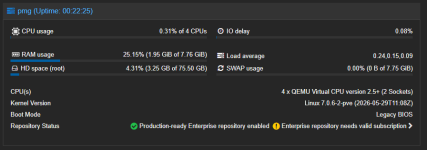
I installed the default settings of PMG in a ESXI VM. PMG Root drive has 8.87GB, with 6.82 used. I ran into a recent issue after an update where it went from about 75% usage to 85% usage and mail stopped flowing through it due to space. Started getting error 452 4.3.1 Insufficient system storage and mail stopped.
There was still ample space left, but I had to run some cleanup of logs and old updates to restore space and mail started flowing again.

I'm a total noob to linux based systems, so I'm look for an idiots guide step-by-step to increase the HD space. I know how to increase the size on our EXSI host, just don't know the step by step process within Proxmox Mail Gateway (PMG)

1770308101094.png
Thr
 
root@mx:/# lsblk -o+FSTYPE,LABEL,MODEL
NAME MAJ:MIN RM SIZE RO TYPE MOUNTPOINTS FSTYPE LABEL MODEL
sda 8:0 0 10G 0 disk Virtual disk
├─sda1 8:1 0 1007K 0 part
├─sda2 8:2 0 512M 0 part vfat
└─sda3 8:3 0 9.5G 0 part LVM2_member
├─pmg-swap 252:0 0 1G 0 lvm [SWAP] swap
└─pmg-root 252:1 0 8.5G 0 lvm / ext4
sr0 11:0 1 1.5G 0 rom iso9660 PMG VMware Virtual IDE CDROM Drive

root@mx:/# df -hT
Filesystem Type Size Used Avail Use% Mounted on
udev devtmpfs 1.9G 0 1.9G 0% /dev
tmpfs tmpfs 392M 836K 392M 1% /run
/dev/mapper/pmg-root ext4 8.3G 6.4G 1.5G 82% /
tmpfs tmpfs 2.0G 1.1M 2.0G 1% /dev/shm
tmpfs tmpfs 5.0M 0 5.0M 0% /run/lock
tmpfs tmpfs 392M 0 392M 0% /run/user/0
root@mx02:/#
 
Please use code blocks so this is readable. It doesn't look like you increased the virtual disk size yet. Do that first.
 
Last edited:
- We increased it from 10GB to 25GB in the host.

Code:
root@mx:~# lsblk -o+FSTYPE,LABEL,MODEL
NAME         MAJ:MIN RM  SIZE RO TYPE MOUNTPOINTS FSTYPE      LABEL MODEL
sda            8:0    0   25G  0 disk                               Virtual disk
├─sda1         8:1    0 1007K  0 part                               
├─sda2         8:2    0  512M  0 part             vfat             
└─sda3         8:3    0  9.5G  0 part             LVM2_member       
  ├─pmg-swap 252:0    0    1G  0 lvm  [SWAP]      swap             
  └─pmg-root 252:1    0  8.5G  0 lvm  /           ext4             
sr0           11:0    1  1.5G  0 rom              iso9660     PMG   VMware Virtual IDE CDROM Drive

root@mx:~# df -hT
Filesystem           Type      Size  Used Avail Use% Mounted on
udev                 devtmpfs  1.9G     0  1.9G   0% /dev
tmpfs                tmpfs     392M  836K  392M   1% /run
/dev/mapper/pmg-root ext4      8.3G  6.4G  1.5G  82% /
tmpfs                tmpfs     2.0G  1.1M  2.0G   1% /dev/shm
tmpfs                tmpfs     5.0M     0  5.0M   0% /run/lock
tmpfs                tmpfs     392M     0  392M   0% /run/user/0
root@mx02:~#
 
That's still garbled but try
Bash:
lvresize -r -l +100%FREE pmg/root
Verify with the same commands afterwards.
 
Last edited:
I see the garbled info your talking about. I tried a different SSH client instead and have cleaner results.
Let me know if I should move forward with your last command reference.

Code:
root@mx:~# lsblk -o+FSTYPE,LABEL,MODEL
NAME         MAJ:MIN RM  SIZE RO TYPE MOUNTPOINTS FSTYPE  LABEL MODEL
sda            8:0    0   25G  0 disk                           Virtual disk
├─sda1         8:1    0 1007K  0 part
├─sda2         8:2    0  512M  0 part             vfat
└─sda3         8:3    0  9.5G  0 part             LVM2_me
  ├─pmg-swap 252:0    0    1G  0 lvm  [SWAP]      swap
  └─pmg-root 252:1    0  8.5G  0 lvm  /           ext4
sr0           11:0    1  1.5G  0 rom              iso9660 PMG   VMware Virtual I

root@mx:~# df -hT
Filesystem           Type      Size  Used Avail Use% Mounted on
udev                 devtmpfs  1.9G     0  1.9G   0% /dev
tmpfs                tmpfs     392M  844K  392M   1% /run
/dev/mapper/pmg-root ext4      8.3G  6.4G  1.5G  82% /
tmpfs                tmpfs     2.0G  1.1M  2.0G   1% /dev/shm
tmpfs                tmpfs     5.0M     0  5.0M   0% /run/lock
tmpfs                tmpfs     392M     0  392M   0% /run/user/0
root@mx:~#
 
Thanks. Sorry, I actually forgot some steps.
Run cfdisk /dev/sda and increase the sda3 partition. Write and confirm. Then resize the PV via pvresize /dev/sda3. Finally resize the LV and the file system with the command above.
 
Last edited:
I ran cfdisk and increased the partition. Ran pvresize, but now I get this error. It's not recognizing the 100%FREE

Code:
root@mx:~# pvresize /dev/sda3
  Physical volume "/dev/sda3" changed
  1 physical volume(s) resized or updated / 0 physical volume(s) not resized

root@mx:~# lvresize -r -L +100%FREE pmg/root
  Can't parse size argument.
  Invalid argument for --size: +100%FREE
  Error during parsing of command line.
 
I think we're in business! I do appreciate your hand-holding on this! :)
Thank you so much for sharing your expertise on this.


Code:
root@mx:~# lsblk -o+FSTYPE,LABEL,MODEL
NAME         MAJ:MIN RM  SIZE RO TYPE MOUNTPOINTS FSTYPE      LABEL MODEL
sda            8:0    0   25G  0 disk                               Virtual disk
├─sda1         8:1    0 1007K  0 part
├─sda2         8:2    0  512M  0 part             vfat
└─sda3         8:3    0 24.5G  0 part             LVM2_member
  ├─pmg-swap 252:0    0    1G  0 lvm  [SWAP]      swap
  └─pmg-root 252:1    0 23.5G  0 lvm  /           ext4
sr0           11:0    1  1.5G  0 rom              iso9660     PMG   VMware Virtual IDE CDROM Drive

root@mx:~# df -hT
Filesystem           Type      Size  Used Avail Use% Mounted on
udev                 devtmpfs  1.9G     0  1.9G   0% /dev
tmpfs                tmpfs     392M  828K  392M   1% /run
/dev/mapper/pmg-root ext4       24G  6.4G   16G  30% /
tmpfs                tmpfs     2.0G  1.1M  2.0G   1% /dev/shm
tmpfs                tmpfs     5.0M     0  5.0M   0% /run/lock
tmpfs                tmpfs     392M     0  392M   0% /run/user/0
root@mx:~#
 
  • Like
Reactions: Impact