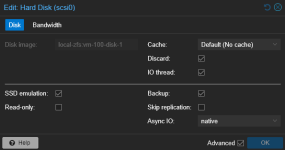
Hi everyone,
I'm seeing an odd storage usage behavior on local ZFS with Proxmox replication that I'd like to understand better.
Setup:
- 2 Proxmox nodes (node1 and node2)
- VM 100: Windows 11
- Daily replication task from node1 to node2 scheduled at 05:00
The workflow:
Inside the VM, a task runs daily at 19:45 creating a full approx. 100 GB database backup. It finishes after about an hour and deletes the previous day's backup. At 05:00, the Proxmox replication task runs.
The issue:
The space release on local-zfs behaves inconsistently after the replication finishes:
- On some days, right after replication completes, ZFS space drops correctly by 100 GB, properly reflecting the deleted backup.
- On other days, it barely drops at all and stays constant. The next day, after another +100 GB backup occurs, right after that day's replication finishes, there is a sudden 200 GB drop that brings the usage back to where it should be.
Has anyone experienced this delayed space release pattern on ZFS tied to replication, or know what might be causing it?
Thanks!

I'm seeing an odd storage usage behavior on local ZFS with Proxmox replication that I'd like to understand better.
Setup:
- 2 Proxmox nodes (node1 and node2)
- VM 100: Windows 11
- Daily replication task from node1 to node2 scheduled at 05:00
The workflow:
Inside the VM, a task runs daily at 19:45 creating a full approx. 100 GB database backup. It finishes after about an hour and deletes the previous day's backup. At 05:00, the Proxmox replication task runs.
The issue:
The space release on local-zfs behaves inconsistently after the replication finishes:
- On some days, right after replication completes, ZFS space drops correctly by 100 GB, properly reflecting the deleted backup.
- On other days, it barely drops at all and stays constant. The next day, after another +100 GB backup occurs, right after that day's replication finishes, there is a sudden 200 GB drop that brings the usage back to where it should be.
Has anyone experienced this delayed space release pattern on ZFS tied to replication, or know what might be causing it?
Thanks!