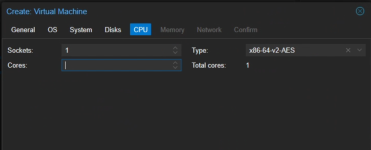
In the VM creation dialog, show how many sockets/cores I can assign ?

shodan

Active Member
Sep 1, 2022
254
69
33
1785628408431.png
So that I don't have to abandon VM creation here, lose my work so far go to the node summary and see how many core this thing has.

I know it's minor but it's just one of those annoying things that could easily be fixed.
 
I am not entirely sure if i understand your question, do you mean to show how many cpu on the host pve server, and the remaining cpu to assign? Similar to how you see storage now?

The thing is, with the Virtualization you can overcommit CPU, and many many productions depends on this,since it's not expected that all vm will consume the assigned CPU all times.
IMHO, I think the correct way is to monitor your vm usage, use tool like lscpu and manage the VM CPU assignment depends on their needs.

I hope I understand your question correctly.

 
Just pick a number then edit the Hardware after clicking Finish.

Also, best practice would be to only add virtual hardware that the VM needs, to avoid large performance swings on the host.

Back in the day, best practice was to have at least two CPU cores, since that would guarantee an SMP kernel would be installed.
 
I mean, this machine has 16 cores
More than 16 cores and it will fail to boot.
I think it should just display here, how many cores the machine has.
 
So that I don't have to abandon VM creation here, lose my work so far go to the node summary and see how many core this thing has.
You could open another PVE UI in a second browser tab. Or just pick any number, and edit it after you finished configuring the VM.

I think it should just display here, how many cores the machine has.
I certainly wouldn't mind if it did that, but it's not a deal-breaker for me. If it is for you, though, you could perhaps open a feature request here: https://bugzilla.proxmox.com/.
 
Last edited:
  • Like
Reactions: UdoB