

i cannot Upgrade Proxmox to the latest version
- Thread starter websystem
- Start date
You are using an out of date browser. It may not display this or other websites correctly.
You should upgrade or use an alternative browser.
You should upgrade or use an alternative browser.

Code:
root@proxmox ~ # cat /etc/apt/sources.list
#

deb http://mirror.hetzner.de/debian/packages bookworm main contrib non-free
deb http://mirror.hetzner.de/debian/security bookworm-security main contrib non-free
deb http://mirror.hetzner.de/debian/packages bookworm-updates main contrib non-free

deb http://ftp.de.debian.org/debian/ bookworm main non-free contrib
deb http://security.debian.org/debian-security bookworm-security main contrib non-free

# bookworm-updates, previously known as 'volatile'
deb http://ftp.de.debian.org/debian/ bookworm-updates main contrib non-free
root@proxmox ~ #
Code:
root@proxmox /etc/apt/sources.list.d # cat pve-enterprise.list
deb https://enterprise.proxmox.com/debian/pve bookworm pve-enterpriseSo, you have an subscription (maybe with support) ... just ask the official channels from your support subscription.
If you don't have a subscription, maybe add the non-subscription repo and disable the enterprise one.
If you don't have a subscription, maybe add the non-subscription repo and disable the enterprise one.
here some errors
Code:
root@proxmox ~ # uname -r
6.5.13-1-pve
root@proxmox ~ # dpkg --list|grep pve-kernel
iU  pve-firmware                         3.11-1                                  all          Binary firmware code for the pve-kernel
rc  pve-kernel-4.15                      5.4-12                                  all          Latest Proxmox VE Kernel Image
rc  pve-kernel-5.0                       6.0-11                                  all          Latest Proxmox VE Kernel Image
rc  pve-kernel-5.4                       6.4-5                                   all          Latest Proxmox VE Kernel Image
ii  pve-kernel-6.2                       8.0.5                                   all          Proxmox Kernel Image for 6.2 series (transitional package)
ii  pve-kernel-6.2.16-4-pve              6.2.16-5                                amd64        Proxmox Kernel Image
rc  pve-kernel-helper                    7.3-3                                   all          Function for various kernel maintenance tasks.
root@proxmox ~ # dpkg --status pve-headers proxmox-default-headers proxmox-headers-6.5 proxmox-headers-6.5.11-8-pve
dpkg-query: package 'pve-headers' is not installed and no information is available

dpkg-query: package 'proxmox-default-headers' is not installed and no information is available

dpkg-query: package 'proxmox-headers-6.5' is not installed and no information is available

dpkg-query: package 'proxmox-headers-6.5.11-8-pve' is not installed and no information is available
Use dpkg --info (= dpkg-deb --info) to examine archive files.
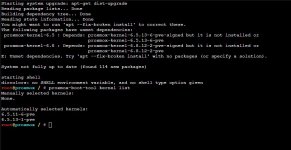
root@proxmox ~ # apt install proxmox-default-headers
Reading package lists... Done
Building dependency tree... Done
Reading state information... Done
You might want to run 'apt --fix-broken install' to correct these.
The following packages have unmet dependencies:
 proxmox-default-headers : Depends: proxmox-headers-6.8 but it is not going to be installed
 proxmox-kernel-6.5 : Depends: proxmox-kernel-6.5.13-6-pve-signed but it is not going to be installed or
                               proxmox-kernel-6.5.13-6-pve
 proxmox-kernel-6.8 : Depends: proxmox-kernel-6.8.12-2-pve-signed but it is not going to be installed or
                               proxmox-kernel-6.8.12-2-pve
E: Unmet dependencies. Try 'apt --fix-broken install' with no packages (or specify a solution).
root@proxmox ~ # apt --fix-broken install
Reading package lists... Done
Building dependency tree... Done
Reading state information... Done
Correcting dependencies... Done
The following packages were automatically installed and are no longer required:
  apt-transport-https libaom0 libavcodec58 libavfilter7 libavformat58 libavutil56 libboost-context1.74.0 libboost-coroutine1.74.0
  libboost-filesystem1.74.0 libboost-program-options1.74.0 libboost-thread1.74.0 libbpf0 libcbor0 libcodec2-0.9 libcups2 libdav1d4
  libdns-export1110 libffi7 libfftw3-double3 libflac8 libicu67 libigdgmm11 libisc-export1105 libldap-2.4-2 libleveldb1d libllvm11
  libmpdec3 libopts25 libperl5.32 libpostproc55 libprocps8 libprotobuf23 libpython3.11 libpython3.9 libpython3.9-minimal
  libpython3.9-stdlib libsdl1.2debian libsrt1.4-gnutls libswresample3 libswscale5 libtiff5 liburcu6 liburing1 libusb-0.1-4 libvpx6
  libwebp6 libx264-160 libx265-192 perl-modules-5.32 pigz proxmox-kernel-6.2 proxmox-kernel-6.2.16-15-pve proxmox-kernel-6.2.16-19-pve
  proxmox-kernel-6.2.16-20-pve pve-kernel-6.2 pve-kernel-6.2.16-4-pve python3-ldb python3-talloc python3.9 python3.9-minimal
Use 'apt autoremove' to remove them.
The following additional packages will be installed:
  proxmox-kernel-6.5.13-6-pve-signed proxmox-kernel-6.8.12-2-pve-signed
The following NEW packages will be installed:
  proxmox-kernel-6.5.13-6-pve-signed proxmox-kernel-6.8.12-2-pve-signed
0 upgraded, 2 newly installed, 0 to remove and 114 not upgraded.
67 not fully installed or removed.
Need to get 0 B/203 MB of archives.
After this operation, 1,136 MB of additional disk space will be used.
Do you want to continue? [Y/n] y
(Reading database ... 95958 files and directories currently installed.)
Preparing to unpack .../proxmox-kernel-6.8.12-2-pve-signed_6.8.12-2_amd64.deb ...
Unpacking proxmox-kernel-6.8.12-2-pve-signed (6.8.12-2) ...
dpkg: error processing archive /var/cache/apt/archives/proxmox-kernel-6.8.12-2-pve-signed_6.8.12-2_amd64.deb (--unpack):
 cannot copy extracted data for './boot/System.map-6.8.12-2-pve' to '/boot/System.map-6.8.12-2-pve.dpkg-new': failed to write (No space left on device)
Examining /etc/kernel/postrm.d.
run-parts: executing /etc/kernel/postrm.d/initramfs-tools 6.8.12-2-pve /boot/vmlinuz-6.8.12-2-pve
dpkg-deb: error: paste subprocess was killed by signal (Broken pipe)
update-initramfs: Deleting /boot/initrd.img-6.8.12-2-pve
run-parts: executing /etc/kernel/postrm.d/proxmox-auto-removal 6.8.12-2-pve /boot/vmlinuz-6.8.12-2-pve
run-parts: executing /etc/kernel/postrm.d/zz-proxmox-boot 6.8.12-2-pve /boot/vmlinuz-6.8.12-2-pve
Re-executing '/etc/kernel/postrm.d/zz-proxmox-boot' in new private mount namespace..
No /etc/kernel/proxmox-boot-uuids found, skipping ESP sync.
run-parts: executing /etc/kernel/postrm.d/zz-update-grub 6.8.12-2-pve /boot/vmlinuz-6.8.12-2-pve
Generating grub configuration file ...
Found linux image: /boot/vmlinuz-6.5.13-1-pve
Found initrd image: /boot/initrd.img-6.5.13-1-pve
Found linux image: /boot/vmlinuz-6.5.11-6-pve
Found initrd image: /boot/initrd.img-6.5.11-6-pve
Found linux image: /boot/vmlinuz-6.2.16-20-pve
Found initrd image: /boot/initrd.img-6.2.16-20-pve
Found linux image: /boot/vmlinuz-6.2.16-19-pve
Found initrd image: /boot/initrd.img-6.2.16-19-pve
Found linux image: /boot/vmlinuz-6.2.16-15-pve
Found initrd image: /boot/initrd.img-6.2.16-15-pve
Found linux image: /boot/vmlinuz-6.2.16-4-pve
Found initrd image: /boot/initrd.img-6.2.16-4-pve
Warning: os-prober will not be executed to detect other bootable partitions.
Systems on them will not be added to the GRUB boot configuration.
Check GRUB_DISABLE_OS_PROBER documentation entry.
done
Preparing to unpack .../proxmox-kernel-6.5.13-6-pve-signed_6.5.13-6_amd64.deb ...
Unpacking proxmox-kernel-6.5.13-6-pve-signed (6.5.13-6) ...
dpkg: error processing archive /var/cache/apt/archives/proxmox-kernel-6.5.13-6-pve-signed_6.5.13-6_amd64.deb (--unpack):
 cannot copy extracted data for './boot/System.map-6.5.13-6-pve' to '/boot/System.map-6.5.13-6-pve.dpkg-new': failed to write (No space left on device)
Examining /etc/kernel/postrm.d.
run-parts: executing /etc/kernel/postrm.d/initramfs-tools 6.5.13-6-pve /boot/vmlinuz-6.5.13-6-pve
update-initramfs: Deleting /boot/initrd.img-6.5.13-6-pve
run-parts: executing /etc/kernel/postrm.d/proxmox-auto-removal 6.5.13-6-pve /boot/vmlinuz-6.5.13-6-pve
dpkg-deb: error: paste subprocess was killed by signal (Broken pipe)
run-parts: executing /etc/kernel/postrm.d/zz-proxmox-boot 6.5.13-6-pve /boot/vmlinuz-6.5.13-6-pve
Re-executing '/etc/kernel/postrm.d/zz-proxmox-boot' in new private mount namespace..
No /etc/kernel/proxmox-boot-uuids found, skipping ESP sync.
run-parts: executing /etc/kernel/postrm.d/zz-update-grub 6.5.13-6-pve /boot/vmlinuz-6.5.13-6-pve
Generating grub configuration file ...
Found linux image: /boot/vmlinuz-6.5.13-1-pve
Found initrd image: /boot/initrd.img-6.5.13-1-pve
Found linux image: /boot/vmlinuz-6.5.11-6-pve
Found initrd image: /boot/initrd.img-6.5.11-6-pve
Found linux image: /boot/vmlinuz-6.2.16-20-pve
Found initrd image: /boot/initrd.img-6.2.16-20-pve
Found linux image: /boot/vmlinuz-6.2.16-19-pve
Found initrd image: /boot/initrd.img-6.2.16-19-pve
Found linux image: /boot/vmlinuz-6.2.16-15-pve
Found initrd image: /boot/initrd.img-6.2.16-15-pve
Found linux image: /boot/vmlinuz-6.2.16-4-pve
Found initrd image: /boot/initrd.img-6.2.16-4-pve
Warning: os-prober will not be executed to detect other bootable partitions.
Systems on them will not be added to the GRUB boot configuration.
Check GRUB_DISABLE_OS_PROBER documentation entry.
done
Errors were encountered while processing:
 /var/cache/apt/archives/proxmox-kernel-6.8.12-2-pve-signed_6.8.12-2_amd64.deb
 /var/cache/apt/archives/proxmox-kernel-6.5.13-6-pve-signed_6.5.13-6_amd64.deb
E: Sub-process /usr/bin/dpkg returned an error code (1)
root@proxmox ~ #
Your disk is full and you need to clean up /boot to get some free space.cannot copy extracted data for './boot/System.map-6.8.12-2-pve' to '/boot/System.map-6.8.12-2-pve.dpkg-new': failed to write (No space left on device)
Show us
df -h /boot to confirm this.It is not clear if it is a separate filesystem: just show us
mount.Show us
ls -Al /boot/ to see what files are present in there.The last resort: if there is old cruft delete some old files manually (without apt remove xyz) to get some free space - caution: deleting the wrong ones may cripple the whole system!
But first try to get rid of some old kernel packages by the official way: look which kernels are officially installed and occupy the precious space. Naming changed some time ago, the old style begins with "linux-", the new style is "proxmox-kernel-*", So show us
dpkg -l | grep proxmox-kernel- and dpkg -l | grep linux-. Then try to dpkg -P linux-image-1.2.3-amd64 (for example) - circumventing "apt".Good luck


Code:
root@proxmox ~ # df -h /boot
Filesystem      Size  Used Avail Use% Mounted on
/dev/md0        486M  475M     0 100% /boot
root@proxmox ~ #
mount
Code:
root@proxmox ~ # mount
sysfs on /sys type sysfs (rw,nosuid,nodev,noexec,relatime)
proc on /proc type proc (rw,relatime)
udev on /dev type devtmpfs (rw,nosuid,relatime,size=32839592k,nr_inodes=8209898,mode=755,inode64)
devpts on /dev/pts type devpts (rw,nosuid,noexec,relatime,gid=5,mode=620,ptmxmode=000)
tmpfs on /run type tmpfs (rw,nosuid,nodev,noexec,relatime,size=6574520k,mode=755,inode64)
/dev/mapper/vg0-root on / type ext4 (rw,relatime)
securityfs on /sys/kernel/security type securityfs (rw,nosuid,nodev,noexec,relatime)
tmpfs on /dev/shm type tmpfs (rw,nosuid,nodev,inode64)
tmpfs on /run/lock type tmpfs (rw,nosuid,nodev,noexec,relatime,size=5120k,inode64)
cgroup2 on /sys/fs/cgroup type cgroup2 (rw,nosuid,nodev,noexec,relatime)
pstore on /sys/fs/pstore type pstore (rw,nosuid,nodev,noexec,relatime)
bpf on /sys/fs/bpf type bpf (rw,nosuid,nodev,noexec,relatime,mode=700)
systemd-1 on /proc/sys/fs/binfmt_misc type autofs (rw,relatime,fd=30,pgrp=1,timeout=0,minproto=5,maxproto=5,direct,pipe_ino=984)
mqueue on /dev/mqueue type mqueue (rw,nosuid,nodev,noexec,relatime)
hugetlbfs on /dev/hugepages type hugetlbfs (rw,relatime,pagesize=2M)
debugfs on /sys/kernel/debug type debugfs (rw,nosuid,nodev,noexec,relatime)
tracefs on /sys/kernel/tracing type tracefs (rw,nosuid,nodev,noexec,relatime)
fusectl on /sys/fs/fuse/connections type fusectl (rw,nosuid,nodev,noexec,relatime)
configfs on /sys/kernel/config type configfs (rw,nosuid,nodev,noexec,relatime)
ramfs on /run/credentials/systemd-sysusers.service type ramfs (ro,nosuid,nodev,noexec,relatime,mode=700)
ramfs on /run/credentials/systemd-tmpfiles-setup-dev.service type ramfs (ro,nosuid,nodev,noexec,relatime,mode=700)
/dev/md0 on /boot type ext4 (rw,relatime)
/dev/mapper/vg0-data on /var/lib/vz type ext4 (rw,relatime)
ramfs on /run/credentials/systemd-sysctl.service type ramfs (ro,nosuid,nodev,noexec,relatime,mode=700)
virtmachines on /virtmachines type zfs (rw,relatime,xattr,noacl,casesensitive)
ramfs on /run/credentials/systemd-tmpfiles-setup.service type ramfs (ro,nosuid,nodev,noexec,relatime,mode=700)
binfmt_misc on /proc/sys/fs/binfmt_misc type binfmt_misc (rw,nosuid,nodev,noexec,relatime)
sunrpc on /run/rpc_pipefs type rpc_pipefs (rw,relatime)
lxcfs on /var/lib/lxcfs type fuse.lxcfs (rw,nosuid,nodev,relatime,user_id=0,group_id=0,allow_other)
//u174395.your-storagebox.de/backup on /mnt/storage-box type cifs (rw,relatime,vers=3.1.1,cache=strict,username=u174395,uid=0,noforceuid,gid=0,noforcegid,addr=195.201.107.60,file_mode=0660,dir_mode=0770,iocharset=utf8,soft,nounix,serverino,mapposix,rsize=4194304,wsize=4194304,bsize=1048576,echo_interval=60,actimeo=1,closetimeo=1)
/dev/fuse on /etc/pve type fuse (rw,nosuid,nodev,relatime,user_id=0,group_id=0,default_permissions,allow_other)
tmpfs on /run/user/0 type tmpfs (rw,nosuid,nodev,relatime,size=6574516k,nr_inodes=1643629,mode=700,inode64)
root@proxmox ~ #
Code:
root@proxmox ~ # ls -Al /boot/
total 474562
-rw-r--r-- 1 root root   275520 Sep 28  2023 config-6.2.16-15-pve
-rw-r--r-- 1 root root   275468 Oct 24  2023 config-6.2.16-19-pve
-rw-r--r-- 1 root root   275468 Dec  1  2023 config-6.2.16-20-pve
-rw-r--r-- 1 root root   275191 Jul 14  2023 config-6.2.16-4-pve
-rw-r--r-- 1 root root   279416 Nov 29  2023 config-6.5.11-6-pve
-rw-r--r-- 1 root root   280485 Feb  5  2024 config-6.5.13-1-pve
drwxr-xr-x 5 root root     1024 Sep 28 06:26 grub
-rw-r--r-- 1 root root 59668479 Oct 16  2023 initrd.img-6.2.16-15-pve
-rw-r--r-- 1 root root 59663637 Dec  3  2023 initrd.img-6.2.16-19-pve
-rw-r--r-- 1 root root 59705505 Apr  5 05:22 initrd.img-6.2.16-20-pve
-rw-r--r-- 1 root root 58864593 Jul 23  2023 initrd.img-6.2.16-4-pve
-rw-r--r-- 1 root root 59079467 Dec  3  2023 initrd.img-6.5.11-6-pve
-rw-r--r-- 1 root root 59113113 Apr  5 05:22 initrd.img-6.5.13-1-pve
drwx------ 2 root root    12288 Apr  3  2019 lost+found
drwxr-xr-x 2 root root     1024 May  8 04:26 pve
-rw-r--r-- 1 root root  7683384 Sep 28  2023 System.map-6.2.16-15-pve
-rw-r--r-- 1 root root  7688348 Oct 24  2023 System.map-6.2.16-19-pve
-rw-r--r-- 1 root root  7684953 Dec  1  2023 System.map-6.2.16-20-pve
-rw-r--r-- 1 root root  7675809 Jul 14  2023 System.map-6.2.16-4-pve
-rw-r--r-- 1 root root  7969247 Nov 29  2023 System.map-6.5.11-6-pve
-rw-r--r-- 1 root root  7971693 Feb  5  2024 System.map-6.5.13-1-pve
-rw-r--r-- 1 root root 13602336 Sep 28  2023 vmlinuz-6.2.16-15-pve
-rw-r--r-- 1 root root 13621376 Oct 24  2023 vmlinuz-6.2.16-19-pve
-rw-r--r-- 1 root root 13619360 Dec  1  2023 vmlinuz-6.2.16-20-pve
-rw-r--r-- 1 root root 13596320 Jul 14  2023 vmlinuz-6.2.16-4-pve
-rw-r--r-- 1 root root 13522408 Nov 29  2023 vmlinuz-6.5.11-6-pve
-rw-r--r-- 1 root root 13527400 Feb  5  2024 vmlinuz-6.5.13-1-pve
root@proxmox ~ #
Code:
root@proxmox ~ # dpkg -l | grep proxmox-kernel-
ii  proxmox-kernel-6.2                   6.2.16-20                               all          Latest Proxmox Kernel Image
ii  proxmox-kernel-6.2.16-15-pve         6.2.16-15                               amd64        Proxmox Kernel Image
ii  proxmox-kernel-6.2.16-19-pve         6.2.16-19                               amd64        Proxmox Kernel Image
ii  proxmox-kernel-6.2.16-20-pve         6.2.16-20                               amd64        Proxmox Kernel Image
iU  proxmox-kernel-6.5                   6.5.13-6                                all          Latest Proxmox Kernel Image
ii  proxmox-kernel-6.5.11-6-pve-signed   6.5.11-6                                amd64        Proxmox Kernel Image (signed)
ii  proxmox-kernel-6.5.13-1-pve-signed   6.5.13-1                                amd64        Proxmox Kernel Image (signed)
iU  proxmox-kernel-6.8                   6.8.12-2                                all          Latest Proxmox Kernel Image
ii  proxmox-kernel-helper                8.1.0                                   all          Function for various kernel maintenance tasks.
root@proxmox ~ #
Code:
root@proxmox ~ # dpkg -l | grep linux-
ii  binutils-x86-64-linux-gnu            2.40-2                                  amd64        GNU binary utilities, for x86-64-linux-gnu target
ii  liblinux-inotify2-perl               1:2.3-2                                 amd64        scalable directory and file change notification
ii  linux-base                           4.9                                     all          Linux image base package
rc  linux-image-4.9.0-8-amd64            4.9.144-3.1                             amd64        Linux 4.9 for 64-bit PCs
iU  linux-libc-dev:amd64                 6.1.90-1                                amd64        Linux support headers for userspace development
ii  util-linux-extra                     2.38.1-5+deb12u1                        amd64        interactive login tools
ii  util-linux-locales                   2.38.1-5+deb12u1                        all          locales files for util-linux
root@proxmox ~ #Okay. "/boot" is on device "md0" (whatever that is) and it is 100% full. So this confirms my statements.
Now you can see that there are several old kernels we need to get rid of.
Very first step: which kernel is loaded and running?
If that is something with "6.5" (and only then!) continue by trying to uninstall everything with "6.2":
If "dpkg" fails you can remove all files with "6.2" manually, one by one. Be careful if you try to delete something with "...*", it is safer to avoid that and delete each file by full name.
If that works fine you can check for the now free with "df -h /boot" again and continue with the "--fix-broken" statement...
Now you can see that there are several old kernels we need to get rid of.
Very first step: which kernel is loaded and running?
uname -a tells us...?If that is something with "6.5" (and only then!) continue by trying to uninstall everything with "6.2":
dpkg -P proxmox-kernel-6.2.16-15-pve && dpkg -P proxmox-kernel-6.2.16-19-pve && dpkg -P proxmox-kernel-6.2 (Not sure out-of-my-mind how dependencies work here - I am not testing it live...)If "dpkg" fails you can remove all files with "6.2" manually, one by one. Be careful if you try to delete something with "...*", it is safer to avoid that and delete each file by full name.
If that works fine you can check for the now free with "df -h /boot" again and continue with the "--fix-broken" statement...

Fine. So you can continue with deleting everything "6.2"...Linux proxmox 6.5.13-1-pve
i did now this command:
dpkg -P proxmox-kernel-6.2.16-15-pve && dpkg -P proxmox-kernel-6.2.16-19-pve
and have now space on /boot
i was now able to run this command
apt --fix-broken install
and it was now working, and after that i was runing the Upgrade to the latest Proxmox Version!!
OK
now after a restart i'am on this state:
i want now also delete more old kernels to become more space on /mount
thanks
dpkg -P proxmox-kernel-6.2.16-15-pve && dpkg -P proxmox-kernel-6.2.16-19-pve
and have now space on /boot
Code:
root@proxmox ~ # df -h /boot
Filesystem      Size  Used Avail Use% Mounted on
/dev/md0        486M  320M  137M  71% /boot
root@proxmox ~ #
i was now able to run this command
apt --fix-broken install
and it was now working, and after that i was runing the Upgrade to the latest Proxmox Version!!
OK
now after a restart i'am on this state:
Code:
root@proxmox ~ # df -h /boot
Filesystem      Size  Used Avail Use% Mounted on
/dev/md0        486M  399M   57M  88% /boot
Code:
root@proxmox ~ # ls -Al /boot/
total 397086
-rw-r--r-- 1 root root   275468 Dec  1  2023 config-6.2.16-20-pve
-rw-r--r-- 1 root root   279416 Nov 29  2023 config-6.5.11-6-pve
-rw-r--r-- 1 root root   280485 Feb  5  2024 config-6.5.13-1-pve
-rw-r--r-- 1 root root   280345 Jul 26 14:34 config-6.5.13-6-pve
-rw-r--r-- 1 root root   286974 Sep  5 12:03 config-6.8.12-2-pve
drwxr-xr-x 5 root root     1024 Sep 28 13:27 grub
-rw-r--r-- 1 root root 59705505 Apr  5 05:22 initrd.img-6.2.16-20-pve
-rw-r--r-- 1 root root 59079467 Dec  3  2023 initrd.img-6.5.11-6-pve
-rw-r--r-- 1 root root 59113113 Apr  5 05:22 initrd.img-6.5.13-1-pve
-rw-r--r-- 1 root root 59120819 Sep 28 13:07 initrd.img-6.5.13-6-pve
-rw-r--r-- 1 root root 59818964 Sep 28 13:27 initrd.img-6.8.12-2-pve
drwx------ 2 root root    12288 Apr  3  2019 lost+found
drwxr-xr-x 2 root root     1024 Sep 28 13:09 pve
-rw-r--r-- 1 root root  7684953 Dec  1  2023 System.map-6.2.16-20-pve
-rw-r--r-- 1 root root  7969247 Nov 29  2023 System.map-6.5.11-6-pve
-rw-r--r-- 1 root root  7971693 Feb  5  2024 System.map-6.5.13-1-pve
-rw-r--r-- 1 root root  7978698 Jul 26 14:34 System.map-6.5.13-6-pve
-rw-r--r-- 1 root root  8343636 Sep  5 12:03 System.map-6.8.12-2-pve
-rw-r--r-- 1 root root 13619360 Dec  1  2023 vmlinuz-6.2.16-20-pve
-rw-r--r-- 1 root root 13522408 Nov 29  2023 vmlinuz-6.5.11-6-pve
-rw-r--r-- 1 root root 13527400 Feb  5  2024 vmlinuz-6.5.13-1-pve
-rw-r--r-- 1 root root 13561448 Jul 26 14:34 vmlinuz-6.5.13-6-pve
-rw-r--r-- 1 root root 14167144 Sep  5 12:03 vmlinuz-6.8.12-2-pve
Code:
root@proxmox ~ # dpkg --list|grep pve-kernel
ii  pve-firmware                         3.13-2                                  all          Binary firmware code for the pve-kernel
rc  pve-kernel-4.15                      5.4-12                                  all          Latest Proxmox VE Kernel Image
rc  pve-kernel-5.0                       6.0-11                                  all          Latest Proxmox VE Kernel Image
rc  pve-kernel-5.4                       6.4-5                                   all          Latest Proxmox VE Kernel Image
ii  pve-kernel-6.2                       8.0.5                                   all          Proxmox Kernel Image for 6.2 series (transitional package)
rc  pve-kernel-helper                    7.3-3                                   all          Function for various kernel maintenance tasks.
Code:
root@proxmox ~ # uname -r
6.8.12-2-pve
Code:
root@proxmox ~ # dpkg -l | grep proxmox-kernel-
pi  proxmox-kernel-6.2                   6.2.16-20                               all          Latest Proxmox Kernel Image
pi  proxmox-kernel-6.2.16-20-pve         6.2.16-20                               amd64        Proxmox Kernel Image
ii  proxmox-kernel-6.5                   6.5.13-6                                all          Latest Proxmox Kernel Image
ii  proxmox-kernel-6.5.11-6-pve-signed   6.5.11-6                                amd64        Proxmox Kernel Image (signed)
ii  proxmox-kernel-6.5.13-1-pve-signed   6.5.13-1                                amd64        Proxmox Kernel Image (signed)
ii  proxmox-kernel-6.5.13-6-pve-signed   6.5.13-6                                amd64        Proxmox Kernel Image (signed)
ii  proxmox-kernel-6.8                   6.8.12-2                                all          Latest Proxmox Kernel Image
ii  proxmox-kernel-6.8.12-2-pve-signed   6.8.12-2                                amd64        Proxmox Kernel Image (signed)
ii  proxmox-kernel-helper                8.1.0                                   all          Function for various kernel maintenance tasks.
i want now also delete more old kernels to become more space on /mount
thanks
Hi UdoB
i delete now all the old kernels and let 6.5.13-6 as Fallback
i think now i'am good to go and clean
Thanks so much for your help!!!!
Thanks Benny
i delete now all the old kernels and let 6.5.13-6 as Fallback
i think now i'am good to go and clean
Thanks so much for your help!!!!
Thanks Benny
Code:
root@proxmox ~ # df -h /boot
Filesystem      Size  Used Avail Use% Mounted on
/dev/md0        486M  167M  289M  37% /boot
Code:
root@proxmox ~ # dpkg -l | grep proxmox-kernel-
ii  proxmox-kernel-6.5                   6.5.13-6                                all          Latest Proxmox Kernel Image
ii  proxmox-kernel-6.5.13-6-pve-signed   6.5.13-6                                amd64        Proxmox Kernel Image (signed)
ii  proxmox-kernel-6.8                   6.8.12-2                                all          Latest Proxmox Kernel Image
ii  proxmox-kernel-6.8.12-2-pve-signed   6.8.12-2                                amd64        Proxmox Kernel Image (signed)
ii  proxmox-kernel-helper                8.1.0                                   all          Function for various kernel maintenance tasks.
Last edited:
You're welcomeThanks so much for you help!!!!
You may click "Like" on my posts... ;-)