

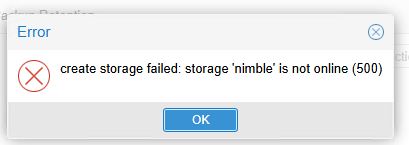
HPE Nimble Storage Getting is not online 500
- Thread starter maip
- Start date
You are using an out of date browser. It may not display this or other websites correctly.
You should upgrade or use an alternative browser.
You should upgrade or use an alternative browser.

Hi @maip , welcome to the forum.
Please share what version of PVE you are running (pveversion).
The context of your /etc/pve/storage.cfg .
Are you able to ping the storage IP you specified?
Run "pvesm status", followed by "journalctl -n 50"
Most likely you have a network problem.
Blockbridge : Ultra low latency all-NVME shared storage for Proxmox - https://www.blockbridge.com/proxmox
Please share what version of PVE you are running (pveversion).
The context of your /etc/pve/storage.cfg .
Are you able to ping the storage IP you specified?
Run "pvesm status", followed by "journalctl -n 50"
Most likely you have a network problem.
Blockbridge : Ultra low latency all-NVME shared storage for Proxmox - https://www.blockbridge.com/proxmox
PVE 9.2.2Hi @maip , welcome to the forum.
Please share what version of PVE you are running (pveversion). -
The context of your /etc/pve/storage.cfg .
Are you able to ping the storage IP you specified? - YES
Run "pvesm status", followed by "journalctl -n 50"
Most likely you have a network problem.
Blockbridge : Ultra low latency all-NVME shared storage for Proxmox - https://www.blockbridge.com/proxmox

There is not yet enough information to give you a confirmed "fix".
I would recommend reviewing our article here: https://kb.blockbridge.com/technote...rage/#connect-all-hosts-to-the-shared-storage
In particular the connection part will guide you through various steps and any errors on the way will be helpful to understanding your issues.
Please use text copy/paste encoded with CODE tags (post box menu) rather than screenshots
Blockbridge : Ultra low latency all-NVME shared storage for Proxmox - https://www.blockbridge.com/proxmox
I would recommend reviewing our article here: https://kb.blockbridge.com/technote...rage/#connect-all-hosts-to-the-shared-storage
In particular the connection part will guide you through various steps and any errors on the way will be helpful to understanding your issues.
Please use text copy/paste encoded with CODE tags (post box menu) rather than screenshots
Blockbridge : Ultra low latency all-NVME shared storage for Proxmox - https://www.blockbridge.com/proxmox
The error comes from the online check PVE runs when you create an iSCSI storage. It just tries a TCP connect to the portal on port 3260, and if that fails you get "is not online", before any login happens. So first check that the node can actually reach the portal:
On Nimble, a common mistake is putting the management IP in as the portal. You need the discovery IP or a data IP of the iSCSI subnet. Is that subnet reachable from the PVE host at all? Does the node have an interface in it? Also add the host IQN from
Code:
nc -zv <portal-ip> 3260
iscsiadm -m discovery -t sendtargets -p <portal-ip>/etc/iscsi/initiatorname.iscsi to an initiator group on the Nimble and assign it to the volume. Otherwise you'll hit the next problem right after the discovery works. What IP did you enter as the portal, and what does the discovery command return?