

[SOLVED] How to remove failed iSCSI multipath paths in Proxmox VE?

Oct 14, 2025
106
39
28
Hi everyone, I am currently facing an issue with failed iSCSI multipath paths in my Proxmox VE environment and would like to ask for advice on how to properly clean them up.

In my setup, I am connecting to a DellEMC PowerStore storage via iSCSI. Originally, I had multipath configured with 8 paths (sessions) connected to a single LUN. Recently, I modified the Host Mapping settings on the storage side, which caused a change in the network topology: 4 of the old paths disconnected, while 4 new paths were added.

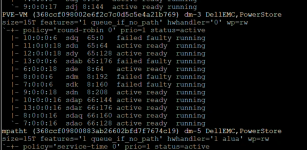
As a result, I have a problematic situation where the system now sees 12 paths for the same LUN, 4 of which are unusable. When I run multipath -ll, the output shows a very cluttered state.

The specific details are as follows. You can see that sdq, sdab, sdm, and sdk are all marked as failed faulty:

Code:
PVE-VM (368ccf098002e6f2c7c0d5c5e4a21b769) dm-3 DellEMC,PowerStore
size=15T features='1 queue_if_no_path' hwhandler='0' wp=rw
`-+- policy='round-robin 0' prio=1 status=active
  |- 10:0:0:6  sdq  65:0    failed faulty running
  |- 11:0:0:18 sdu  65:64   active ready  running
  |- 12:0:0:18 sdy  65:128  active ready  running
  |- 13:0:0:6  sdab 65:176  failed faulty running
  |- 6:0:0:18  sde  8:64    active ready  running
  |- 8:0:0:6   sdm  8:192   failed faulty running
  |- 7:0:0:6   sdk  8:160   failed faulty running
  |- 9:0:0:18  sdn  8:208   active ready  running
  |- 10:0:0:16 sdap 66:144  active ready  running
  |- 13:0:0:16 sdar 66:176  active ready  running
  |- 8:0:0:16  sdaq 66:160  active ready  running
  `- 7:0:0:16  sdao 66:128  active ready  running

I tried restarting the multipathd service, but these failed paths still persist.

I would like to know what commands I should run to safely remove these non-existent devices (sdq, sdab, sdm, sdk) without affecting the 8 healthy paths currently in use. Is there a specific "correct" order to follow?

Thanks in advance for your help!
 

Attachments
  • 螢幕擷取畫面 2026-03-19 070100.png
    螢幕擷取畫面 2026-03-19 070100.png
    537 KB · Views: 3
Last edited:
Thank you for the guidance! The previous steps worked perfectly.

However, I have encountered a follow-up issue while trying to remove another LUN named PVE-VM-02.

The situation is that the PVE host can no longer reach the storage backend, and PVE-VM-02 is completely inaccessible. My plan was to run multipath -f PVE-VM-02, update /etc/multipath.conf, and then proceed with the cleanup steps you mentioned earlier.

However, I am stuck at the first step. When I execute: multipath -f PVE-VM-02

I get the error: map or partition in use

Furthermore, if I attempt to run any LVM-related commands such as vgs, vgscan, pvs, or pvscan, the terminal stops responding entirely. This also causes the PVE node to show a "?" status in the cluster web interface and become unresponsive.

There are currently VMs running on this node, so I need to resolve this without a reboot if possible.

How can I force the system to release the "in use" hold on this failed multipath device so I can safely remove it without hanging the entire node?
 
After I had removed faulty "devices" (sdxx), I flushed maps with multipath -f 360xxxxxxxx...
that is, using these long strings (you have 368ccf...). Maybe you get the error because you use PVE-VM-02 instead?

P.S. I can add that I had various experience in such situations. Sometimes I had to remove faulty "devices" (sdxx) first, then flush the unused maps.
Other time just removing the faulty devices was sufficient to flush maps also...

An additional detail which I noticed that messages were often misleading. For instance there were messages
"devmap not registered, can't remove" and map was successfully removed anyway :-).

BTW, you can also use dmsetup deps -o devname 368ccf.... (put the real string here) to see the devices used by the map.

For an unused map it returned
0 dependencies
while for a used map it returned, for instance,
8 dependencies : (sduw) (sdkq) ...

And check /var/log/messages or journalctl for messages about multipath events.
 
Last edited:
Thanks for the suggestion. I have already confirmed that "PVE-VM-02" has been removed from the PVE WebUI Storage.

Regarding the procedure, I actually attempted to run multipath -f before I executed echo 1 > /sys/block/sdq/device/delete.

Should the underlying devices be deleted first before flushing the multipath map? I was under the impression that the multipath map should be handled first to avoid leaving stale entries, but it seems I might have the order reversed.
 
Hi, guys I have the same issues on my pve02. I had an empty lune, so I tried to delete it.
History of my commands that i used.
1. Deleted from data center storage.
2. vgremove vg_lun016
3. pvremove /dev/mapper/lun016
4. vgremove vg_lun016
5. multipath -f lun016
6. Deleted from /etc/multipath
multipath {
wwid xxxxxxxxxxxxxxxxx
alias lun016
} this one
7. multipathd reconfigure

after this my promox gui started getting status unknown, generally I can check the vm's ram and etc, however storages not showing the metrics. Also, it shows this after using this command "multipath -ll":
mpathe (362c97b11007d81ef26ff4e270000000f) dm-27 HUAWEI,XSG1
size=10T features='1 queue_if_no_path' hwhandler='0' wp=rw
`-+- policy='round-robin 0' prio=0 status=enabled
|- 6:0:0:5 sdf 8:80 failed faulty running
`- 15:0:0:5 sdk 8:160 failed faulty running

I realized that the vgs is issue. But how is it possible to kill the D process.
root@pve02:~# ps -o pid,state,wchan,cmd -p 3583771,3585638,3587112,3587215,3605043
PID S WCHAN CMD
3583771 S read_e /sbin/vgs --separator : --noheadings --units b --unbuffered --nosuffix --options vg_name,vg_size,vg_free,lv_count
3585638 S read_e /sbin/vgs --separator : --noheadings --units b --unbuffered --nosuffix --options vg_name,vg_size,vg_free,lv_count
3587112 S read_e /sbin/vgs --separator : --noheadings --units b --unbuffered --nosuffix --options vg_name,vg_size,vg_free,lv_count
3587215 S read_e /sbin/vgs --separator : --noheadings --units b --unbuffered --nosuffix --options vg_name,vg_size,vg_free,lv_count
3605043 D exit_a [vgs]


root@pve02:~# lsof /dev/mapper/mpathe
COMMAND PID USER FD TYPE DEVICE SIZE/OFF NODE NAME
vgs 3583771 root 12r BLK 252,27 0t0 7652 /dev/mapper/../dm-27
vgs 3585638 root 11r BLK 252,27 0t0 7652 /dev/mapper/../dm-27
vgs 3587112 root 11r BLK 252,27 0t0 7652 /dev/mapper/../dm-27
vgs 3587215 root 11r BLK 252,27 0t0 7652 /dev/mapper/../dm-27
vgs 3605043 root 11r BLK 252,27 0t0 7652 /dev/mapper/../dm-27

root@pve02:~# dmsetup info -c | grep mpathe
mpathe 252 27 L--w 5 1 1 mpath-362c97b11007d81ef26ff4e270000000f


I have to mention, it is my second server. I had the same issue with pve03, there I deleted
echo 1 > /sys/block/sdi/device/delete
echo 1 > /sys/block/sdn/device/delete
however it didn't work, so I rebooted the server and it solved it.
Could you help me?
 
But how is it possible to kill the D process.
Hi, @Yerni
It's usually not possible without a reboot.

"D" state means "uninterruptible sleep state". Unless the I/O device recovers (so not your situation), only a reboot removes such a process.

As for the rest of your issue, I don't quite understand what you did and whether you also tried rebooting this particular server (as the other one), or not.

Please read carefully my messages #2 and #4 in this thread and try to execute the appropriate commands.

If you post commands' outputs, please use CODE blocks to quote them (use this "</>" icon in the menu) to keep the original format. Without that, the output is hard to understand.