

Hi everyone, I am currently facing an issue with failed iSCSI multipath paths in my Proxmox VE environment and would like to ask for advice on how to properly clean them up.
In my setup, I am connecting to a DellEMC PowerStore storage via iSCSI. Originally, I had multipath configured with 8 paths (sessions) connected to a single LUN. Recently, I modified the Host Mapping settings on the storage side, which caused a change in the network topology: 4 of the old paths disconnected, while 4 new paths were added.
As a result, I have a problematic situation where the system now sees 12 paths for the same LUN, 4 of which are unusable. When I run multipath -ll, the output shows a very cluttered state.
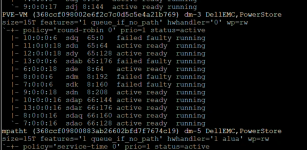
The specific details are as follows. You can see that sdq, sdab, sdm, and sdk are all marked as failed faulty:
I tried restarting the
I would like to know what commands I should run to safely remove these non-existent devices (sdq, sdab, sdm, sdk) without affecting the 8 healthy paths currently in use. Is there a specific "correct" order to follow?
Thanks in advance for your help!
In my setup, I am connecting to a DellEMC PowerStore storage via iSCSI. Originally, I had multipath configured with 8 paths (sessions) connected to a single LUN. Recently, I modified the Host Mapping settings on the storage side, which caused a change in the network topology: 4 of the old paths disconnected, while 4 new paths were added.
As a result, I have a problematic situation where the system now sees 12 paths for the same LUN, 4 of which are unusable. When I run multipath -ll, the output shows a very cluttered state.
The specific details are as follows. You can see that sdq, sdab, sdm, and sdk are all marked as failed faulty:
Code:
PVE-VM (368ccf098002e6f2c7c0d5c5e4a21b769) dm-3 DellEMC,PowerStore
size=15T features='1 queue_if_no_path' hwhandler='0' wp=rw
`-+- policy='round-robin 0' prio=1 status=active
  |- 10:0:0:6  sdq  65:0    failed faulty running
  |- 11:0:0:18 sdu  65:64   active ready  running
  |- 12:0:0:18 sdy  65:128  active ready  running
  |- 13:0:0:6  sdab 65:176  failed faulty running
  |- 6:0:0:18  sde  8:64    active ready  running
  |- 8:0:0:6   sdm  8:192   failed faulty running
  |- 7:0:0:6   sdk  8:160   failed faulty running
  |- 9:0:0:18  sdn  8:208   active ready  running
  |- 10:0:0:16 sdap 66:144  active ready  running
  |- 13:0:0:16 sdar 66:176  active ready  running
  |- 8:0:0:16  sdaq 66:160  active ready  running
  `- 7:0:0:16  sdao 66:128  active ready  running
I tried restarting the
multipathd service, but these failed paths still persist.I would like to know what commands I should run to safely remove these non-existent devices (sdq, sdab, sdm, sdk) without affecting the 8 healthy paths currently in use. Is there a specific "correct" order to follow?
Thanks in advance for your help!
Attachments
Last edited:

 .
.