How to Reduce SSD Wearout in Proxmox?

How do I check if Proxmox can even see the HDD?
node > Disks or lsblk -o+FSTYPE,LABEL,MODEL.

How do I format it (and which filesystem should I use for a single HDD like this)?
node > Disks > .... What to use depends a bit on the use case and model number of the disk. Please share yours.
I like ZFS but it tends to perform badly with VMs on HDDs. without disabling sync or having a separate SLOG. CTs are fine.
LVM-Thin would by my secondary choice but you can't directly store files there like you can with ZFS. I don't recommend Directory for storing guests.

How do I add it as a storage target in Proxmox so I can actually assign VMs or backups to it?
Above way does that automatically if selected. You should edit the Thin provision option for ZFS though. You can create/edit via Datacenter > Storage.
Any mount options I should use to keep things running smoothly?
This is too vague and depends a lot on storage, guest type, etc. Something I recommend most often is discard. Not as mount option though.
I'd suggest relatime instead of noatime which, AFAIK, is also the default for ext4 nowadays.
 
Last edited:
Just wanted to come back and say a huge thank you to everyone who contributed to this thread. All the advice and suggestions have been incredibly helpful.

I have made quite a few changes to my setup since my first post and wanted to share where things stand now.

What I have done:
- Added noatime to the SSD mount options in /etc/fstab
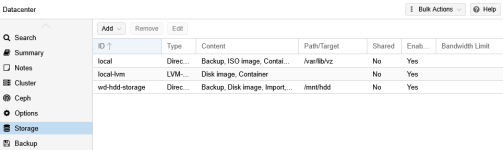
- Added a 1TB WD Blue HDD as secondary storage, formatted with ext4 and mounted at /mnt/hdd with noatime to minimize unnecessary writes
- Moved VM backups, ISO images, and RRD metrics database to the HDD
- Installed and configured log2ram so logs are written to RAM first and only synced to disk periodically instead of constant small writes
- Decided against ZFS on this system given the limited hardware, ext4 on a single HDD is more appropriate here

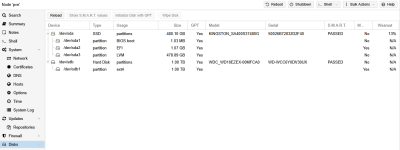
Current storage layout (screenshots attached):

SSD wearout is currently at 13% and SMART shows PASSED on both drives. Hoping these changes will slow down the wear significantly going forward.

Thanks again to everyone, for the detailed advice. This thread has been a great learning experience for someone still finding their feet with Proxmox.

Proxmox_disks_current.PNGProxmox_storage_current.PNG
 
- Added noatime to the SSD mount options in /etc/fstab
Watch out when doing PBS backups with that setting. If I remember correctly, PBS makes use of that.

To get back to your initial question "How to reduce wear out" the correct answer IMHO would be:
Don't worry!

Others here recommended PLP drives, but in reality most workloads are perfectly fine with just good consumer drives.
I have been running a mixture of cheap Kingston DC1000 and WD Red NAS NVME drives and the estimated wearout with 10VMs would be +20 years.

Modern consumer SSDs have a very high TBW. Even though you might suffer internal or ZFS based write amplification, unless you are not running a high workload DB, this is not a problem.

But your Kingston SSD is bottom tier trash when it comes to consumer SSDs, with a laughable TBW amount, so your high wearout is to be expected.
That does not automatically mean that you have to steer into the other extreme and get a PLP server drive :)
 
Watch out when doing PBS backups with that setting. If I remember correctly, PBS makes use of that.

Yes PBS makes use of that, but I think it is setting the last access time by hand and so that „should“ work, but to be save don’t set this to the pbs datastore fs.