

How to permanently change the "Scaling Mode" default value from preseed autoinstall answer.toml file ?
- Thread starter shodan
- Start date
You are using an out of date browser. It may not display this or other websites correctly.
You should upgrade or use an alternative browser.
You should upgrade or use an alternative browser.

Hi!
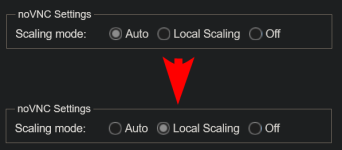
The noVNC Settings Scaling Mode is a browser-local setting. FWIW, all settings in the "My Settings" panel are browser-local settings and aren't shared across different cluster nodes or browsers, so these are settings only for the current browser for a Proxmox VE node.
Hope this helps!
The noVNC Settings Scaling Mode is a browser-local setting. FWIW, all settings in the "My Settings" panel are browser-local settings and aren't shared across different cluster nodes or browsers, so these are settings only for the current browser for a Proxmox VE node.
Hope this helps!
Yes, I understand however "Auto" is the default value of this setting for new browsers. I want to change the default so it always starts as "Local Scaling".
I understand the answer.toml file doesn't have a hook for it, so I would put a script in the answer.toml file that makes that change in the file where the default is.
I understand the answer.toml file doesn't have a hook for it, so I would put a script in the answer.toml file that makes that change in the file where the default is.
IOW, the browser-local settings are stored in the browser's local storage. That is, if you clear the particular node's site data in the browser, the setting will be restored to the default value "auto".
There is no configuration file on the Proxmox VE node itself, which does change this setting or its default.
There is no configuration file on the Proxmox VE node itself, which does change this setting or its default.
I think the default values of "Auto" are defined somewhere in these files
and the important parameters/values appear to be...
Proxmox “My Settings” — pvemanagerlib.js
Proxmox : noVNC browser URL
noVNC HTML settings UI : index.html.tpl
noVNC setting initialization : novnc-pve/app.js
noVNC runtime behavior : novnc-pve/app.js
So if I understand correctly
For noVNC there is only scale, off and remote
But Proxmox has Auto, local scaling and off
And Auto means the ?resize value is not set
What I want is, by default, whether embed or popup, I want the image to fill the space, and I never-ever want noVNC to fight me when I resize the screen. It should never pop back to the "original" size.
I'm not sure but I now think the change I need to make is in this file.
/usr/share/pve-manager/js/pvemanagerlib.js
and change
scaling = sp.get('novnc-scaling', 'off');
to
scaling = sp.get('novnc-scaling', 'scale');
but I'm not sure, I guess only way to know for sure is to test now
Code:
/usr/share/pve-manager/js/pvemanagerlib.js
/usr/share/novnc-pve/index.html.tpl
/usr/share/novnc-pve/app.js
and the important parameters/values appear to be...
Proxmox “My Settings” — pvemanagerlib.js
Code:
novnc-scaling : Browser-local Proxmox scaling preference key.
 scale : Local Scaling.
 off : Scaling Off.
 unset/missing : Auto behavior; use Proxmox fallback.
noVNCScalingField : My Settings Scaling Mode radio field.
 auto : Clear novnc-scaling.
 scale : Store Local Scaling.
 off : Store Scaling Off.
 unset/missing : UI is initialized from novnc-scaling, falling back to auto.
scaling : Popup-console launch scaling variable.
 scale : Launch with Local Scaling.
 off : Launch with Scaling Off.
 unset/missing : Normally impossible; initialized to off first.
Proxmox.Utils.toolkit : Current Proxmox UI toolkit.
 touch : Do not read novnc-scaling; retain initial scaling value.
 other : Read novnc-scaling.
 unset/undefined : Treated like non-touch by the !== 'touch' test.
Proxmox : noVNC browser URL
Code:
resize : Query parameter carrying the requested noVNC resize/scaling mode.
 scale : Local Scaling.
 off : Scaling Off.
 remote : Remote Resizing.
 missing : noVNC falls back to its own stored/default resize setting.
 empty (resize=) : Empty string is supplied; not the same as the parameter being missing.
noVNC HTML settings UI : index.html.tpl
Code:
noVNC_setting_resize : HTML element representing noVNC's Scaling Mode selector.
 scale : Local Scaling option.
 off : None option.
 remote : Remote Resizing option.
 unset : JavaScript initialization determines the displayed value.
vncResize : HTML form name of the same Scaling Mode selector.
 scale / off / remote : Values belonging to that selector.
 unset : No independent behavior; the JavaScript resize setting controls it.
autoresize : Separate noVNC browser-window autoresize setting.
 true : Allow automatic browser-window resizing.
 false : Do not automatically resize browser window.
 unset/missing : Defaults to true.
noVNC setting initialization : novnc-pve/app.js
Code:
resize : noVNC's internal Scaling Mode setting.
 scale : Local Scaling.
 off : Scaling disabled.
 remote : Remote session resizing.
 unset/missing : readSetting() eventually uses the built-in default off.
initSetting : Initializes a noVNC setting.
 URL/config value present : Use that value.
 URL/config value missing : Use saved setting/default.
getConfigVar : Reads a setting from URL configuration.
 value present : Return that value.
 missing : Return null, allowing fallback.
readSetting : Reads noVNC's browser-saved setting.
 value present : Return saved value.
 missing : Return supplied default.
autoresize : noVNC's automatic browser-window resizing setting.
 true : Enabled.
 false : Disabled.
 unset/missing : Defaults to true.
noVNC runtime behavior : novnc-pve/app.js
Code:
resize : Current active noVNC resize/scaling mode.
 scale : Scale framebuffer locally.
 off : Neither local nor remote resizing.
 remote : Resize the remote session/framebuffer.
 empty/unknown : Matches none of the special modes; effectively no Local/Remote Scaling behavior.
scaling : Boolean derived from resize === "scale".
 true : Local Scaling active.
 false : Local Scaling not active.
 unset : Not really applicable; expression always produces true or false.
autoresize : Runtime permission to resize the browser window.
 true : Browser-window resizing may occur.
 false : Browser-window resizing disabled.
 unset : Normally not reached because initialization defaults it to true.
So if I understand correctly
For noVNC there is only scale, off and remote
But Proxmox has Auto, local scaling and off
And Auto means the ?resize value is not set
What I want is, by default, whether embed or popup, I want the image to fill the space, and I never-ever want noVNC to fight me when I resize the screen. It should never pop back to the "original" size.
I'm not sure but I now think the change I need to make is in this file.
/usr/share/pve-manager/js/pvemanagerlib.js
and change
scaling = sp.get('novnc-scaling', 'off');
to
scaling = sp.get('novnc-scaling', 'scale');
but I'm not sure, I guess only way to know for sure is to test now
Here is a video demonstrating the current default proxmox 9.2 for the vnc console
In embed mode it is local scaling, but popup mode it is, I think "off" and "autoresize"
So you can't resize it, it will always only be the guest screen resolution and will fight you even you try to resize it ! Super annoying !
https://youtu.be/HbLTFGd_BCw
I searched and found these threads about this
In embed mode it is local scaling, but popup mode it is, I think "off" and "autoresize"
So you can't resize it, it will always only be the guest screen resolution and will fight you even you try to resize it ! Super annoying !
https://youtu.be/HbLTFGd_BCw
I searched and found these threads about this
Code:
https://forum.proxmox.com/threads/how-to-permanently-change-the-scaling-mode-default-value-from-preseed-autoinstall-answer-toml-file.186193/#post-868411
https://forum.proxmox.com/threads/change-or-set-novnc-window-size.127456/#post-558131
https://forum.proxmox.com/threads/how-to-open-vnc-console-with-scaling-already-set-to-local-scaling.68264/
https://forum.proxmox.com/threads/local-scaling-preference-has-no-effect.102637/#post-443780
https://forum.proxmox.com/threads/novnc-defaulting-to-local-scaling-possible.55607/#post-256241
https://forum.proxmox.com/threads/novnc-window-floating-around.49982/#post-232957
https://forum.proxmox.com/threads/proxmox-vm-console.148403/#post-671492
https://forum.proxmox.com/threads/vnc-window-size-problem.7715/
https://forum.proxmox.com/threads/can-vnc-resolution-be-scaled-zoomed-if-too-large.22122/
https://forum.proxmox.com/threads/strange-console-window-issue.148826/
https://forum.proxmox.com/threads/weird-behavior-when-use-console-directly-into-web-gui.134052/#post-592372
https://forum.proxmox.com/threads/vnc-console-is-alternately-shrinking-and-expanding.142636/
https://forum.proxmox.com/threads/vnc-screesize-issue.4417/ok
I have the solution

And I reboot the server, started private browsing window and clear browser data
Then I tried it
https://youtu.be/HbLTFGd_BCw
and that works as I hoped it would !
I have the solution
Code:
bash -c 'f=/usr/share/pve-manager/js/pvemanagerlib.js; old="scaling = sp.get('\''novnc-scaling'\'', '\''off'\'');"; new="scaling = sp.get('\''novnc-scaling'\'', '\''scale'\'');"; c=$(grep -Fc "$old" "$f"); [ "$c" -eq 1 ] || { echo "ERROR: expected exactly 1 matching line, found $c; no changes made."; exit 1; }; n=$(grep -nF "$old" "$f" | cut -d: -f1); s=$((n>1?n-1:1)); e=$((n+1)); echo "BEFORE:"; sed -n "${s},${e}p" "$f"; echo "----------------"; sed -i "s|$old|$new|" "$f"; grep -Fq "$new" "$f" || { echo "ERROR: replacement verification failed."; exit 1; }; echo "AFTER:"; sed -n "${s},${e}p" "$f"'And I reboot the server, started private browsing window and clear browser data
Then I tried it
https://youtu.be/HbLTFGd_BCw
and that works as I hoped it would !
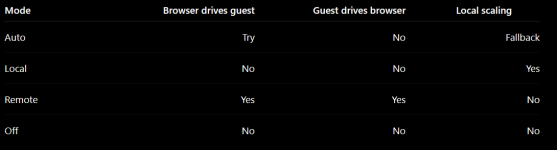
This works for me but I've been thinking about it, I saw in the code there is some "remote" option, where resizing the browser window was supposed to tell the guest to resize its display resolution. So I think the complete set of options should be
So like this
Code:
Auto
    Try Remote resizing first.
    If the guest cannot resize, fall back to Local Scaling.

Local
    Browser window is freely resizable.
    Guest resolution stays unchanged.
    Image is scaled locally to fit.

Remote
    Browser window and guest resolution try to stay matched.
    Resize browser → request guest resolution change.
    Guest resolution change → browser window follows it.
    If guest cannot resize → browser snaps back to guest size.

Off
    Browser window is freely resizable.
    Guest resolution stays unchanged.
    Image remains 1:1.
    Extra space becomes borders; insufficient space becomes scrollbars.
So like this
Ok,
I remade the previous command to be clearer about what it does
Auto will locally Scale
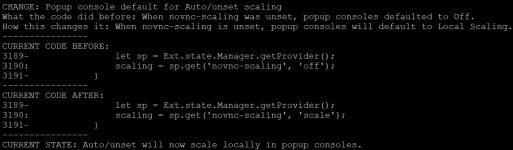
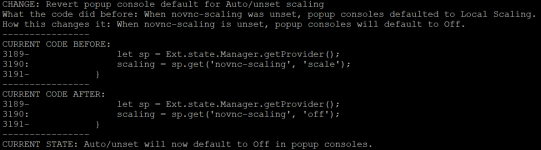
Revert from "Auto will locally Scale" back to stock behaviour
I remade the previous command to be clearer about what it does
Auto will locally Scale
Code:
bash -c 'f=/usr/share/pve-manager/js/pvemanagerlib.js; old="scaling = sp.get('\''novnc-scaling'\'', '\''off'\'');"; new="scaling = sp.get('\''novnc-scaling'\'', '\''scale'\'');"; printf "\n"; echo "CHANGE: Popup console default for Auto/unset scaling"; echo "What the code did before: When novnc-scaling was unset, popup consoles defaulted to Off."; echo "How this changes it: When novnc-scaling is unset, popup consoles will default to Local Scaling."; echo "----------------"; oc=$(grep -Fc "$old" "$f"); nc=$(grep -Fc "$new" "$f"); if [ "$oc" -eq 0 ] && [ "$nc" -eq 1 ]; then echo "ALREADY APPLIED:"; grep -n -B1 -A1 -F "$new" "$f"; echo "----------------"; echo "CURRENT STATE: Auto/unset will scale locally in popup consoles."; exit 0; elif [ "$oc" -ne 1 ] || [ "$nc" -ne 0 ]; then echo "ERROR: unexpected file state (original=$oc, modified=$nc); no changes made."; exit 1; fi; echo "CURRENT CODE BEFORE:"; grep -n -B1 -A1 -F "$old" "$f"; echo "----------------"; sed -i "s|$old|$new|" "$f"; grep -Fq "$new" "$f" || { echo "ERROR: replacement verification failed."; exit 1; }; echo "CURRENT CODE AFTER:"; grep -n -B1 -A1 -F "$new" "$f"; echo "----------------"; echo "CURRENT STATE: Auto/unset will now scale locally in popup consoles."'Revert from "Auto will locally Scale" back to stock behaviour
Code:
bash -c 'f=/usr/share/pve-manager/js/pvemanagerlib.js; old="scaling = sp.get('\''novnc-scaling'\'', '\''scale'\'');"; new="scaling = sp.get('\''novnc-scaling'\'', '\''off'\'');"; printf "\n"; echo "CHANGE: Revert popup console default for Auto/unset scaling"; echo "What the code did before: When novnc-scaling was unset, popup consoles defaulted to Local Scaling."; echo "How this changes it: When novnc-scaling is unset, popup consoles will default to Off."; echo "----------------"; oc=$(grep -Fc "$old" "$f"); nc=$(grep -Fc "$new" "$f"); if [ "$oc" -eq 0 ] && [ "$nc" -eq 1 ]; then echo "ALREADY REVERTED:"; grep -n -B1 -A1 -F "$new" "$f"; echo "----------------"; echo "CURRENT STATE: Auto/unset defaults to Off in popup consoles."; exit 0; elif [ "$oc" -ne 1 ] || [ "$nc" -ne 0 ]; then echo "ERROR: unexpected file state (modified=$oc, original=$nc); no changes made."; exit 1; fi; echo "CURRENT CODE BEFORE:"; grep -n -B1 -A1 -F "$old" "$f"; echo "----------------"; sed -i "s|$old|$new|" "$f"; grep -Fq "$new" "$f" || { echo "ERROR: revert verification failed."; exit 1; }; echo "CURRENT CODE AFTER:"; grep -n -B1 -A1 -F "$new" "$f"; echo "----------------"; echo "CURRENT STATE: Auto/unset will now default to Off in popup consoles."'Ok, I have made a better solution
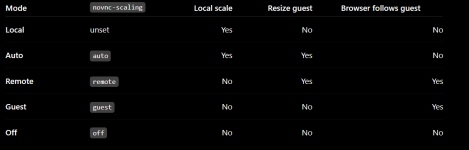
Code:
Local
  default when novnc-scaling is unset
  local framebuffer scaling ON
  guest resize request OFF
  popup follows guest OFF

Auto
  local framebuffer scaling ON
  guest resize request ON
  popup follows guest OFF

Remote
  local framebuffer scaling OFF
  guest resize request ON
  popup follows guest ON

Guest
  local framebuffer scaling OFF
  guest resize request OFF
  popup follows guest ON

Off
  local framebuffer scaling OFF
  guest resize request OFF
  popup follows guest OFF
Attachments
Last edited:
Ok, this works for me
APPLY "Auto will try to resize guest resolution but guest resolution will not reset browser, Auto is default selection, add options Auto Local Remote Guest and Off"
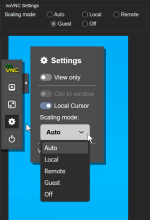
APPLY "Auto will try to resize guest resolution but guest resolution will not reset browser, Auto is default selection, add options Auto Local Remote Guest and Off"
Code:
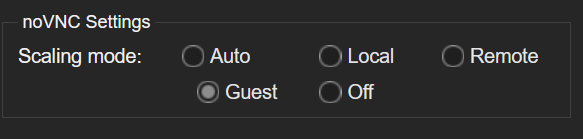
show_code(){ local f="$1" needle="$2"; NEEDLE="$needle" perl -0777 -ne '$n=$ENV{NEEDLE};$i=index($_,$n);die "target block not found\n" if $i<0;$before=substr($_,0,$i);$start=($before=~tr/\n//);$count=($n=~tr/\n//)+1;@lines=split(/\n/,$_,-1);$from=$start>0?$start-1:0;$to=$start+$count;for($j=$from;$j<=$to&&$j<@lines;$j++){printf "%d: %s\n",$j+1,$lines[$j];}' "$f"; }; code_change(){ local f="$1" title="$2" effect="$3" old="$4" new="$5"; local oc nc; printf '\nFILE: %s\nCHANGE: %s\nEFFECT: %s\n' "$f" "$title" "$effect"; [ -f "$f" ] || { echo "ERROR: file not found"; return 1; }; oc=$(OLD="$old" perl -0777 -ne '$o=$ENV{OLD};$c=()=/\Q$o\E/g;END{print $c+0}' "$f"); nc=$(NEW="$new" perl -0777 -ne '$n=$ENV{NEW};$c=()=/\Q$n\E/g;END{print $c+0}' "$f"); if [ "$oc" -eq 0 ] && [ "$nc" -eq 1 ]; then echo "ALREADY IN TARGET STATE:"; show_code "$f" "$new"; echo "----------------"; return 0; fi; if [ "$oc" -ne 1 ] || [ "$nc" -ne 0 ]; then echo "ERROR: unexpected file state (before=$oc, after=$nc); no change made."; return 1; fi; echo "BEFORE:"; show_code "$f" "$old"; OLD="$old" NEW="$new" perl -0777 -i -pe '$o=$ENV{OLD};$n=$ENV{NEW};s/\Q$o\E/$n/' "$f"; nc=$(NEW="$new" perl -0777 -ne '$n=$ENV{NEW};$c=()=/\Q$n\E/g;END{print $c+0}' "$f"); [ "$nc" -eq 1 ] || { echo "ERROR: replacement verification failed."; return 1; }; echo "AFTER:"; show_code "$f" "$new"; echo "----------------"; }; printf '\nWILL DO: Replace the current noVNC behavior with five explicit modes: Auto, Local, Remote, Guest and Off.\nAuto remains the DEFAULT/UNSET Proxmox preference.\nAuto will use Local Scaling while also requesting guest resizing.\nLocal will always scale locally without resizing the guest.\nRemote will request guest resizing and allow the popup to follow the guest.\nGuest will not resize the guest, but the popup will follow guest resolution changes.\nOff will do no scaling, no guest resize, and no popup autoresizing.\nMy Settings will display all five choices using a 3-column, 2-row layout.\n----------------\n'
code_change /usr/share/pve-manager/js/pvemanagerlib.js '1/12 - Make Auto the popup-console fallback' 'When novnc-scaling is unset, popup consoles launch noVNC with resize=auto instead of resize=off.' $'            let scaling = \'off\';\n            if (Proxmox.Utils.toolkit !== \'touch\') {\n                let sp = Ext.state.Manager.getProvider();\n                scaling = sp.get(\'novnc-scaling\', \'off\');' $'            let scaling = \'auto\';\n            if (Proxmox.Utils.toolkit !== \'touch\') {\n                let sp = Ext.state.Manager.getProvider();\n                scaling = sp.get(\'novnc-scaling\', \'auto\');'
code_change /usr/share/pve-manager/js/pvemanagerlib.js '2/12 - Make Auto the embedded-console fallback' 'When novnc-scaling is unset, embedded consoles launch noVNC with resize=auto instead of resize=scale.' $'                        resize: sp.get(\'novnc-scaling\', \'scale\'),' $'                        resize: sp.get(\'novnc-scaling\', \'auto\'),'
code_change /usr/share/pve-manager/js/pvemanagerlib.js '3/12 - Give My Settings enough room for five modes' 'Replace the fixed one-row hbox with a 3-column radio layout so all five choices are visible.' $'                            height: \'15px\', // renders faster with value assigned\n                            layout: {\n                                type: \'hbox\',\n                            },' $'                            columns: 3,\n                            vertical: false,'
code_change /usr/share/pve-manager/js/pvemanagerlib.js '4/12 - Expand My Settings to five modes' 'My Settings shows Auto, Local, Remote, Guest and Off. Auto remains the existing unset/default choice.' $'                                {\n                                    xtype: \'radiofield\',\n                                    name: \'noVNCScalingField\',\n                                    inputValue: \'auto\',\n                                    boxLabel: \'Auto\',\n                                },\n                                {\n                                    xtype: \'radiofield\',\n                                    name: \'noVNCScalingField\',\n                                    inputValue: \'scale\',\n                                    boxLabel: \'Local Scaling\',\n                                    margin: \'0 0 0 10\',\n                                },\n                                {\n                                    xtype: \'radiofield\',\n                                    name: \'noVNCScalingField\',\n                                    inputValue: \'off\',\n                                    boxLabel: \'Off\',\n                                    margin: \'0 0 0 10\',\n                                },' $'                                {\n                                    xtype: \'radiofield\',\n                                    name: \'noVNCScalingField\',\n                                    inputValue: \'auto\',\n                                    boxLabel: \'Auto\',\n                                },\n                                {\n                                    xtype: \'radiofield\',\n                                    name: \'noVNCScalingField\',\n                                    inputValue: \'scale\',\n                                    boxLabel: \'Local\',\n                                    margin: \'0 0 0 10\',\n                                },\n                                {\n                                    xtype: \'radiofield\',\n                                    name: \'noVNCScalingField\',\n                                    inputValue: \'remote\',\n                                    boxLabel: \'Remote\',\n                                    margin: \'0 0 0 10\',\n                                },\n                                {\n                                    xtype: \'radiofield\',\n                                    name: \'noVNCScalingField\',\n                                    inputValue: \'guest\',\n                                    boxLabel: \'Guest\',\n                                    margin: \'0 0 0 10\',\n                                },\n                                {\n                                    xtype: \'radiofield\',\n                                    name: \'noVNCScalingField\',\n                                    inputValue: \'off\',\n                                    boxLabel: \'Off\',\n                                    margin: \'0 0 0 10\',\n                                },'
code_change /usr/share/novnc-pve/app.js '5/12 - Define Remote and Guest as popup-follow modes' 'Only Remote and Guest may resize the browser popup to follow guest framebuffer changes.' $'        var clip = me.UI.getSetting("view_clip");\n        var resize = me.UI.getSetting("resize");\n        var autoresize = me.UI.getSetting("autoresize");\n        if (clip || resize === "scale" || !autoresize) {' $'        var clip = me.UI.getSetting("view_clip");\n        var resize = me.UI.getSetting("resize");\n        var followGuest = resize === "remote" || resize === "guest";\n        if (clip || !followGuest) {'
code_change /usr/share/novnc-pve/app.js '6/12 - Make Auto the native noVNC default and remove standalone autoresize state' 'Direct noVNC defaults to Auto, while popup-follow behavior is now defined by the selected mode.' $'    UI.initSetting("resize", "off");\n    UI.initSetting("quality", 6);\n    UI.initSetting("compression", 2);\n    UI.initSetting("autoresize", true);' $'    UI.initSetting("resize", "auto");\n    UI.initSetting("quality", 6);\n    UI.initSetting("compression", 2);'
code_change /usr/share/novnc-pve/app.js '7/12 - Remove the standalone autoresize change handler' 'Autoresize is no longer a separate user preference; Remote and Guest explicitly control popup following.' $'    UI.addSettingChangeHandler("resize", UI.updateViewClip);\n    UI.addSettingChangeHandler("autoresize");\n    UI.addSettingChangeHandler("quality");' $'    UI.addSettingChangeHandler("resize", UI.updateViewClip);\n    UI.addSettingChangeHandler("quality");'
code_change /usr/share/novnc-pve/app.js '8/12 - Teach initial noVNC connection setup about Auto' 'Auto enables both local framebuffer scaling and remote guest resize requests when the connection starts.' $'    UI.rfb.localCursor = UI.getSetting("local_cursor");\n    UI.rfb.scaleViewport = UI.getSetting("resize") === "scale";\n    UI.rfb.resizeSession = UI.getSetting("resize") === "remote";\n    UI.rfb.qualityLevel = parseInt(UI.getSetting("quality"));' $'    UI.rfb.localCursor = UI.getSetting("local_cursor");\n    const resizeMode = UI.getSetting("resize");\n    UI.rfb.scaleViewport = resizeMode === "scale" || resizeMode === "auto";\n    UI.rfb.resizeSession = resizeMode === "remote" || resizeMode === "auto";\n    UI.rfb.qualityLevel = parseInt(UI.getSetting("quality"));'
code_change /usr/share/novnc-pve/app.js '9/12 - Stop fullscreen from overriding the selected mode' 'Entering and leaving fullscreen preserves Auto, Local, Remote, Guest or Off.' $'  toggleFullscreen() {\n    if (document.fullscreenElement || // alternative standard method\n    document.mozFullScreenElement || // currently working methods\n    document.webkitFullscreenElement || document.msFullscreenElement) {\n      if (document.exitFullscreen) {\n        document.exitFullscreen();\n      } else if (document.mozCancelFullScreen) {\n        document.mozCancelFullScreen();\n      } else if (document.webkitExitFullscreen) {\n        document.webkitExitFullscreen();\n      } else if (document.msExitFullscreen) {\n        document.msExitFullscreen();\n      }\n      if (getQueryVar("resize") !== "scale") {\n        UI.forceSetting("resize", "off");\n        UI.enableSetting("resize");\n      }\n    } else {\n      if (document.documentElement.requestFullscreen) {\n        document.documentElement.requestFullscreen();\n      } else if (document.documentElement.mozRequestFullScreen) {\n        document.documentElement.mozRequestFullScreen();\n      } else if (document.documentElement.webkitRequestFullscreen) {\n        document.documentElement.webkitRequestFullscreen(Element.ALLOW_KEYBOARD_INPUT);\n      } else if (document.body.msRequestFullscreen) {\n        document.body.msRequestFullscreen();\n      }\n      UI.forceSetting("resize", "scale");\n      UI.enableSetting("resize");\n    }\n    UI.applyResizeMode();\n    UI.updateFullscreenButton();\n  },' $'  toggleFullscreen() {\n    if (document.fullscreenElement || // alternative standard method\n    document.mozFullScreenElement || // currently working methods\n    document.webkitFullscreenElement || document.msFullscreenElement) {\n      if (document.exitFullscreen) {\n        document.exitFullscreen();\n      } else if (document.mozCancelFullScreen) {\n        document.mozCancelFullScreen();\n      } else if (document.webkitExitFullscreen) {\n        document.webkitExitFullscreen();\n      } else if (document.msExitFullscreen) {\n        document.msExitFullscreen();\n      }\n    } else {\n      if (document.documentElement.requestFullscreen) {\n        document.documentElement.requestFullscreen();\n      } else if (document.documentElement.mozRequestFullScreen) {\n        document.documentElement.mozRequestFullScreen();\n      } else if (document.documentElement.webkitRequestFullscreen) {\n        document.documentElement.webkitRequestFullscreen(Element.ALLOW_KEYBOARD_INPUT);\n      } else if (document.body.msRequestFullscreen) {\n        document.body.msRequestFullscreen();\n      }\n    }\n    UI.applyResizeMode();\n    UI.updateFullscreenButton();\n  },'
code_change /usr/share/novnc-pve/app.js '10/12 - Teach runtime mode switching about Auto' 'Whenever modes change, Auto enables both local scaling and guest resize requests.' $'  applyResizeMode() {\n    if (!UI.rfb) return;\n    UI.rfb.scaleViewport = UI.getSetting("resize") === "scale";\n    UI.rfb.resizeSession = UI.getSetting("resize") === "remote";\n  },' $'  applyResizeMode() {\n    if (!UI.rfb) return;\n    const resizeMode = UI.getSetting("resize");\n    UI.rfb.scaleViewport = resizeMode === "scale" || resizeMode === "auto";\n    UI.rfb.resizeSession = resizeMode === "remote" || resizeMode === "auto";\n  },'
code_change /usr/share/novnc-pve/app.js '11/12 - Treat Auto as locally scaled for viewport handling' 'Auto receives the same viewport/clipping handling as Local because local scaling remains enabled.' $'    const scaling = UI.getSetting("resize") === "scale";' $'    const scaling = ["scale", "auto"].includes(UI.getSetting("resize"));'
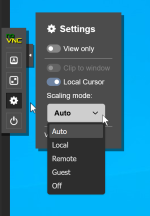
code_change /usr/share/novnc-pve/index.html.tpl '12/12 - Replace the noVNC settings panel with five explicit modes' 'The noVNC gear menu shows Auto, Local, Remote, Guest and Off and removes the separate Autoresize Window checkbox.' $'                    <li>\n                        <label>\n                            <input id="noVNC_setting_autoresize" type="checkbox"\n                                    class="toggle">\n                            Autoresize Window\n                        </label>\n                    </li>\n                    <li>\n                        <label for="noVNC_setting_resize">Scaling mode:</label>\n                        <select id="noVNC_setting_resize" name="vncResize">\n                            <option value="off">None</option>\n                            <option value="scale">Local scaling</option>\n                            <option value="remote">Remote resizing</option>\n                        </select>\n                    </li>' $'                    <li>\n                        <label for="noVNC_setting_resize">Scaling mode:</label>\n                        <select id="noVNC_setting_resize" name="vncResize">\n                            <option value="auto">Auto</option>\n                            <option value="scale">Local</option>\n                            <option value="remote">Remote</option>\n                            <option value="guest">Guest</option>\n                            <option value="off">Off</option>\n                        </select>\n                    </li>'
printf '\nVERIFYING JAVASCRIPT...\n'; if command -v node >/dev/null 2>&1; then node --check /usr/share/pve-manager/js/pvemanagerlib.js && node --check /usr/share/novnc-pve/app.js && echo 'JavaScript syntax: OK'; else echo 'JavaScript syntax check skipped: node not installed.'; fi; printf '%s\n' '----------------' 'CURRENT STATE:' 'Auto   : DEFAULT/UNSET; scale locally + request guest resize; browser does not follow guest.' 'Local  : scale locally; no guest resize; browser does not follow guest.' 'Remote : no local scaling; request guest resize; browser follows guest.' 'Guest  : no local scaling; no guest resize request; browser follows guest.' 'Off    : no local scaling; no guest resize; browser does not follow guest.' 'My Settings layout:' '  Row 1: Auto   Local   Remote' '  Row 2: Guest  Off' '----------------'
Last edited:
This will undo the previous change above
Code:
show_code(){ local f="$1" needle="$2"; NEEDLE="$needle" perl -0777 -ne '$n=$ENV{NEEDLE};$i=index($_,$n);die "target block not found\n" if $i<0;$before=substr($_,0,$i);$start=($before=~tr/\n//);$count=($n=~tr/\n//)+1;@lines=split(/\n/,$_,-1);$from=$start>0?$start-1:0;$to=$start+$count;for($j=$from;$j<=$to&&$j<@lines;$j++){printf "%d: %s\n",$j+1,$lines[$j];}' "$f"; }; code_change(){ local f="$1" title="$2" effect="$3" old="$4" new="$5"; local oc nc; printf '\nFILE: %s\nCHANGE: %s\nEFFECT: %s\n' "$f" "$title" "$effect"; [ -f "$f" ] || { echo "ERROR: file not found"; return 1; }; oc=$(OLD="$old" perl -0777 -ne '$o=$ENV{OLD};$c=()=/\Q$o\E/g;END{print $c+0}' "$f"); nc=$(NEW="$new" perl -0777 -ne '$n=$ENV{NEW};$c=()=/\Q$n\E/g;END{print $c+0}' "$f"); if [ "$oc" -eq 0 ] && [ "$nc" -eq 1 ]; then echo "ALREADY IN TARGET STATE:"; show_code "$f" "$new"; echo "----------------"; return 0; fi; if [ "$oc" -ne 1 ] || [ "$nc" -ne 0 ]; then echo "ERROR: unexpected file state (before=$oc, after=$nc); no change made."; return 1; fi; echo "BEFORE:"; show_code "$f" "$old"; OLD="$old" NEW="$new" perl -0777 -i -pe '$o=$ENV{OLD};$n=$ENV{NEW};s/\Q$o\E/$n/' "$f"; nc=$(NEW="$new" perl -0777 -ne '$n=$ENV{NEW};$c=()=/\Q$n\E/g;END{print $c+0}' "$f"); [ "$nc" -eq 1 ] || { echo "ERROR: replacement verification failed."; return 1; }; echo "AFTER:"; show_code "$f" "$new"; echo "----------------"; }; printf '\nWILL DO: Undo the revised five-mode noVNC patch and restore original Proxmox/noVNC behavior.\nAuto will again mean only an unset Proxmox preference.\nPopup Auto/unset will again default to Off.\nEmbedded Auto/unset will again default to Local Scaling.\nMy Settings will return to Auto, Local Scaling and Off.\nAutoresize Window will again be a separate noVNC setting.\nFullscreen will again use the original scale/off override behavior.\n----------------\n'
code_change /usr/share/pve-manager/js/pvemanagerlib.js '1/12 - Restore original popup-console fallback' 'Unset popup consoles again launch noVNC with resize=off instead of resize=auto.' $'            let scaling = \'auto\';\n            if (Proxmox.Utils.toolkit !== \'touch\') {\n                let sp = Ext.state.Manager.getProvider();\n                scaling = sp.get(\'novnc-scaling\', \'auto\');' $'            let scaling = \'off\';\n            if (Proxmox.Utils.toolkit !== \'touch\') {\n                let sp = Ext.state.Manager.getProvider();\n                scaling = sp.get(\'novnc-scaling\', \'off\');'
code_change /usr/share/pve-manager/js/pvemanagerlib.js '2/12 - Restore original embedded-console fallback' 'Unset embedded consoles again launch noVNC with resize=scale instead of resize=auto.' $'                        resize: sp.get(\'novnc-scaling\', \'auto\'),' $'                        resize: sp.get(\'novnc-scaling\', \'scale\'),'
code_change /usr/share/pve-manager/js/pvemanagerlib.js '3/12 - Restore original one-row My Settings layout' 'The noVNC scaling radio group returns to its original fixed-height horizontal layout.' $'                            columns: 3,\n                            vertical: false,' $'                            height: \'15px\', // renders faster with value assigned\n                            layout: {\n                                type: \'hbox\',\n                            },'
code_change /usr/share/pve-manager/js/pvemanagerlib.js '4/12 - Restore original three My Settings modes' 'My Settings returns to Auto, Local Scaling and Off.' $'                                {\n                                    xtype: \'radiofield\',\n                                    name: \'noVNCScalingField\',\n                                    inputValue: \'auto\',\n                                    boxLabel: \'Auto\',\n                                },\n                                {\n                                    xtype: \'radiofield\',\n                                    name: \'noVNCScalingField\',\n                                    inputValue: \'scale\',\n                                    boxLabel: \'Local\',\n                                    margin: \'0 0 0 10\',\n                                },\n                                {\n                                    xtype: \'radiofield\',\n                                    name: \'noVNCScalingField\',\n                                    inputValue: \'remote\',\n                                    boxLabel: \'Remote\',\n                                    margin: \'0 0 0 10\',\n                                },\n                                {\n                                    xtype: \'radiofield\',\n                                    name: \'noVNCScalingField\',\n                                    inputValue: \'guest\',\n                                    boxLabel: \'Guest\',\n                                    margin: \'0 0 0 10\',\n                                },\n                                {\n                                    xtype: \'radiofield\',\n                                    name: \'noVNCScalingField\',\n                                    inputValue: \'off\',\n                                    boxLabel: \'Off\',\n                                    margin: \'0 0 0 10\',\n                                },' $'                                {\n                                    xtype: \'radiofield\',\n                                    name: \'noVNCScalingField\',\n                                    inputValue: \'auto\',\n                                    boxLabel: \'Auto\',\n                                },\n                                {\n                                    xtype: \'radiofield\',\n                                    name: \'noVNCScalingField\',\n                                    inputValue: \'scale\',\n                                    boxLabel: \'Local Scaling\',\n                                    margin: \'0 0 0 10\',\n                                },\n                                {\n                                    xtype: \'radiofield\',\n                                    name: \'noVNCScalingField\',\n                                    inputValue: \'off\',\n                                    boxLabel: \'Off\',\n                                    margin: \'0 0 0 10\',\n                                },'
code_change /usr/share/novnc-pve/app.js '5/12 - Restore original autoresize-driven popup-follow logic' 'The separate Autoresize Window setting again controls whether the popup follows framebuffer size changes.' $'        var clip = me.UI.getSetting("view_clip");\n        var resize = me.UI.getSetting("resize");\n        var followGuest = resize === "remote" || resize === "guest";\n        if (clip || !followGuest) {' $'        var clip = me.UI.getSetting("view_clip");\n        var resize = me.UI.getSetting("resize");\n        var autoresize = me.UI.getSetting("autoresize");\n        if (clip || resize === "scale" || !autoresize) {'
code_change /usr/share/novnc-pve/app.js '6/12 - Restore native noVNC Off default and standalone autoresize setting' 'Direct noVNC again defaults resize to Off, and Autoresize Window again defaults to enabled.' $'    UI.initSetting("resize", "auto");\n    UI.initSetting("quality", 6);\n    UI.initSetting("compression", 2);' $'    UI.initSetting("resize", "off");\n    UI.initSetting("quality", 6);\n    UI.initSetting("compression", 2);\n    UI.initSetting("autoresize", true);'
code_change /usr/share/novnc-pve/app.js '7/12 - Restore standalone autoresize change handler' 'Autoresize Window again has its own noVNC setting-change handler.' $'    UI.addSettingChangeHandler("resize", UI.updateViewClip);\n    UI.addSettingChangeHandler("quality");' $'    UI.addSettingChangeHandler("resize", UI.updateViewClip);\n    UI.addSettingChangeHandler("autoresize");\n    UI.addSettingChangeHandler("quality");'
code_change /usr/share/novnc-pve/app.js '8/12 - Restore original initial resize-mode behavior' 'At connection startup, only scale enables local scaling and only remote enables guest resizing.' $'    UI.rfb.localCursor = UI.getSetting("local_cursor");\n    const resizeMode = UI.getSetting("resize");\n    UI.rfb.scaleViewport = resizeMode === "scale" || resizeMode === "auto";\n    UI.rfb.resizeSession = resizeMode === "remote" || resizeMode === "auto";\n    UI.rfb.qualityLevel = parseInt(UI.getSetting("quality"));' $'    UI.rfb.localCursor = UI.getSetting("local_cursor");\n    UI.rfb.scaleViewport = UI.getSetting("resize") === "scale";\n    UI.rfb.resizeSession = UI.getSetting("resize") === "remote";\n    UI.rfb.qualityLevel = parseInt(UI.getSetting("quality"));'
code_change /usr/share/novnc-pve/app.js '9/12 - Restore fullscreen scaling overrides' 'Fullscreen again forces Local scaling on entry and may restore Off when leaving fullscreen.' $'  toggleFullscreen() {\n    if (document.fullscreenElement || // alternative standard method\n    document.mozFullScreenElement || // currently working methods\n    document.webkitFullscreenElement || document.msFullscreenElement) {\n      if (document.exitFullscreen) {\n        document.exitFullscreen();\n      } else if (document.mozCancelFullScreen) {\n        document.mozCancelFullScreen();\n      } else if (document.webkitExitFullscreen) {\n        document.webkitExitFullscreen();\n      } else if (document.msExitFullscreen) {\n        document.msExitFullscreen();\n      }\n    } else {\n      if (document.documentElement.requestFullscreen) {\n        document.documentElement.requestFullscreen();\n      } else if (document.documentElement.mozRequestFullScreen) {\n        document.documentElement.mozRequestFullScreen();\n      } else if (document.documentElement.webkitRequestFullscreen) {\n        document.documentElement.webkitRequestFullscreen(Element.ALLOW_KEYBOARD_INPUT);\n      } else if (document.body.msRequestFullscreen) {\n        document.body.msRequestFullscreen();\n      }\n    }\n    UI.applyResizeMode();\n    UI.updateFullscreenButton();\n  },' $'  toggleFullscreen() {\n    if (document.fullscreenElement || // alternative standard method\n    document.mozFullScreenElement || // currently working methods\n    document.webkitFullscreenElement || document.msFullscreenElement) {\n      if (document.exitFullscreen) {\n        document.exitFullscreen();\n      } else if (document.mozCancelFullScreen) {\n        document.mozCancelFullScreen();\n      } else if (document.webkitExitFullscreen) {\n        document.webkitExitFullscreen();\n      } else if (document.msExitFullscreen) {\n        document.msExitFullscreen();\n      }\n      if (getQueryVar("resize") !== "scale") {\n        UI.forceSetting("resize", "off");\n        UI.enableSetting("resize");\n      }\n    } else {\n      if (document.documentElement.requestFullscreen) {\n        document.documentElement.requestFullscreen();\n      } else if (document.documentElement.mozRequestFullScreen) {\n        document.documentElement.mozRequestFullScreen();\n      } else if (document.documentElement.webkitRequestFullscreen) {\n        document.documentElement.webkitRequestFullscreen(Element.ALLOW_KEYBOARD_INPUT);\n      } else if (document.body.msRequestFullscreen) {\n        document.body.msRequestFullscreen();\n      }\n      UI.forceSetting("resize", "scale");\n      UI.enableSetting("resize");\n    }\n    UI.applyResizeMode();\n    UI.updateFullscreenButton();\n  },'
code_change /usr/share/novnc-pve/app.js '10/12 - Restore original runtime resize-mode behavior' 'After mode changes, only scale enables local scaling and only remote enables guest resizing.' $'  applyResizeMode() {\n    if (!UI.rfb) return;\n    const resizeMode = UI.getSetting("resize");\n    UI.rfb.scaleViewport = resizeMode === "scale" || resizeMode === "auto";\n    UI.rfb.resizeSession = resizeMode === "remote" || resizeMode === "auto";\n  },' $'  applyResizeMode() {\n    if (!UI.rfb) return;\n    UI.rfb.scaleViewport = UI.getSetting("resize") === "scale";\n    UI.rfb.resizeSession = UI.getSetting("resize") === "remote";\n  },'
code_change /usr/share/novnc-pve/app.js '11/12 - Restore original viewport scaling test' 'Only scale is again treated as locally scaled for viewport and clipping handling.' $'    const scaling = ["scale", "auto"].includes(UI.getSetting("resize"));' $'    const scaling = UI.getSetting("resize") === "scale";'
code_change /usr/share/novnc-pve/index.html.tpl '12/12 - Restore original noVNC settings panel' 'The noVNC gear menu returns to Autoresize Window plus None, Local scaling and Remote resizing.' $'                    <li>\n                        <label for="noVNC_setting_resize">Scaling mode:</label>\n                        <select id="noVNC_setting_resize" name="vncResize">\n                            <option value="auto">Auto</option>\n                            <option value="scale">Local</option>\n                            <option value="remote">Remote</option>\n                            <option value="guest">Guest</option>\n                            <option value="off">Off</option>\n                        </select>\n                    </li>' $'                    <li>\n                        <label>\n                            <input id="noVNC_setting_autoresize" type="checkbox"\n                                    class="toggle">\n                            Autoresize Window\n                        </label>\n                    </li>\n                    <li>\n                        <label for="noVNC_setting_resize">Scaling mode:</label>\n                        <select id="noVNC_setting_resize" name="vncResize">\n                            <option value="off">None</option>\n                            <option value="scale">Local scaling</option>\n                            <option value="remote">Remote resizing</option>\n                        </select>\n                    </li>'
printf '\nVERIFYING JAVASCRIPT...\n'; if command -v node >/dev/null 2>&1; then node --check /usr/share/pve-manager/js/pvemanagerlib.js && node --check /usr/share/novnc-pve/app.js && echo 'JavaScript syntax: OK'; else echo 'JavaScript syntax check skipped: node not installed.'; fi; printf '%s\n' '----------------' 'CURRENT STATE: Original Proxmox/noVNC behavior restored.' 'My Settings   : Auto / Local Scaling / Off.' 'Auto          : novnc-scaling is unset.' 'Popup Auto    : defaults to Off.' 'Embedded Auto : defaults to Local Scaling.' 'Autoresize    : independent noVNC setting; default enabled.' 'Fullscreen    : original scale/off override behavior restored.' '----------------'