Hi Team,
We want to Enable notification for FC multipath-down and up.
Can I have configuration notification sample in Proxmox built-in function , e.g Notification matcher or other alernative method ?
Found the log sample for lun that have 4 paths.
Path Down log sample :
{Time} {Hostname} multipathd[968]: {LunName}: remaining active paths: 3
{Time} {Hostname} multipathd[968]: {LunName}: remaining active paths: 2
{Time} {Hostname} multipathd[968]: {LunName}: remaining active paths: 1
Path up log sample :
{Time} {Hostname} multipathd[968]: {LunName}: {diskName} - tur checker reports path is up
I have followed these steps
I have followed these steps , but no more options for specific alert for FC multipath status.
Can you give steps via GUI for below system log I grep in PVE?
Logging:
Jul 09 11:15:15 pve-01 multipathd[968]: sdc: mark as failed
Jul 09 11:15:15 pve-01 multipathd[968]: lun1: remaining active paths: 3
Jul 09 11:15:46 pve-01 multipathd[968]: sde: mark as failed
Jul 09 11:15:46 pve-01 multipathd[968]: lun1: remaining active paths: 2
Jul 09 11:16:22 pve-01 multipathd[968]: sdf: mark as failed
Jul 09 11:16:22 pve-01 multipathd[968]: lun1: remaining active paths: 1
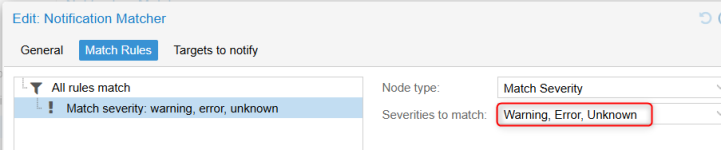
Alternativity : I configured below via GUI, May I know the severity warning , error & unknown definition ? It is included multipath down alert.
We want to Enable notification for FC multipath-down and up.
Can I have configuration notification sample in Proxmox built-in function , e.g Notification matcher or other alernative method ?
Found the log sample for lun that have 4 paths.
Path Down log sample :
{Time} {Hostname} multipathd[968]: {LunName}: remaining active paths: 3
{Time} {Hostname} multipathd[968]: {LunName}: remaining active paths: 2
{Time} {Hostname} multipathd[968]: {LunName}: remaining active paths: 1
Path up log sample :
{Time} {Hostname} multipathd[968]: {LunName}: {diskName} - tur checker reports path is up
I have followed these steps
Code:
Here's a step-by-step guide to configuring Notification Matchers via the GUI:

1. Enable the Notification System:
Navigate to Datacenter -> Notifications in the Proxmox web interface.
Ensure the "Notification system" is enabled, not "Email (legacy)" or "Auto" with an email address. This ensures the new matcher-based system is used.

2. Configure Notification Targets:
In the same "Notifications" section, you can add, modify, or remove notification targets.
Targets can be email addresses, or potentially other endpoints depending on the Proxmox version and extensions.
For email targets, you'll need to configure SMTP settings, which might involve specifying the SMTP server, port, username, and password.

3. Create Notification Matchers:
Under the same "Notifications" section, you can define notification matchers.
Matchers allow you to specify conditions (filters) based on event type, severity, time, or other metadata.
For example, you could create a matcher to send email notifications only for "Error" severity events related to ZFS storage during specific times or days.
The "match-calendar" option allows you to schedule notifications based on time and day of the week.
The "match-field" option allows you to filter based on metadata fields.
The "match-severity" option allows you to filter based on the severity of the event.

4. Testing Notifications:
After configuring your targets and matchers, you can test them.
Proxmox provides a "Test" button within the notification settings, allowing you to send a test notification to the configured targets.
You can also trigger specific events (like a backup job or a disk error) and see if the notifications are generated as expected.
If you're not receiving notifications, double-check that the notification mode is set to "Notification system" in relevant sections like datastores.
Also, ensure that the SMTP settings are correct and that the sendmail binary is properly configured.
I have followed these steps , but no more options for specific alert for FC multipath status.
Can you give steps via GUI for below system log I grep in PVE?
Logging:
Jul 09 11:15:15 pve-01 multipathd[968]: sdc: mark as failed
Jul 09 11:15:15 pve-01 multipathd[968]: lun1: remaining active paths: 3
Jul 09 11:15:46 pve-01 multipathd[968]: sde: mark as failed
Jul 09 11:15:46 pve-01 multipathd[968]: lun1: remaining active paths: 2
Jul 09 11:16:22 pve-01 multipathd[968]: sdf: mark as failed
Jul 09 11:16:22 pve-01 multipathd[968]: lun1: remaining active paths: 1
Alternativity : I configured below via GUI, May I know the severity warning , error & unknown definition ? It is included multipath down alert.