[SOLVED] How I fixed 100 % host CPU usage (Windows 11 24H2 guest)

gothbert

Member
Apr 3, 2021
27
4
23
45
Dear all,

after updating VM guest to Windows 11 Pro 24H2 and changing some settings, the host (Xeon E3-1230 v3) had a 100 % load on all cores assigned to the VM. There are quite a lot of similar reports on that issue in this and other forums.

I managed to solve the issue as follows:
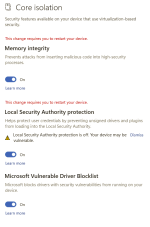
  • Turn off core isolation in the Windows 11 security settings
The following measures, which did or did not help other users, did not work for me:
  • Do not use memory ballooning but assign a fixed amount of memory.
  • Turn VirtIO IOMMU on or off.
  • Assign only the real amount of cores to the VM (i.e. 4 instead of 8 on a hyperthreading CPU)
  • Change CPU type from "host" to "KVM64" (results in Win11 boot loop)
  • Use latest VirtIO drivers (0.1.266).
Hope this helps those who encounter the same issue.

Best regards,
Boris
 
Interesting solution. I have two Windows 11 instances that had initially been identical copies. One did not start up any more on an AMD Ryzen 7 5700G after one of the last Windows updates. The other VM was unaffected. The way I fixed it, was to switch the CPU emulation to "x86-64-v3" from "host". After I turned off core isolation, I could re-use "host" CPU emulation type without a hitch.
 
The way I fixed it, was to switch the CPU emulation to "x86-64-v3" from "host".
Mmd. In case of performance problems go away from "host". :rolleyes: I chose "Skylake-Server-v5" because that's the next best choice for the real CPU. Now it's still not overwhelming but at least a similar "feel" like on ESXi. :p
 
Dear all,

after updating VM guest to Windows 11 Pro 24H2 and changing some settings, the host (Xeon E3-1230 v3) had a 100 % load on all cores assigned to the VM. There are quite a lot of similar reports on that issue in this and other forums.

I managed to solve the issue as follows:
  • Turn off core isolation in the Windows 11 security settings
The following measures, which did or did not help other users, did not work for me:
  • Do not use memory ballooning but assign a fixed amount of memory.
  • Turn VirtIO IOMMU on or off.
  • Assign only the real amount of cores to the VM (i.e. 4 instead of 8 on a hyperthreading CPU)
  • Change CPU type from "host" to "KVM64" (results in Win11 boot loop)
  • Use latest VirtIO drivers (0.1.266).
Hope this helps those who encounter the same issue.

Best regards,
Boris

Can anyone be more specific? All the posts I'm seeing here and various other threads, everyone is simply saying to "turn off core isolation". There is no 1-click toggle to enabled/disable "Core Isolation" specifically. There are 3 things listed there. Memory Integrity, Local Security Authority protection, and Microsoft Vulnerable Driver Blocklist. Do I turn 1, 2, or all of them off?

1755042895384.png