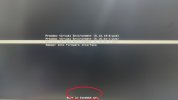
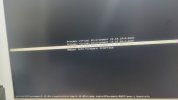
[SOLVED] hot to modify timeout in systemd-boot menu ,its too long (5,102,000 sec)

That does not look like the GRUB menu. It looks a lot like the systemd-boot menu. Please reference the Proxmox manual to find out which bootloader is used and how to configure it.
you are right,it is systemd-boot menu, but i still dont know how to configure it.

i try add load.conf file with timeout=5 text content,then use promox-boot-tool refresh cmd to update ,but it not work.
some post wrote boot manager will save the timeout time in a variable with overiding timeout config in load.conf. i guess it save as loaderConfigtimeout

 
you are right,it is systemd-boot menu, but i still dont know how to configure it.
check the output of `proxmox-boot-tool status` - it will tell you which UUIDs your ESP-disks (where systemd-boot is installed) have:

Code:
proxmox-boot-tool status
Re-executing '/usr/sbin/proxmox-boot-tool' in new private mount namespace..
System currently booted with uefi
XXXX-XXXX is configured with: uefi (versions: ....)

With the UUIDs you can now mount the ESP:
Code:
mount /dev/disk/by-uuid/XXXX-XXXX /mnt/tmp/

then you can edit /mnt/tmp/loader/loader.conf
Code:
timeout 3
default proxmox-*
(this is the default contents)

still quite curios how the value got set so high in the first place

I hope this helps!
 
check the output of `proxmox-boot-tool status` - it will tell you which UUIDs your ESP-disks (where systemd-boot is installed) have:

Code:
proxmox-boot-tool status
Re-executing '/usr/sbin/proxmox-boot-tool' in new private mount namespace..
System currently booted with uefi
XXXX-XXXX is configured with: uefi (versions: ....)

With the UUIDs you can now mount the ESP:
Code:
mount /dev/disk/by-uuid/XXXX-XXXX /mnt/tmp/

then you can edit /mnt/tmp/loader/loader.conf
Code:
timeout 3
default proxmox-*
(this is the default contents)

still quite curios how the value got set so high in the first place

I hope this helps!

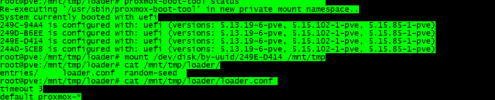
thank your tips,but the content text of loader.conf is same yours:

1679928946119.png

I never edit it before,and really dont know the value when or how it got so high.
 
Last edited:
Is it the same on all 4 disks?

* you could also try to run `proxmox-boot-tool reinit`, which should set the config correctly for all ESPs

Additionally make sure that you don't have any other ESP partitions which have a broken config, but are not listed with proxmox-boot-tool
 
Is it the same on all 4 disks?

* you could also try to run `proxmox-boot-tool reinit`, which should set the config correctly for all ESPs

Additionally make sure that you don't have any other ESP partitions which have a broken config, but are not listed with proxmox-boot-tool

i use zfs for raid10 (only 4disks),and never move or edit the esps before.
only upgrade it when pve update.
 
thanks all .
it is resolved.


From the guide doc of systemd-boot , the timeout will be saved as a variable LoaderConfigTimeout. the timeout config in file ESP/loader/loader.conf just only workly when system startup at first time.

Code:
# I use zfs raid10(4disks),so that each disk has a esp partion.
# try mount esp and use booctl to remove it
mount /dev/sdc2 /mnt/tmp
root@pve:~# bootctl --esp-path=/mnt/tmp remove
Removed "/mnt/tmp/EFI/BOOT/BOOTX64.EFI".
Removed "/mnt/tmp/loader/loader.conf".
Removed "/mnt/tmp/loader/random-seed".
Removed "/mnt/tmp/EFI/BOOT".
Removed "/mnt/tmp/EFI/Linux".
Removed EFI variable LoaderConfigTimeout.
Removed EFI variable LoaderSystemToken.

# finally,reinit the esp partions
 proxmox-boot-tool reinit