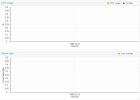
Installed Proxmox 7.4-17 on a new PC. Everything works except that Host -> Summary graphs do not move and all show 1969-12-31. See attached screenshot.
I checked the links. Proxmox has the right date/time. If I look at the VM -> Summary, the graphs are all accurate. 'Date' in Proxmox shell returns today's date as well.
I neglected to mention that this used PC came with a dead CMOS battery. I think I installed Proxmox first, and modified BIOS date/time manually, rebooted a few times, before replacing the CMOS battery. Not sure if it matters.
I neglected to mention that this used PC came with a dead CMOS battery. I think I installed Proxmox first, and modified BIOS date/time manually, rebooted a few times, before replacing the CMOS battery. Not sure if it matters.
The date in the thread title is what you get when you boot Linux with a dead CMOS (Unix time of zero). If chronyd or systemd-timedatectl are running they will fix the time after the boot is complete. Perhaps the web service gets started before that is done.