HI!
I have a Windows 2008R2 Server (full patched) with Terminal Services enabled. Running now fine for more than 1 Year without bigger Problems on an Ubuntu 12.04 LTS with KVM and libvirt. Moving the Image to a complete new Proxmoxserver results in extrem high IRQ Loads. Especially when large amounts of data are transferred over the network.
Networkcard is an e1000, Driver for Storage is virtio. Version 1.74 from http://alt.fedoraproject.org/pub/alt/virtio-win/latest/images/
High IRQ means up to 74% of CPU Time. I've got a second Machine (complete 1:1), still on Ubuntu wich never goes higher than 12%.
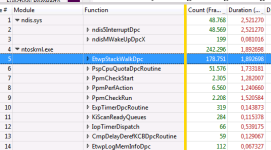
After some profiling with Windows Performance Analyzer i can see that there are 2 very expensive Procedures:
in ndis.sys: ndis5InterruptDpc and in ntoskrnl.exe EtwpStackWalkDpc
I've tried so step back to virtio 1.3 = no results
more CPU Power (more vcpus) = was even worse
Stop all other VMs on the host (3 Linux Boxes without noticable load) = no results
Install a complete new Window 2008R2 = out of the Box high IRQ Load
No Idea left...
Lg
mike
Some infos:
pveversion
pve-manager/3.1-43/1d4b0dfb (running kernel: 2.6.32-27-pve)
root@kobannode4:~# pveversion -v
proxmox-ve-2.6.32: 3.1-121 (running kernel: 2.6.32-27-pve)
pve-manager: 3.1-43 (running version: 3.1-43/1d4b0dfb)
pve-kernel-2.6.32-27-pve: 2.6.32-121
pve-kernel-2.6.32-26-pve: 2.6.32-114
lvm2: 2.02.98-pve4
clvm: 2.02.98-pve4
corosync-pve: 1.4.5-1
openais-pve: 1.1.4-3
libqb0: 0.11.1-2
redhat-cluster-pve: 3.2.0-2
resource-agents-pve: 3.9.2-4
fence-agents-pve: 4.0.5-1
pve-cluster: 3.0-12
qemu-server: 3.1-15
pve-firmware: 1.1-2
libpve-common-perl: 3.0-13
libpve-access-control: 3.0-11
libpve-storage-perl: 3.0-19
pve-libspice-server1: 0.12.4-3
vncterm: 1.1-6
vzctl: 4.0-1pve4
vzprocps: 2.0.11-2
vzquota: 3.1-2
pve-qemu-kvm: 1.7-4
ksm-control-daemon: 1.1-1
glusterfs-client: 3.4.2-1
pveperf
CPU BOGOMIPS: 110393.88
REGEX/SECOND: 1061612
HD SIZE: 275.01 GB
BUFFERED READS: 420.60 MB/sec
AVERAGE SEEK TIME: 9.31 ms
FSYNCS/SECOND: 1896.44
DNS EXT: 21.75 ms
DNS INT: 23.71 ms
I have a Windows 2008R2 Server (full patched) with Terminal Services enabled. Running now fine for more than 1 Year without bigger Problems on an Ubuntu 12.04 LTS with KVM and libvirt. Moving the Image to a complete new Proxmoxserver results in extrem high IRQ Loads. Especially when large amounts of data are transferred over the network.
Networkcard is an e1000, Driver for Storage is virtio. Version 1.74 from http://alt.fedoraproject.org/pub/alt/virtio-win/latest/images/
High IRQ means up to 74% of CPU Time. I've got a second Machine (complete 1:1), still on Ubuntu wich never goes higher than 12%.
After some profiling with Windows Performance Analyzer i can see that there are 2 very expensive Procedures:
in ndis.sys: ndis5InterruptDpc and in ntoskrnl.exe EtwpStackWalkDpc
I've tried so step back to virtio 1.3 = no results
more CPU Power (more vcpus) = was even worse
Stop all other VMs on the host (3 Linux Boxes without noticable load) = no results
Install a complete new Window 2008R2 = out of the Box high IRQ Load
No Idea left...
Lg
mike
Some infos:
pveversion
pve-manager/3.1-43/1d4b0dfb (running kernel: 2.6.32-27-pve)
root@kobannode4:~# pveversion -v
proxmox-ve-2.6.32: 3.1-121 (running kernel: 2.6.32-27-pve)
pve-manager: 3.1-43 (running version: 3.1-43/1d4b0dfb)
pve-kernel-2.6.32-27-pve: 2.6.32-121
pve-kernel-2.6.32-26-pve: 2.6.32-114
lvm2: 2.02.98-pve4
clvm: 2.02.98-pve4
corosync-pve: 1.4.5-1
openais-pve: 1.1.4-3
libqb0: 0.11.1-2
redhat-cluster-pve: 3.2.0-2
resource-agents-pve: 3.9.2-4
fence-agents-pve: 4.0.5-1
pve-cluster: 3.0-12
qemu-server: 3.1-15
pve-firmware: 1.1-2
libpve-common-perl: 3.0-13
libpve-access-control: 3.0-11
libpve-storage-perl: 3.0-19
pve-libspice-server1: 0.12.4-3
vncterm: 1.1-6
vzctl: 4.0-1pve4
vzprocps: 2.0.11-2
vzquota: 3.1-2
pve-qemu-kvm: 1.7-4
ksm-control-daemon: 1.1-1
glusterfs-client: 3.4.2-1
pveperf
CPU BOGOMIPS: 110393.88
REGEX/SECOND: 1061612
HD SIZE: 275.01 GB
BUFFERED READS: 420.60 MB/sec
AVERAGE SEEK TIME: 9.31 ms
FSYNCS/SECOND: 1896.44
DNS EXT: 21.75 ms
DNS INT: 23.71 ms