I added an NFS share from a Linux server. The share is on an XFS partition (shall not be relevant).
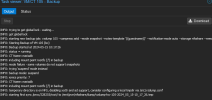
I backed up a couple of containers and after that all other backups I try get stuck at "INFO: starting first sync /proc/328849/root/ to /mnt/pve/nfsshare/dump/vzdump-lxc-104-2024_05_15-10_26_08.tmp":
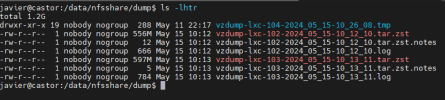
NFS folder:

The tmp file does not grow.
It is not an NFS issue, I copied an ISO file from Proxmox interface also and it is properly uploaded to template/iso/xxxxx.iso.
When I run the backup in mode "Stop" works fine.
- I did check that it is not the firewall on the NFS host (disabled it, same result).
- No permissions issue too.
Thanks!
I backed up a couple of containers and after that all other backups I try get stuck at "INFO: starting first sync /proc/328849/root/ to /mnt/pve/nfsshare/dump/vzdump-lxc-104-2024_05_15-10_26_08.tmp":
NFS folder:
The tmp file does not grow.
It is not an NFS issue, I copied an ISO file from Proxmox interface also and it is properly uploaded to template/iso/xxxxx.iso.
When I run the backup in mode "Stop" works fine.
- I did check that it is not the firewall on the NFS host (disabled it, same result).
- No permissions issue too.
Thanks!