

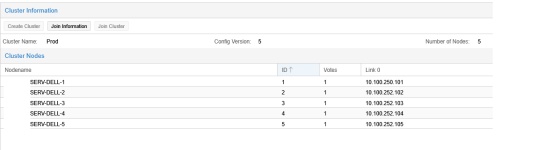
Hello, I need to change the IP of one host for corosync network link0.
- Thread starter HristoY
- Start date
You are using an out of date browser. It may not display this or other websites correctly.
You should upgrade or use an alternative browser.
You should upgrade or use an alternative browser.

Few questions before offering a solution:
- What does SERV-DELL-1 show for ip -br a, and what's in its /etc/network/interfaces?
- Is your corosync network on its own physical NIC, or a VLAN on a shared one? That changes how much work adding the address is.
Save your /etc/pve/ha/resources.cfg ~/resources.cfg.save
touch ~/resources.cfg
mv ~/resources.cfg /etc/pve/ha/.
Change IP manual in /etc/pve/corosync.cfg AND (!!) give it a "1" new higher config_version (below in config) BEFORE (!!) saving, eg with vi.
On each pve-host do : systemctl restart corosync
cp ~/resources.cfg.save /etc/pve/ha/resources.cfg
touch ~/resources.cfg
mv ~/resources.cfg /etc/pve/ha/.
Change IP manual in /etc/pve/corosync.cfg AND (!!) give it a "1" new higher config_version (below in config) BEFORE (!!) saving, eg with vi.
On each pve-host do : systemctl restart corosync
cp ~/resources.cfg.save /etc/pve/ha/resources.cfg

A small adaption to this. With PVE 9.2 you can disarm HA [0] which closes all watchdogs, the resource.cfg move is not needed anymore.Save your /etc/pve/ha/resources.cfg ~/resources.cfg.save
touch ~/resources.cfg
mv ~/resources.cfg /etc/pve/ha/.
Change IP manual in /etc/pve/corosync.cfg AND (!!) give it a "1" new higher config_version (below in config) BEFORE (!!) saving, eg with vi.
On each pve-host do : systemctl restart corosync
cp ~/resources.cfg.save /etc/pve/ha/resources.cfg
[0] https://pve.proxmox.com/pve-docs/pve-admin-guide.html#ha_manager_disarm

lo UNKNOWN 127.0.0.1/8 ::1/128Few questions before offering a solution:
- What does SERV-DELL-1 show for ip -br a, and what's in its /etc/network/interfaces?
- Is your corosync network on its own physical NIC, or a VLAN on a shared one? That changes how much work adding the address is.
nic0 UP
nic1 UP
nic2 UP
nic3 UP
bond0 UP
vmbr0 UP fe80::425b:7fff:fe88:8c10/64
bond0.148@bond0 UP
vmbr0v148 UP 10.100.250.101/23 fe80::425b:7fff:fe88:8c10/64
bond0.149@bond0 UP
vmbr0v149 UP 10.100.252.101/23 fe80::425b:7fff:fe88:8c10/64
bond1 UP
vmbr1 UP fe80::425b:7fff:fe88:8c11/64
bond1.147@bond1 UP
vmbr1v147 UP 10.100.248.101/23 fe80::425b:7fff:fe88:8c11/64
bond1.100@bond1 UP
bond1.101@bond1 UP
bond1.102@bond1 UP
vmbr1v100 UP fe80::425b:7fff:fe88:8c11/64
vmbr1v101 UP fe80::425b:7fff:fe88:8c11/64
vmbr1v102 UP fe80::425b:7fff:fe88:8c11/64
tap304i0 UNKNOWN
fwbr304i0 UP
fwpr304p0@fwln304i0 UP
fwln304i0@fwpr304p0 UP
tap335i0 UNKNOWN
fwbr335i0 UP
fwpr335p0@fwln335i0 UP
fwln335i0@fwpr335p0 UP
tap338i0 UNKNOWN
fwbr338i0 UP
fwpr338p0@fwln338i0 UP
fwln338i0@fwpr338p0 UP
tap345i0 UNKNOWN
fwbr345i0 UP
fwpr345p0@fwln345i0 UP
fwln345i0@fwpr345p0 UP
tap348i0 UNKNOWN
fwbr348i0 UP
fwpr348p0@fwln348i0 UP
fwln348i0@fwpr348p0 UP
tap351i0 UNKNOWN
fwbr351i0 UP
fwpr351p0@fwln351i0 UP
fwln351i0@fwpr351p0 UP
tap354i0 UNKNOWN
fwbr354i0 UP
fwpr354p0@fwln354i0 UP
fwln354i0@fwpr354p0 UP
tap301i0 UNKNOWN
fwbr301i0 UP
fwpr301p0@fwln301i0 UP
fwln301i0@fwpr301p0 UP
tap309i0 UNKNOWN
fwbr309i0 UP
fwpr309p0@fwln309i0 UP
fwln309i0@fwpr309p0 UP
tap312i0 UNKNOWN
fwbr312i0 UP
fwpr312p0@fwln312i0 UP
fwln312i0@fwpr312p0 UP
tap315i0 UNKNOWN
fwbr315i0 UP
fwpr315p0@fwln315i0 UP
fwln315i0@fwpr315p0 UP
tap318i0 UNKNOWN
fwbr318i0 UP
fwpr318p0@fwln318i0 UP
fwln318i0@fwpr318p0 UP
tap321i0 UNKNOWN
fwbr321i0 UP
fwpr321p0@fwln321i0 UP
fwln321i0@fwpr321p0 UP
tap333i0 UNKNOWN
fwbr333i0 UP
fwpr333p0@fwln333i0 UP
fwln333i0@fwpr333p0 UP
tap355i0 UNKNOWN
fwbr355i0 UP
fwpr355p0@fwln355i0 UP
fwln355i0@fwpr355p0 UP
tap359i0 UNKNOWN
fwbr359i0 UP
fwpr359p0@fwln359i0 UP
fwln359i0@fwpr359p0 UP
SERV-DELL-1:~#
# network interface settings; autogenerated
# Please do NOT modify this file directly, unless you know what
# you're doing.
#
# If you want to manage parts of the network configuration manually,
# please utilize the 'source' or 'source-directory' directives to do
# so.
# PVE will preserve these directives, but will NOT read its network
# configuration from sourced files, so do not attempt to move any of
# the PVE managed interfaces into external files!
auto lo
iface lo inet loopback
auto nic0
iface nic0 inet manual
auto nic1
iface nic1 inet manual
auto nic2
iface nic2 inet manual
auto nic3
iface nic3 inet manual
auto bond0
iface bond0 inet manual
bond-slaves nic0 nic2
bond-miimon 100
bond-mode 802.3ad
bond-xmit-hash-policy layer2+3
iface bond0.148 inet manual
iface bond0.149 inet manual
auto bond1
iface bond1 inet manual
bond-slaves nic1 nic3
bond-miimon 100
bond-mode 802.3ad
bond-xmit-hash-policy layer2+3
auto bond1.147
iface bond1.147 inet manual
auto bond1.100
iface bond1.100 inet manual
#VM NETWORK
auto bond1.101
iface bond1.101 inet manual
#VM NETWORK2
auto bond1.102
iface bond1.102 inet manual
#VM NETWORK3
auto vmbr0
iface vmbr0 inet manual
bridge-ports bond0
bridge-stp off
bridge-fd 0
bridge-vlan-aware yes
bridge-vids 1-4094
auto vmbr0v148
iface vmbr0v148 inet static
address 10.100.250.101/23
gateway 10.100.250.1
bridge-ports bond0.148
bridge-stp off
bridge-fd 0
#Management
auto vmbr0v149
iface vmbr0v149 inet static
address 10.100.252.101/23
bridge-ports bond0.149
bridge-stp off
bridge-fd 0
#Corosync
auto vmbr1
iface vmbr1 inet manual
bridge-ports bond1
bridge-stp off
bridge-fd 0
bridge-vlan-aware yes
bridge-vids 2-4094
auto vmbr1v147
iface vmbr1v147 inet static
address 10.100.248.101/23
bridge-ports bond1.147
bridge-stp off
bridge-fd 0
#Live Migration
auto vmbr1v100
iface vmbr1v100 inet manual
bridge-ports bond1.100
bridge-stp off
bridge-fd 0
#VM 10.100.66.0/23
auto vmbr1v101
iface vmbr1v101 inet manual
bridge-ports bond1.101
bridge-stp off
bridge-fd 0
#VMUAT 10.100.70.0/23
auto vmbr1v102
iface vmbr1v102 inet manual
bridge-ports bond1.102
bridge-stp off
bridge-fd 0
#VM3 10.100.163.0/24
source /etc/network/interfaces.d/*
Last edited:
2 physical links shared the Management Network and Corosync Network.Few questions before offering a solution:
- What does SERV-DELL-1 show for ip -br a, and what's in its /etc/network/interfaces?
- Is your corosync network on its own physical NIC, or a VLAN on a shared one? That changes how much work adding the address is.

A small adaption to this. With PVE 9.2 you can disarm HA [0] which closes all watchdogs, the resource.cfg move is not needed anymore.
[0] https://pve.proxmox.com/pve-docs/pve-admin-guide.html#ha_manager_disarm
So Thank you to All and I prepared the action plan. Is it good ?:
1. Move all VM-s from server 1 to the other nodes.
2. Put the host server 1 into maintenance mode - ha-manager crm-command node-maintenance enable <server1>
3. ha-manager crm-command disarm-ha freeze
4. Change IP manual in /etc/pve/corosync.cfg AND (!!) give it a "1" new higher config_version (below in config) BEFORE (!!) saving, eg with vi.
On server 1 only change from:
node {
name: SERV-DELL-1
nodeid: 1
quorum_votes: 1
ring0_addr: 10.100.250.101
}
To:
node {
name: SERV-DELL-1
nodeid: 1
quorum_votes: 1
ring0_addr: 10.100.252.101
}
Increment config_version: 5 to config_version: 6
5. On server 1 systemctl restart corosync
corosync -t
corosync-cfgtool -s
pvecm nodes
pvecm status
6. Check if config is changes for all hosts
7. ha-manager crm-command arm-ha
Last edited:
2 physical links shared the Management Network and Corosync Network. View attachment 99294
That's great — just to confirm, can you ping the other hosts from each VLAN?
Assuming they're all communicating, they should be able to sync a new version of the Corosync config between the hosts [0].
If you update ring0_addr for Host 1 and also increment the config_version, it will sync between the hosts and update cleanly. [1]
Please note the version number increment is extremely important for it to be picked up and synced to the other hosts automatically, this is also why you must confirm the hosts are communicating correctly.
[0] https://pve.proxmox.com/pve-docs/chapter-pvecm.html#pvecm_edit_corosync_conf
[1] https://pve.proxmox.com/pve-docs/chapter-pvecm.html#Separate After Cluster Creation
So Thank you to All and I prepared the action plan. Is it good ?:
1. Move all VM-s from server 1 to the other nodes.
2. Put the host server 1 into maintenance mode - ha-manager crm-command node-maintenance enable <server1>
3. Change IP manual in /etc/pve/corosync.cfg AND (!!) give it a "1" new higher config_version (below in config) BEFORE (!!) saving, eg with vi.
On server 1 only change from:
node {
name: SERV-DELL-1
nodeid: 1
quorum_votes: 1
ring0_addr: 10.100.250.101
}
To:
node {
name: SERV-DELL-1
nodeid: 1
quorum_votes: 1
ring0_addr: 10.100.252.101
}
Increment config_version: 5 to config_version: 6
4. On server 1 systemctl restart corosync
corosync -t
corosync-cfgtool -s
pvecm nodes
pvecm status
5. Check if config is changes for all hosts
It should automatically pick up the changes without the need to restart corosync, but otherwise yes this is correct!