I'm trying to get vlan tagging set up on my Bridge adapter, which is also acting as my management IP. I've got the "bridge-vlan-aware yes" and "bridge-vids xxx" specified in vmbr0, and a vmbr0.XXX iface with static IP and gateway configured, but I can't get out to the gateway and can't get in. My network guy insists the VLAN is set up fine on the switch. Anything else I should check on the server?


Having trouble setting up VLANs
- Thread starter bpizzuti
- Start date
You are using an out of date browser. It may not display this or other websites correctly.
You should upgrade or use an alternative browser.
You should upgrade or use an alternative browser.

For a useful reply you should a) describe your hardware verbally, in a few sentences - which kind of hardware, cluster yes/no etc., b) describe especially your existing networking environment and c) post your /etc/network/interfaces (in "</>" blocks).
Then add 1) the basic test you want to perform, 2) the test-command you choose, 3) what you expect to happen, 4) what you enter in the cli and 5) what you get instead.
Only 4. + 5. need to be in code-tags and shall contain the whole, uncut part via copy-n-paste from the terminal. (Only if you can not grab the text because you have no usable network you may take a photo of the screen...)
Oh..., and welcome here in the forum
Then add 1) the basic test you want to perform, 2) the test-command you choose, 3) what you expect to happen, 4) what you enter in the cli and 5) what you get instead.
Only 4. + 5. need to be in code-tags and shall contain the whole, uncut part via copy-n-paste from the terminal. (Only if you can not grab the text because you have no usable network you may take a photo of the screen...)
Oh..., and welcome here in the forum
Ok, I'm not sure how much of this will be overkill. I have failover switches but right now I'm just trying to get the uplink going to the primary switch so I can get network access. I also have baseband access on the same port and THAT'S working. At least, near as I can tell it's the same port. There's 8 ports, 4 of them connected, but only one of them is showing an actual link in ethtool, which bothers me: the others SHOULD at least show an active link, even if there's no IP config on them yet. I do need to verify that it's the right port by unplugging it and plugging it back in but I'll have to be onsite to do that, and I can't be there today.
All I want to do is ping out to the gateway or SSH in right now. Neither is working. Pings out from the server (to the gateway) fail with destination host unreachable.
I'm using a remote console to get in so there's no copy/pasting going on yet.
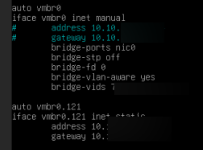
All I want to do is ping out to the gateway or SSH in right now. Neither is working. Pings out from the server (to the gateway) fail with destination host unreachable.
I'm using a remote console to get in so there's no copy/pasting going on yet.
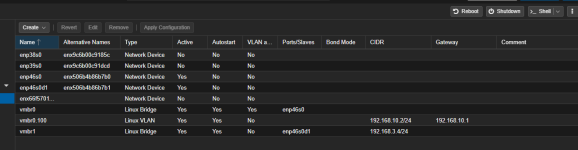
OK, so here's how I do it. This is contained in /etc/network/interfaces. don't forget to restart networking or reboot after changes
Also, remember that the port feeding your VLAN aware NIC has to be a trunk port with all VLANs tagged that you want to use on that NIC. If you try to connect an untagged port/access port to a VLAN aware NIC, it won't work. In my set up above, I am running a dual port ConnectX-3 card. Port one is VLAN aware. I have created a separate interface on vmbr.100 for the Proxmox GUI. Any VM's that I attach to vmbr0 need to have the VLAN number specified in the network interface settings
The other port on the same two port NIC is NOT VLAN aware. I have this one plugged into a untagged port for my dedicated storage network. Plus you only need to include one gateway in the entire configuration, so long as all the VLANs are on the same firewall/router device
Code:
auto lo
iface lo inet loopback

iface enp46s0 inet manual

iface enp46s0d1 inet manual

auto vmbr0
iface vmbr0 inet static
        bridge-ports enp46s0
        bridge-stp off
        bridge-fd 0
        bridge-vlan-aware yes
        bridge-vids 2-100

auto vmbr0.100
iface vmbr0.100 inet static
        address 192.168.10.2/24
        gateway 192.168.10.1

auto vmbr1
iface vmbr1 inet static
        address 192.168.3.4/24
        bridge-ports enp46s0d1
        bridge-stp off
        bridge-fd 0
Also, remember that the port feeding your VLAN aware NIC has to be a trunk port with all VLANs tagged that you want to use on that NIC. If you try to connect an untagged port/access port to a VLAN aware NIC, it won't work. In my set up above, I am running a dual port ConnectX-3 card. Port one is VLAN aware. I have created a separate interface on vmbr.100 for the Proxmox GUI. Any VM's that I attach to vmbr0 need to have the VLAN number specified in the network interface settings
The other port on the same two port NIC is NOT VLAN aware. I have this one plugged into a untagged port for my dedicated storage network. Plus you only need to include one gateway in the entire configuration, so long as all the VLANs are on the same firewall/router device