My apologies if I post this thread in wrong location, I just wanted to share my experience with Intel Arc A310 + Windows Server 2025 VM + Emby + Transcoding.
I really hope my solution can help.
Many online guides suggest that Intel Arc GPUs require:
For my particular workload (Emby hardware transcoding), that was not the case.
This guide documents the complete process that ultimately resulted in stable hardware transcoding on the following legacy platform.
Installing a simple HDMI dummy plug allowed the GPU to initialize correctly after every reboot.
Although this may not be required on every system, it was required in my configuration.
Recommended configuration:
Without these components, Emby's Quick Sync detection failed and produced:
Result: null
inside:
hardware_detection.txt
Install-WindowsFeature Server-Media-Foundation
Also install the required .NET Framework Features from Server Manager.
Restart Windows.
DirectX End-User Runtimes (June 2010)
Extract the package and run:
DXSETUP.exe
as Administrator.
Instead:
intel_fix.reg
Paste:
Windows Registry Editor Version 5.00
[HKEY_LOCAL_MACHINE\SOFTWARE\Intel\MediaSDK]
"DispatchLevel"=dword:00000001
[HKEY_LOCAL_MACHINE\SOFTWARE\Wow6432Node\Intel\MediaSDK]
"DispatchLevel"=dword:00000001
[HKEY_LOCAL_MACHINE\SOFTWARE\Khronos\OpenCL\Vendors]
"intelocl64.dll"=dword:00000000
Merge the registry file.
By default, Microsoft Remote Desktop may replace the active graphics adapter with the Microsoft Remote Display Adapter during remote sessions.
In my testing, this caused Emby to lose access to Intel hardware encoders even though the GPU driver remained installed.
To prevent this:
Open:
gpedit.msc
Navigate to:
Computer Configuration
Administrative Templates
Windows Components
Remote Desktop Services
Remote Desktop Session Host
Remote Session Environment
Configure:
Then run:
gpupdate /force
Restart the VM.
Settings
System
Display
Graphics
Assign High Performance to:
EmbyServer.exe
and
ffmpeg.exe
located in the Emby installation directory.
Switch Windows to the High-Performance power plan.
Finally:
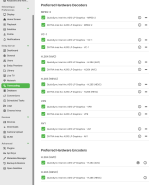
The Preferred Hardware Encoders list correctly displayed:
However, it demonstrates that full Intel Arc A310 hardware transcoding is possible on a legacy BIOS platform without UEFI or Resizable BAR, provided that Windows Server's multimedia framework, graphics policies, and driver installation are configured appropriately.
I hope this saves someone else the many hours of troubleshooting that went into discovering these interactions.
I really hope my solution can help.
Overview
After several days of troubleshooting, I successfully deployed an Intel Arc A310 LP GPU for full hardware decoding and encoding inside an Emby Server running in a Windows Server 2025 virtual machine hosted on Proxmox VE.Many online guides suggest that Intel Arc GPUs require:
- UEFI firmware
- Resizable BAR (ReBAR)
- Modern PCIe platforms
For my particular workload (Emby hardware transcoding), that was not the case.
This guide documents the complete process that ultimately resulted in stable hardware transcoding on the following legacy platform.
Tested Hardware
Host- Lenovo ThinkStation D20
- Dual Intel Xeon X5680
- Legacy BIOS (no UEFI)
- PCIe 2.0
- Intel Arc A310 Low Profile
- Proxmox VE
- Windows Server 2025
- Q35 machine type
- GPU PCI passthrough
Initial Symptoms
Initially I observed the following behavior: Intel Arc driver installed correctly
- GPU detected by Windows
- GPU passed through successfully
- Hardware decoding worked
 Preferred Hardware Encoders always reverted to Software Encoders
- hardware_detection.txt contained Quick Sync initialization failures (Result: null)
- Connecting through Microsoft Remote Desktop caused hardware encoding to stop working
- Proxmox
- PCI passthrough
- Intel Arc drivers
- Legacy BIOS
- Missing ReBAR
Phase 1 — Base Platform Preparation
1. HDMI Dummy Plug
In my environment, Windows Server would not consistently initialize the Intel Arc media engine while running completely headless.Installing a simple HDMI dummy plug allowed the GPU to initialize correctly after every reboot.
Although this may not be required on every system, it was required in my configuration.
2. GPU Passthrough
Configure GPU passthrough normally.Recommended configuration:
- IOMMU enabled
- iommu=pt
- Q35 virtual machine
- Intel Arc A310 passed directly to the guest
Phase 2 — Restore Windows Server Multimedia Components
Unlike Windows 11, Windows Server intentionally removes many multimedia features that consumer applications expect.Without these components, Emby's Quick Sync detection failed and produced:
Result: null
inside:
hardware_detection.txt
Install Media Foundation
Open an elevated PowerShell window:Install-WindowsFeature Server-Media-Foundation
Also install the required .NET Framework Features from Server Manager.
Restart Windows.
Install DirectX End-User Runtime
Download Microsoft's official:DirectX End-User Runtimes (June 2010)
Extract the package and run:
DXSETUP.exe
as Administrator.
Phase 3 — Install the Intel Driver Correctly
The standard Intel installer detects Windows Server and may omit or block portions of the consumer multimedia stack.Instead:
- Extract the Intel driver package with 7-Zip.
- Open Device Manager.
- Update the Intel Arc device manually.
- Browse to the extracted driver folder.
- Enable Include subfolders.
- Complete the installation.
Phase 4 — Media SDK Registry Configuration
Create:intel_fix.reg
Paste:
Windows Registry Editor Version 5.00
[HKEY_LOCAL_MACHINE\SOFTWARE\Intel\MediaSDK]
"DispatchLevel"=dword:00000001
[HKEY_LOCAL_MACHINE\SOFTWARE\Wow6432Node\Intel\MediaSDK]
"DispatchLevel"=dword:00000001
[HKEY_LOCAL_MACHINE\SOFTWARE\Khronos\OpenCL\Vendors]
"intelocl64.dll"=dword:00000000
Merge the registry file.
Phase 5 — Prevent RDP from Taking Over the GPU
This ended up being one of the largest obstacles.By default, Microsoft Remote Desktop may replace the active graphics adapter with the Microsoft Remote Display Adapter during remote sessions.
In my testing, this caused Emby to lose access to Intel hardware encoders even though the GPU driver remained installed.
To prevent this:
Open:
gpedit.msc
Navigate to:
Computer Configuration
Administrative Templates
Windows Components
Remote Desktop Services
Remote Desktop Session Host
Remote Session Environment
Configure:
| Policy | Setting |
| Use the hardware default graphics adapter for all Remote Desktop Services sessions | Disabled |
| Prioritize H.264/AVC graphics mode for Remote Desktop Connections | Disabled |
| Use WDDM graphics display driver for Remote Desktop Connections | Enabled |
gpupdate /force
Restart the VM.
Phase 6 — Configure Emby
Inside Windows:Settings
System
Display
Graphics
Assign High Performance to:
EmbyServer.exe
and
ffmpeg.exe
located in the Emby installation directory.
Switch Windows to the High-Performance power plan.
Finally:
- Exit Emby completely.
- Delete:
- Restart Emby Server.
Results
After Emby rebuilt its hardware detection cache, both hardware decoding and hardware encoding became available.The Preferred Hardware Encoders list correctly displayed:
- Quick Sync Intel Arc A310 LP Graphics — H.264 (AVC)
- Quick Sync Intel Arc A310 LP Graphics — H.265 (HEVC)
- Multiple server reboots
- Multiple RDP sessions
- Normal day-to-day server administration
Final Notes
This guide documents one verified working configuration and should not be interpreted as proof that every Intel Arc deployment behaves identically.However, it demonstrates that full Intel Arc A310 hardware transcoding is possible on a legacy BIOS platform without UEFI or Resizable BAR, provided that Windows Server's multimedia framework, graphics policies, and driver installation are configured appropriately.
I hope this saves someone else the many hours of troubleshooting that went into discovering these interactions.