Grew Lun on hp san how grow lvm

Jun 18, 2026
4
0
1
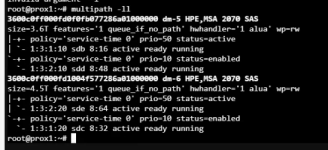
this is a multipath setup
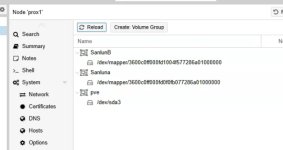
i believe the below command is what i need i know my volume group name i dont know how to get the logical volume name

lvextend -l +100%FREE /dev/<Volume-Group-Name>/<Logical-Volume-Name>

see attached screen shots if that helps
 

Attachments

  • mercy.png
    mercy.png
    68.9 KB · Views: 4
  • mercy2.png
    mercy2.png
    40.5 KB · Views: 4
  • mercy3.png
    mercy3.png
    73.7 KB · Views: 4
Hi @bfoss ,

You want to extend the PV and VG part of the LVM. The LV is managed by the PVE (in most cases).

First, confirm that you see the new size - you did not mention what the old and new size is:
multipathd reconfigure
multipath -ll
vgs
lvs
pvdisplay /dev/mapper/mpathX
vgdisplay my_vg
pvresize /dev/mapper/mpathX
pvs
vgs


Blockbridge : Ultra low latency all-NVME shared storage for Proxmox - https://www.blockbridge.com/proxmox
 
Here is the process I use. Believe I got these steps from other various sources. Probably some unnecessary steps as well. But it does work. Might verify on a test lun first to make sure results are what you expect. I'm still kind of new to PVE so don't know if there is a better way. The main thing here is to detect the increased size with the rescan and then use pvresize to increase the LVM.

How to resize an iSCSI LUN in Proxmox
This process assumes you have already set up your Proxmox cluster with multipath and have already done the resize on your SAN.

Display information about all physical volumes (PVs) with additional tag details, your LUN_name will be in /dev/mapper/Your_LUN_name. It will also show your device identifier.
pvs -o +tags

Show detailed information about the specified multipath device 'Your_LUN_name'.
multipath -ll Your_LUN_name

List information about all available block devices in a tree-like format, so you can check the volume size.
lsblk

Trigger a rescan of the SCSI device 'sdX' (Inform your device identifier) to detect any changes (e.g., increased LUN size).
echo 1 >/sys/block/sdX/device/rescan

Reload the multipath configuration to apply any changes detected during the rescan.
multipath -r

Show updated detailed information about the specified multipath device 'LUN_name'.
multipath -ll Your_LUN_name

STOP
Repeat above process on other hosts in cluster so they have detected the new size. Then do remaining step below.

Resize the physical volume to use any additional space detected on the multipath device. Only need to do on once on one host.
pvresize /dev/mapper/Your_LUN_name

-Craig

 
Here is the process I use. Believe I got these steps from other various sources. Probably some unnecessary steps as well. But it does work. Might verify on a test lun first to make sure results are what you expect. I'm still kind of new to PVE so don't know if there is a better way. The main thing here is to detect the increased size with the rescan and then use pvresize to increase the LVM.

How to resize an iSCSI LUN in Proxmox
This process assumes you have already set up your Proxmox cluster with multipath and have already done the resize on your SAN.

Display information about all physical volumes (PVs) with additional tag details, your LUN_name will be in /dev/mapper/Your_LUN_name. It will also show your device identifier.
pvs -o +tags

Show detailed information about the specified multipath device 'Your_LUN_name'.
multipath -ll Your_LUN_name

List information about all available block devices in a tree-like format, so you can check the volume size.
lsblk

Trigger a rescan of the SCSI device 'sdX' (Inform your device identifier) to detect any changes (e.g., increased LUN size).
echo 1 >/sys/block/sdX/device/rescan

Reload the multipath configuration to apply any changes detected during the rescan.
multipath -r

Show updated detailed information about the specified multipath device 'LUN_name'.
multipath -ll Your_LUN_name

STOP
Repeat above process on other hosts in cluster so they have detected the new size. Then do remaining step below.

Resize the physical volume to use any additional space detected on the multipath device. Only need to do on once on one host.
pvresize /dev/mapper/Your_LUN_name

-Craig

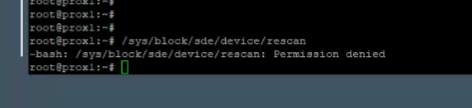
thank for both replies , it seems it isnt seeing the size change and im getting a permission denied when running /sys/block/sdc/device/rescan

sdc and sde are the two device but are using a multipath of 3600c0ff000fd1004f577286a01000000
 
Are there any messages in "dmesg" that correspond to the time of extension?

As for permission denied - it would be best if you copy/paste the exact command/response from your session. Its possible you are incorrectly running a non-executable command.

Please use CODE tags from the edit box menu when pasting the code

Please mention what was the original size and expected size. Also, post the output of "fdisk -l" and "lsblk" in CODE tags.


Blockbridge : Ultra low latency all-NVME shared storage for Proxmox - https://www.blockbridge.com/proxmox
 
lun was 5TB proxmox sees it as 4.55TB now is 8TB on HP 2070 San. command and error is in screen snip. Thanks for the help with this trying to import a large vm from vmware and dont have the room.

1781795328163.png
 
As suspected - your are incorrectly trying to execute a Device attribute in special SYS filesystem.

As @Cutthroat posted the correct command is:
echo 1 >/sys/block/sdX/device/rescan

Additionally, please use TEXT copy/paste using CODE tags. The screenshots are often blurry and hard to read.

I would suggest that you review all the recommendations carefully and repeat the steps as outlined.


Blockbridge : Ultra low latency all-NVME shared storage for Proxmox - https://www.blockbridge.com/proxmox
 
Thanks folks i got it to work finally really appreciate the help, couldn't respond yesterday as i lost power at my home office. Have a few follow up ?'s on the proper order of what i believe made it work below are the command that i ran multiple times so not sure what should come first, i you have time to repond and put then in order and if i needed anything else. Also i went from 5TB to 8Tb on san and have 10TB more space, do you recommend making a new lun for the last 8TB? i think the limit is 16TB on a lvm is that correct?

multipath -r
multipath -ll 3600c0ff000fd1004f577286a01000000

pvresize /dev/mapper/3600c0ff000fd1004f577286a01000000

lvextend -l +100%FREE /dev/SanlunB/dev/mapper/3600c0ff000fd1004f577286a01000000
 
Hi @bfoss ,

The first three commands are fine in the order you listed. The last command is both unnecessary in the PVE context and looks suspect.

If you lost power, then on hard boot the OS likely recognized the new size and that allowed you to proceed further. I.e. it allowed you to skip the "rescan" command.

There is no 16TB limit to a LUN managed by LVM, or to LVM itself.

The decision on whether to have one single device or multiple is completely up to you. The capacity you are operating with is on a smaller side these days.


Blockbridge : Ultra low latency all-NVME shared storage for Proxmox - https://www.blockbridge.com/proxmox