I'm trying to set up GPU passthrough with an RX 6900XT. I followed the guide here: https://pve.proxmox.com/wiki/Pci_passthrough but i'm unable to detect the GPU in the guest OS. Here is what I tried.
Step 1:
As I was unsure if I'm using grub or systemd-boot, I modified both /etc/default/grub and /etc/kernel/cmdline:
Modifications to /etc/default/grub:
GRUB_CMDLINE_LINUX_DEFAULT="quiet amd_iommu=on iommu=pt"
GRUB_CMDLINE_LINUX="root=ZFS=rpool/ROOT/pve-1 boot=zfs"
Modifications to /etc/kernel/cmdline
root=ZFS=rpool/ROOT/pve-1 boot=zfs quiet amd_iommu=on iommu=pt
I ran both udate-grub and proxmox-boot-tool refresh after modifcation.
Step 2:
I verified that IOMMU is enabled:
root@beatrice:~# dmesg | grep -e DMAR -e IOMMU
[ 1.239448] pci 0000:00:00.2: AMD-Vi: IOMMU performance counters supported
[ 1.241134] pci 0000:00:00.2: AMD-Vi: Found IOMMU cap 0x40
[ 1.241834] perf/amd_iommu: Detected AMD IOMMU #0 (2 banks, 4 counters/bank).
[ 5.680671] AMD-Vi: AMD IOMMUv2 driver by Joerg Roedel <jroedel@suse.de>
Step 3:
Modified /etc/modules:
vfio
vfio_iommu_type1
vfio_pci
vfio_virqfd
Step 4:
Verified IOMMU Interrupt Remapping
root@beatrice:~# dmesg | grep 'remapping'
[ 1.241139] AMD-Vi: Interrupt remapping enabled
Step 5:
Verified IOMMU Isolation.
root@beatrice:~# find /sys/kernel/iommu_groups/ -type l
/sys/kernel/iommu_groups/17/devices/0000:03:03.0
/sys/kernel/iommu_groups/35/devices/0000:10:00.1
/sys/kernel/iommu_groups/7/devices/0000:00:05.0
/sys/kernel/iommu_groups/25/devices/0000:07:00.0
/sys/kernel/iommu_groups/15/devices/0000:02:00.0
/sys/kernel/iommu_groups/33/devices/0000:0f:00.0
/sys/kernel/iommu_groups/5/devices/0000:00:03.1
/sys/kernel/iommu_groups/23/devices/0000:04:00.0
/sys/kernel/iommu_groups/13/devices/0000:00:18.3
/sys/kernel/iommu_groups/13/devices/0000:00:18.1
/sys/kernel/iommu_groups/13/devices/0000:00:18.6
/sys/kernel/iommu_groups/13/devices/0000:00:18.4
/sys/kernel/iommu_groups/13/devices/0000:00:18.2
/sys/kernel/iommu_groups/13/devices/0000:00:18.0
/sys/kernel/iommu_groups/13/devices/0000:00:18.7
/sys/kernel/iommu_groups/13/devices/0000:00:18.5
/sys/kernel/iommu_groups/31/devices/0000:0e:00.2
/sys/kernel/iommu_groups/3/devices/0000:00:02.0
/sys/kernel/iommu_groups/21/devices/0000:03:09.0
/sys/kernel/iommu_groups/21/devices/0000:0a:00.0
/sys/kernel/iommu_groups/11/devices/0000:00:08.1
/sys/kernel/iommu_groups/1/devices/0000:00:01.1
/sys/kernel/iommu_groups/28/devices/0000:0d:00.0
/sys/kernel/iommu_groups/18/devices/0000:03:04.0
/sys/kernel/iommu_groups/36/devices/0000:10:00.3
/sys/kernel/iommu_groups/8/devices/0000:00:07.0
/sys/kernel/iommu_groups/26/devices/0000:08:00.0
/sys/kernel/iommu_groups/16/devices/0000:03:02.0
/sys/kernel/iommu_groups/34/devices/0000:10:00.0
/sys/kernel/iommu_groups/6/devices/0000:00:04.0
/sys/kernel/iommu_groups/24/devices/0000:06:00.0
/sys/kernel/iommu_groups/24/devices/0000:06:00.1
/sys/kernel/iommu_groups/14/devices/0000:01:00.0
/sys/kernel/iommu_groups/32/devices/0000:0e:00.3
/sys/kernel/iommu_groups/4/devices/0000:00:03.0
/sys/kernel/iommu_groups/22/devices/0000:0b:00.0
/sys/kernel/iommu_groups/22/devices/0000:03:0a.0
/sys/kernel/iommu_groups/12/devices/0000:00:14.3
/sys/kernel/iommu_groups/12/devices/0000:00:14.0
/sys/kernel/iommu_groups/30/devices/0000:0e:00.1
/sys/kernel/iommu_groups/2/devices/0000:00:01.2
/sys/kernel/iommu_groups/20/devices/0000:09:00.0
/sys/kernel/iommu_groups/20/devices/0000:09:00.3
/sys/kernel/iommu_groups/20/devices/0000:09:00.1
/sys/kernel/iommu_groups/20/devices/0000:03:08.0
/sys/kernel/iommu_groups/10/devices/0000:00:08.0
/sys/kernel/iommu_groups/29/devices/0000:0e:00.0
/sys/kernel/iommu_groups/0/devices/0000:00:01.0
/sys/kernel/iommu_groups/19/devices/0000:03:05.0
/sys/kernel/iommu_groups/37/devices/0000:10:00.4
/sys/kernel/iommu_groups/9/devices/0000:00:07.1
/sys/kernel/iommu_groups/27/devices/0000:0c:00.0
Step 6:
I found the device and vendor id as follows:
root@beatrice:~# lspci -n -s 0e:00
0e:00.0 0300: 1002:73bf (rev c0)
0e:00.1 0403: 1002:ab28
0e:00.2 0c03: 1002:73a6
0e:00.3 0c80: 1002:73a4
I then created the file /etc/modprobe.d/vfio.conf with the following:
options vfio-pci ids=1002:73bf,1002:ab28,1002:73a6,1002:73a4 disable_vga=1
I then blacklisted radeon:
blacklist radeon
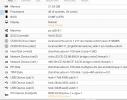
I made sure the guest was set up as follows:
machine: q35
bios: OVMF
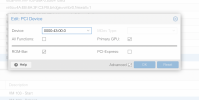
I added the PCIe device 0000:0e:00.0 in the gui while selecting all functions, primary GPU, ROM-Bar, and PCI-Express.
Step 7:
I tried installing windows 10 pro, but the driver cannot find the device. I do see the devices in device manager but they are of unknown type. Am I missing something from the setup?
Step 1:
As I was unsure if I'm using grub or systemd-boot, I modified both /etc/default/grub and /etc/kernel/cmdline:
Modifications to /etc/default/grub:
GRUB_CMDLINE_LINUX_DEFAULT="quiet amd_iommu=on iommu=pt"
GRUB_CMDLINE_LINUX="root=ZFS=rpool/ROOT/pve-1 boot=zfs"
Modifications to /etc/kernel/cmdline
root=ZFS=rpool/ROOT/pve-1 boot=zfs quiet amd_iommu=on iommu=pt
I ran both udate-grub and proxmox-boot-tool refresh after modifcation.
Step 2:
I verified that IOMMU is enabled:
root@beatrice:~# dmesg | grep -e DMAR -e IOMMU
[ 1.239448] pci 0000:00:00.2: AMD-Vi: IOMMU performance counters supported
[ 1.241134] pci 0000:00:00.2: AMD-Vi: Found IOMMU cap 0x40
[ 1.241834] perf/amd_iommu: Detected AMD IOMMU #0 (2 banks, 4 counters/bank).
[ 5.680671] AMD-Vi: AMD IOMMUv2 driver by Joerg Roedel <jroedel@suse.de>
Step 3:
Modified /etc/modules:
vfio
vfio_iommu_type1
vfio_pci
vfio_virqfd
Step 4:
Verified IOMMU Interrupt Remapping
root@beatrice:~# dmesg | grep 'remapping'
[ 1.241139] AMD-Vi: Interrupt remapping enabled
Step 5:
Verified IOMMU Isolation.
root@beatrice:~# find /sys/kernel/iommu_groups/ -type l
/sys/kernel/iommu_groups/17/devices/0000:03:03.0
/sys/kernel/iommu_groups/35/devices/0000:10:00.1
/sys/kernel/iommu_groups/7/devices/0000:00:05.0
/sys/kernel/iommu_groups/25/devices/0000:07:00.0
/sys/kernel/iommu_groups/15/devices/0000:02:00.0
/sys/kernel/iommu_groups/33/devices/0000:0f:00.0
/sys/kernel/iommu_groups/5/devices/0000:00:03.1
/sys/kernel/iommu_groups/23/devices/0000:04:00.0
/sys/kernel/iommu_groups/13/devices/0000:00:18.3
/sys/kernel/iommu_groups/13/devices/0000:00:18.1
/sys/kernel/iommu_groups/13/devices/0000:00:18.6
/sys/kernel/iommu_groups/13/devices/0000:00:18.4
/sys/kernel/iommu_groups/13/devices/0000:00:18.2
/sys/kernel/iommu_groups/13/devices/0000:00:18.0
/sys/kernel/iommu_groups/13/devices/0000:00:18.7
/sys/kernel/iommu_groups/13/devices/0000:00:18.5
/sys/kernel/iommu_groups/31/devices/0000:0e:00.2
/sys/kernel/iommu_groups/3/devices/0000:00:02.0
/sys/kernel/iommu_groups/21/devices/0000:03:09.0
/sys/kernel/iommu_groups/21/devices/0000:0a:00.0
/sys/kernel/iommu_groups/11/devices/0000:00:08.1
/sys/kernel/iommu_groups/1/devices/0000:00:01.1
/sys/kernel/iommu_groups/28/devices/0000:0d:00.0
/sys/kernel/iommu_groups/18/devices/0000:03:04.0
/sys/kernel/iommu_groups/36/devices/0000:10:00.3
/sys/kernel/iommu_groups/8/devices/0000:00:07.0
/sys/kernel/iommu_groups/26/devices/0000:08:00.0
/sys/kernel/iommu_groups/16/devices/0000:03:02.0
/sys/kernel/iommu_groups/34/devices/0000:10:00.0
/sys/kernel/iommu_groups/6/devices/0000:00:04.0
/sys/kernel/iommu_groups/24/devices/0000:06:00.0
/sys/kernel/iommu_groups/24/devices/0000:06:00.1
/sys/kernel/iommu_groups/14/devices/0000:01:00.0
/sys/kernel/iommu_groups/32/devices/0000:0e:00.3
/sys/kernel/iommu_groups/4/devices/0000:00:03.0
/sys/kernel/iommu_groups/22/devices/0000:0b:00.0
/sys/kernel/iommu_groups/22/devices/0000:03:0a.0
/sys/kernel/iommu_groups/12/devices/0000:00:14.3
/sys/kernel/iommu_groups/12/devices/0000:00:14.0
/sys/kernel/iommu_groups/30/devices/0000:0e:00.1
/sys/kernel/iommu_groups/2/devices/0000:00:01.2
/sys/kernel/iommu_groups/20/devices/0000:09:00.0
/sys/kernel/iommu_groups/20/devices/0000:09:00.3
/sys/kernel/iommu_groups/20/devices/0000:09:00.1
/sys/kernel/iommu_groups/20/devices/0000:03:08.0
/sys/kernel/iommu_groups/10/devices/0000:00:08.0
/sys/kernel/iommu_groups/29/devices/0000:0e:00.0
/sys/kernel/iommu_groups/0/devices/0000:00:01.0
/sys/kernel/iommu_groups/19/devices/0000:03:05.0
/sys/kernel/iommu_groups/37/devices/0000:10:00.4
/sys/kernel/iommu_groups/9/devices/0000:00:07.1
/sys/kernel/iommu_groups/27/devices/0000:0c:00.0
Step 6:
I found the device and vendor id as follows:
root@beatrice:~# lspci -n -s 0e:00
0e:00.0 0300: 1002:73bf (rev c0)
0e:00.1 0403: 1002:ab28
0e:00.2 0c03: 1002:73a6
0e:00.3 0c80: 1002:73a4
I then created the file /etc/modprobe.d/vfio.conf with the following:
options vfio-pci ids=1002:73bf,1002:ab28,1002:73a6,1002:73a4 disable_vga=1
I then blacklisted radeon:
blacklist radeon
I made sure the guest was set up as follows:
machine: q35
bios: OVMF
I added the PCIe device 0000:0e:00.0 in the gui while selecting all functions, primary GPU, ROM-Bar, and PCI-Express.
Step 7:
I tried installing windows 10 pro, but the driver cannot find the device. I do see the devices in device manager but they are of unknown type. Am I missing something from the setup?
Last edited: