

Hello,
i did a lot of research over hours and hours and tried to fix it, but i can not get it working.
I had Proxmox 6.2 before and did a full clean install to 7.4-1. Before my AMD RX580 did work without any problems in VMs.
So after i installed fresh and tried to passthrough i had no screen at all.
After turning CSM off in the BIOS, i thought i had the solution. I got a Screen output after starting the VM, hell yes!
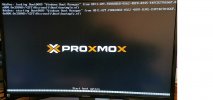
But i dont get further than the booting screen. The screen "hangs" at this point:
Just about a minute later, the screen looks like this:
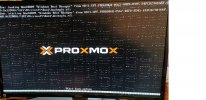
It is not really freezing, i can tap on my Keyboard (Enter Key) and the screen changes a bit, like more "abstract lines". The Keyboard is not passthroughed to the VM.
I have to mention that the Windows VM does start up. I can remote connect to it, but ill get Error 43 at the Device Manager for my RX580.
Also i have to mention that i tried a different Card (AMD RX5700XT, same behaviour)
This is what i blacklisted:
this is in my grub file:
my args in the .conf file
I found this in my syslog:
While booting up:
Also after a few minutes of running VM:
Any ideas? I just want to have it running again, so bad.
i did a lot of research over hours and hours and tried to fix it, but i can not get it working.
I had Proxmox 6.2 before and did a full clean install to 7.4-1. Before my AMD RX580 did work without any problems in VMs.
So after i installed fresh and tried to passthrough i had no screen at all.
After turning CSM off in the BIOS, i thought i had the solution. I got a Screen output after starting the VM, hell yes!
But i dont get further than the booting screen. The screen "hangs" at this point:
Just about a minute later, the screen looks like this:
It is not really freezing, i can tap on my Keyboard (Enter Key) and the screen changes a bit, like more "abstract lines". The Keyboard is not passthroughed to the VM.
I have to mention that the Windows VM does start up. I can remote connect to it, but ill get Error 43 at the Device Manager for my RX580.
Also i have to mention that i tried a different Card (AMD RX5700XT, same behaviour)
This is what i blacklisted:
echo "blacklist radeon" >> /etc/modprobe.d/blacklist.conf
echo "blacklist nouveau" >> /etc/modprobe.d/blacklist.conf
echo "blacklist nvidia" >> /etc/modprobe.d/blacklist.conf
echo "blacklist amdgpu" >> /etc/modprobe.d/blacklist.conf
this is in my grub file:
GRUB_CMDLINE_LINUX_DEFAULT="quiet amd_iommu=on iommu=pt pcie_acs_override=downstream,multifunction nofb nomodeset video=vesafb:off,efifb:off"
my args in the .conf file
args: -cpu 'host,+kvm_pv_unhalt,+kvm_pv_eoi,hv_vendor_id=NV43FIX,kvm=off'
cpu: host,hidden=1,flags=+pcid
I found this in my syslog:
While booting up:
May 1 19:55:09 pve kernel: [ 1761.248547] vfio-pci 0000:12:00.0: BAR 0: can't reserve [mem 0xd0000000-0xdfffffff 64bit pref]
Also after a few minutes of running VM:
May 1 19:52:10 pve QEMU[3654]: kvm: vfio_region_write(0000:12:00.0:region0+0x1dc118, 0xff0a0a0aff0b0b0b,8) failed: Device or resource busy
Any ideas? I just want to have it running again, so bad.

