

Get VM from failed Server

Dec 3, 2023
2
0
1
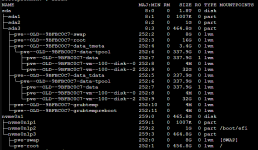
I installed Proxmox and was working for some time. I am relatively new to the platform and have limited experience. The Disk failed and of course i didn't have a backup. I had a VM on the server. I can get to the disk and see the structure of the disk as i reinstalled Proxmox and have that working just fine. As you can see below the VM100 is still showing and i can connect the entire disk to Proxmox as a LVM in Storage. I am not certain on how to extract the VM out and reconnect it as it is to Proxmox. I have searched and found things that are not 100% related as some talk to ZFS or migrating. The disk i connected is not bootable so it is just data. Any help would be appreciated. :)

Screenshot 2023-12-02 193702.png
 
add something like this into your /etc/pve/storage.cfg
Code:
lvmthin: old-lvm
        thinpool data
        vgname pve-old
        content images,rootdir

restart service to get it recognized:
systemctl try-reload-or-restart pvedaemon pveproxy pvestatd pvescheduler

add new empty VM if you didnt yet:
qm create 100

rescan disks to get them in:
qm disk rescan --dryrun 1
qm disk rescan

edit VM config to change unknown disk to scsi or ide.
use "move disk" menu in GUI to migrate the disk to new disk, if thats what you want

profit

PS some steps may need to be added or omitted based on outcome of prior steps. Names may need to be adjusted. This is just a general direction guide.


Blockbridge : Ultra low latency all-NVME shared storage for Proxmox - https://www.blockbridge.com/proxmox
 
Last edited:
  • Like
Reactions: egarlepp
@egarlepp
I installed Proxmox and was working for some time. I am relatively new to the platform and have limited experience. The Disk failed and of course i didn't have a backup. I had a VM on the server. I can get to the disk and see the structure of the disk as i reinstalled Proxmox and have that working just fine. As you can see below the VM100 is still showing and i can connect the entire disk to Proxmox as a LVM in Storage. I am not certain on how to extract the VM out and reconnect it as it is to Proxmox. I have searched and found things that are not 100% related as some talk to ZFS or migrating. The disk i connected is not bootable so it is just data. Any help would be appreciated. :)
View attachment 59185
I've just had this same issue. How did you get to here originally? How did you reinstall proxmox and have the old VM files available? any help would be greatly appreciated thanks!
 
I've just had this same issue. How did you get to here originally? How did you reinstall proxmox and have the old VM files available? any help would be greatly appreciated thanks!
I got the impression that Op bought a new disk and re-installed PVE on the new disk.


Blockbridge : Ultra low latency all-NVME shared storage for Proxmox - https://www.blockbridge.com/proxmox