

Fujitsu PRIMERGY TX1320 M3 & FUJITSU PRAID CP400i
- Thread starter blondie63
- Start date
You are using an out of date browser. It may not display this or other websites correctly.
You should upgrade or use an alternative browser.
You should upgrade or use an alternative browser.

Where are your screenshots?
CP400i are normally not a problem, they're SAS3008-based LSI controllers and work out-of-the-box. AFAIK they can be configured to be a hardware RAID (needs to be done in BIOS) or software RAID (needs to be done in the bios and enable passthrough). I've a bunch of them running in PVE and also in RHEL-environments without any problem:
Fujitsu PRIMERGY RX2540 M2 with a CP400i, identified as
configured as a hardware raid1:
CP400i are normally not a problem, they're SAS3008-based LSI controllers and work out-of-the-box. AFAIK they can be configured to be a hardware RAID (needs to be done in BIOS) or software RAID (needs to be done in the bios and enable passthrough). I've a bunch of them running in PVE and also in RHEL-environments without any problem:
Fujitsu PRIMERGY RX2540 M2 with a CP400i, identified as
Code:
$ lspci -vvv -s 01:00.0 | head -3
01:00.0 Serial Attached SCSI controller: Broadcom / LSI SAS3008 PCI-Express Fusion-MPT SAS-3 (rev 02)
        Subsystem: Fujitsu Technology Solutions SAS3008 PCI-Express Fusion-MPT SAS-3
        Physical Slot: 1

$ pveversion
pve-manager/8.2.2/9355359cd7afbae4 (running kernel: 6.8.4-3-pve)
configured as a hardware raid1:
Code:
$ lsscsi --size
[6:0:0:0]    disk    HGST     HUC101830CSS204  C7L0  -               -
[6:0:1:0]    disk    HGST     HUC101830CSS204  C7L0  -               -
[6:0:2:0]    enclosu FTS Corp SAS30_EXPAND36   0600  -               -
[6:1:0:0] disk LSI Logical Volume 3000 /dev/sda 298GBOps sorry, here my screenshots: https://forum.proxmox.com/threads/f...0-m3-fujitsu-praid-cp400i.146653/#post-662186
Now i try to set raid on Bios settings..
Now i try to set raid on Bios settings..
You linked this thread, which has no images. Please post the correct link.Ops sorry, here my screenshots: https://forum.proxmox.com/threads/f...0-m3-fujitsu-praid-cp400i.146653/#post-662186
Sorry for my mistake:
https://drive.google.com/file/d/10eWowZ6-_hTEErbXkzwc7dhq6S7RAQaY/view?usp=sharing
https://drive.google.com/file/d/10RhCP86QpcVcyDb4k3RB7a18W51MkGeW/view?usp=sharing
https://drive.google.com/file/d/10XpXd_ESNAZftRSDfZqWdup_hX5ymoDZ/view?usp=sharing
https://drive.google.com/file/d/10dBWauzmp5FFWfubHQYbFcTKrLjTaB7G/view?usp=sharing
regards
https://drive.google.com/file/d/10eWowZ6-_hTEErbXkzwc7dhq6S7RAQaY/view?usp=sharing
https://drive.google.com/file/d/10RhCP86QpcVcyDb4k3RB7a18W51MkGeW/view?usp=sharing
https://drive.google.com/file/d/10XpXd_ESNAZftRSDfZqWdup_hX5ymoDZ/view?usp=sharing
https://drive.google.com/file/d/10dBWauzmp5FFWfubHQYbFcTKrLjTaB7G/view?usp=sharing
regards
Could you access the controller BIOS and take screenshots from there?
I found in my ticket system these images:
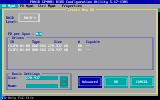
and
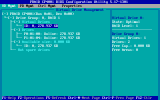
I found in my ticket system these images:
and
I have no machine to reboot right now, try F2 to get in the BIOS and there can/should be an try to enter the RAID bios.
I've done many test on this server!
I've installed win2022, esxi 8, CentOS 9 Stream all without problems !
They recognize my raid VD and use it
Only Proxmox 8.2 can't see my VD
https://drive.google.com/drive/folders/10wKGfzqBKrlqlQdTUMSiHIdDmuWIGJjj?usp=sharing
ps. This forum permit only very little files
I've installed win2022, esxi 8, CentOS 9 Stream all without problems !
They recognize my raid VD and use it
Only Proxmox 8.2 can't see my VD
https://drive.google.com/drive/folders/10wKGfzqBKrlqlQdTUMSiHIdDmuWIGJjj?usp=sharing
ps. This forum permit only very little files
Hi Frank, how you can choose this mpt3sas-driver ?LSI SAS3008 under Proxmox (since Update 8.1->8.2) is a special thing. With mpt3sas-driver everything is fine, using megaraid-sas no disk detected.
How you can set bios? UEFI or Legacy ?
Thanks for help
Hello,
I got an issue with a Fujitsu Rx100 because on proxmox 8.2 have kernel 6.8 with intel_iommu=on by default and raid card was not working (even blinking).
I don't know if it is the same issue but because you have a Fujitsu, you may check.
Can you test with proxmox 8.1 and see if it works : https://enterprise.proxmox.com/iso/proxmox-ve_8.1-2.iso ?
If it works, you can try to set intel_iommu=off in the grub and then update to 8.2.
I got an issue with a Fujitsu Rx100 because on proxmox 8.2 have kernel 6.8 with intel_iommu=on by default and raid card was not working (even blinking).
I don't know if it is the same issue but because you have a Fujitsu, you may check.
Can you test with proxmox 8.1 and see if it works : https://enterprise.proxmox.com/iso/proxmox-ve_8.1-2.iso ?
If it works, you can try to set intel_iommu=off in the grub and then update to 8.2.
Last edited:
With this iso 8.1-2 i've installed on same server without problems !!Hello,
I got an issue with a Fujitsu Rx100 because on proxmox 8.2 have kernel 6.8 with intel_iommu=on by default and raid card was not working (even blinking).
I don't know if it is the same issue but because you have a Fujitsu, you may check.
Can you test with proxmox 8.1 and see if it works : https://enterprise.proxmox.com/iso/proxmox-ve_8.1-2.iso ?
If it works, you can try to set intel_iommu=off in the grub and then update to 8.2.
SO 8.2.2 is bugged
?And i think i cannot upgrade my install, is it right ?
you can. you'll just need to pin your kernel.And i think i cannot upgrade my install, is it right ?
How can i pin my kernel ?you can. you'll just need to pin your kernel.

"3.13.7. Override the Kernel-Version for next Boot" --> https://pve.proxmox.com/pve-docs/pve-admin-guide.html#sysboot 

Hello,Hello,
I got an issue with a Fujitsu Rx100 because on proxmox 8.2 have kernel 6.8 with intel_iommu=on by default and raid card was not working (even blinking).
I don't know if it is the same issue but because you have a Fujitsu, you may check.
Can you test with proxmox 8.1 and see if it works : https://enterprise.proxmox.com/iso/proxmox-ve_8.1-2.iso ?
If it works, you can try to set intel_iommu=off in the grub and then update to 8.2.
I would like to thank you for this suggestion. After struggling with "No disk found" problem for hours, I tried downloading 8.1 .iso and it all worked "out of the box".
THANK YOU!