

Hi,
I've got two virtual machines in the same VNET and I can't seem to establish any firewalling between the two. They are on an EVPN/VXLAN setup. I've got a zone with two IP ranges - 192.168.1.0/24 and 10.20.34.0/24
I want to block interaction between the two. I've setup a security group at the DC level
DC > Firewall > Options > Firewall > YES
DC > SDN > VNET Firewall > VNET > Options > Firewall > YES
Each node > Firewall > Options > Firewall > YES
VMs > Hardware > Interface > Firewall > Checked
VMs > Firewall > Options > Firewall > YES
VMs > Firewall > Input Policy > DROP
I've created a security group (as below) and applied it to the firewall rules:

I've also got default input policy on both VMs as DROP
I've also created a rule on the 10.20.34.4/24 VM with a DROP SSH rule:

Despite these layers, I am still able to establish a connection with the VMs SSH?
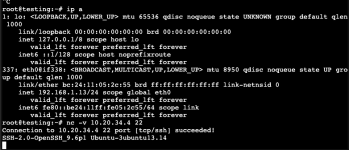
I thought that this firewalling would still apply, even if they were in the same VNET?
Any help is appreciated!
Chris.
I've got two virtual machines in the same VNET and I can't seem to establish any firewalling between the two. They are on an EVPN/VXLAN setup. I've got a zone with two IP ranges - 192.168.1.0/24 and 10.20.34.0/24
I want to block interaction between the two. I've setup a security group at the DC level
DC > Firewall > Options > Firewall > YES
DC > SDN > VNET Firewall > VNET > Options > Firewall > YES
Each node > Firewall > Options > Firewall > YES
VMs > Hardware > Interface > Firewall > Checked
VMs > Firewall > Options > Firewall > YES
VMs > Firewall > Input Policy > DROP
I've created a security group (as below) and applied it to the firewall rules:
I've also got default input policy on both VMs as DROP
I've also created a rule on the 10.20.34.4/24 VM with a DROP SSH rule:
Despite these layers, I am still able to establish a connection with the VMs SSH?
I thought that this firewalling would still apply, even if they were in the same VNET?
Any help is appreciated!
Chris.