

Failed update to 6.4

beriapl

Active Member
Jan 22, 2019
23
0
41
42
Hello,

One of nodes in my cluster failed after update to 6.4 - it doesn't start with the network

When doing pveveriosn -v some packages got the error "not correctly installed"
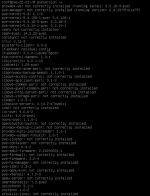
1628849884092.png

So, I got an idea to revert /etc/network/interfaces to old one, and it worked - after systemctl restart networking
I've run apt-get update && apt-get full-upgrade again. Reverted back to the "newest" /etc/network/interfaces. Reboot.
The network still doesn't work, and moreover, reverting back to "initial" /etc/network/interfaces does not work at all.

Is there anything that I can try to get this node up&running again? Or is my only option here to perform a fresh reinstall?
 
Post your non working interfaces file, and working one, mask out the last few octets if you want.
 
Fixed by a clean reinstall, unfortunately. I didn't find much that I was able to fix...


But, for further discussion:

- "initial interfaces" - a copy of working one (but that works only when the update was failed and I revert it for the first time - after I was able to run update once again - this wasn't working anyway)

Code:
auto lo
iface lo inet loopback

iface eno1 inet manual

auto vmbr0.25
iface vmbr0.25 inet static
        address 10.2.128.31/17
        gateway 10.2.128.1

auto vmbr0
iface vmbr0 inet manual
        bridge_ports eno1
        bridge_stp off
        bridge_fd 0
        bridge_vlan_aware yes


iface enp68s0f1 inet manual

iface idrac inet manual

iface eno3 inet manual

iface eno2 inet manual

iface enp2s0f0 inet manual

iface enp2s0f1 inet manual

iface eno4 inet manual

iface enp68s0f0 inet manual

And this is final (which was working before the update - I've removed part for ceph only)


Code:
auto lo
iface lo inet loopback

auto eno1
iface eno1 inet manual

iface enp68s0f1 inet manual

iface idrac inet manual

auto eno2
iface eno2 inet manual

iface enp2s0f0 inet manual

iface enp2s0f1 inet manual

iface enp68s0f0 inet manual

auto eno3
iface eno3 inet manual

auto eno4
iface eno4 inet manual

allow-vmbr0 vlan25
iface vlan25 inet static
        address 10.2.128.31/17
        gateway 10.2.128.1
        ovs_type OVSIntPort
        ovs_bridge vmbr0
        ovs_options tag=25

allow-vmbr0 bond0
iface bond0 inet manual
        ovs_bonds eno1 eno2 eno3 eno4
        ovs_type OVSBond
        ovs_bridge vmbr0
        ovs_options bond_mode=active-backup

allow-ovs vmbr0
iface vmbr0 inet manual
        ovs_type OVSBridge
        ovs_ports bond0 vlan25
 
That does not explain why even "initial" conf doesn't work.

Anyway - fixed by reinstall :)