

A few weeks ago I bought a subscription and entered it successfully. However, due to an administrative error, it was cancelled and I had to buy a new one.However, when I entered the new key I got the error:
"Error checking subscription: https://shop.proxmox.com/modules/servers/licensing/verify.php: Dns Failed: resolve dns name 'shop.proxmox.com:443': failed to lookup address information: Temporary failure in name resolution (500)"
There is another support request about this kind of problem here and, according to Fabian the answer is "It's not possible to use an HTTPS proxy for the subscription update atm. please add "https://shop.proxmox.com" to the exception list of your corporate firewall".
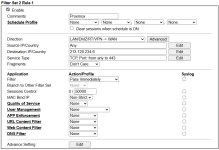
However, there appears to be no way to achieve this on a Draytek firewall which requires an IP address. I have therefore tried resolving the 'shop.proxmox.com' address to its IP address which gave 213.120.234.6 and entered this into the Draytek's filter rules but it is still giving me the same error.
So, can you please tell me:
1. Why did it work before?
2. Why doesn't the filter rule work now?
"Error checking subscription: https://shop.proxmox.com/modules/servers/licensing/verify.php: Dns Failed: resolve dns name 'shop.proxmox.com:443': failed to lookup address information: Temporary failure in name resolution (500)"
There is another support request about this kind of problem here and, according to Fabian the answer is "It's not possible to use an HTTPS proxy for the subscription update atm. please add "https://shop.proxmox.com" to the exception list of your corporate firewall".
However, there appears to be no way to achieve this on a Draytek firewall which requires an IP address. I have therefore tried resolving the 'shop.proxmox.com' address to its IP address which gave 213.120.234.6 and entered this into the Draytek's filter rules but it is still giving me the same error.
So, can you please tell me:
1. Why did it work before?
2. Why doesn't the filter rule work now?