


Hello people, first time happy new year 2026, now i tray to migrate vm from vmware 6.5, i download with winscp vmdk of VM host in Vmware 6.5, and upload to PVE9 with same Winscp, run command
qm importdisk vm-id backup-name.vmdk disk-name --format raw
but send error
root@pverarisa:/mnt/pve/wdex4100/import# qm importdisk 200 prod1g5_1-flat.vmdk s sdstorage --format raw
importing disk 'prod1g5_1-flat.vmdk' to VM 200 ...
transferred 0.0 B of 350.0 GiB (0.00%)
qemu-img: Could not open 'prod1g5_1-flat.vmdk': invalid VMDK image descriptor
copy failed: command '/usr/bin/qemu-img convert -p -n -t none -f vmdk -O raw pro d1g5_1-flat.vmdk zeroinit:/dev/zvol/ssdstorage/vm-200-disk-0' failed: exit code
also i tray to make from web and also to send error
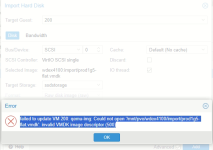
say vmdk invalid,
any have idea whats happend?
qm importdisk vm-id backup-name.vmdk disk-name --format raw
but send error
root@pverarisa:/mnt/pve/wdex4100/import# qm importdisk 200 prod1g5_1-flat.vmdk s sdstorage --format raw
importing disk 'prod1g5_1-flat.vmdk' to VM 200 ...
transferred 0.0 B of 350.0 GiB (0.00%)
qemu-img: Could not open 'prod1g5_1-flat.vmdk': invalid VMDK image descriptor
copy failed: command '/usr/bin/qemu-img convert -p -n -t none -f vmdk -O raw pro d1g5_1-flat.vmdk zeroinit:/dev/zvol/ssdstorage/vm-200-disk-0' failed: exit code
also i tray to make from web and also to send error
say vmdk invalid,
any have idea whats happend?
