

Hello,
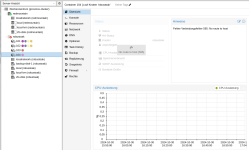
I installed proxmox 8.2.7 on two systems and added both to a cluster. I configured replication which seems to be working fine and added all lxc to the cluster. The problem is that I am not able to use or manually migrate the lxc systems when one system is going down. I only see the error message "No route to host (595)" when I click on the lxc container or "Verbindungsfehler (Connection error) 595: No route to host" when I want to migrate the lxc container to the working node.
The output (when one node is down) for pvecm status is
I even configured HA (even I know that 3 nodes are neccessary to get an automatic failover working) but I still get the same error when I click on migrate. When both nodes are up, I am able to migrate the lxc container to the other node without any problem.
Maybe I completely missunderstand the concept or I did some configuration error I am not able to find out ?
Does anyone have a hint for me ? I didn't find any other entry that describes the 595 error that describes the same environment.
If you need any logs please let me know I am happy to provide you with the information.
I installed proxmox 8.2.7 on two systems and added both to a cluster. I configured replication which seems to be working fine and added all lxc to the cluster. The problem is that I am not able to use or manually migrate the lxc systems when one system is going down. I only see the error message "No route to host (595)" when I click on the lxc container or "Verbindungsfehler (Connection error) 595: No route to host" when I want to migrate the lxc container to the working node.
The output (when one node is down) for pvecm status is
Code:
root@redmountain:~# pvecm status
Cluster information
-------------------
Name:             proxmox-cluster
Config Version:   2
Transport:        knet
Secure auth:      on

Quorum information
------------------
Date:             Wed Oct 30 17:42:04 2024
Quorum provider:  corosync_votequorum
Nodes:            1
Node ID:          0x00000002
Ring ID:          2.2c9
Quorate:          No

Votequorum information
----------------------
Expected votes:   2
Highest expected: 2
Total votes:      1
Quorum:           2 Activity blocked
Flags:

Membership information
----------------------
    Nodeid      Votes Name
0x00000002          1 192.168.5.54 (local)
I even configured HA (even I know that 3 nodes are neccessary to get an automatic failover working) but I still get the same error when I click on migrate. When both nodes are up, I am able to migrate the lxc container to the other node without any problem.
Maybe I completely missunderstand the concept or I did some configuration error I am not able to find out ?
Does anyone have a hint for me ? I didn't find any other entry that describes the 595 error that describes the same environment.
If you need any logs please let me know I am happy to provide you with the information.
Attachments
Last edited:
