

Error installing "'pve-headers-6.5.11-8-pve".

mb19

New Member
Jul 11, 2024
2
0
1
Hello everyone,

I'm trying to install the kernel headers to be able to run the "make release" which uses "clang" but I don't know how to do it, I've tried with:

Code:
apt install pve-headers-$(uname -r)
apt install proxmox-headers-$(uname -r)

I'm using a container with privileges on Proxmox version 8.1.4 and the O.S is Debian12
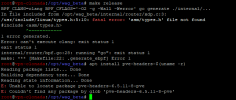
1720688573770.png

Any help would be appreciated, thank you very much!
 
the package is called "proxmox-headers-XXX" now. but you need to setup the PVE repositories, the package is not in the stock Debian repositories.
 
the package is called "proxmox-headers-XXX" now. but you need to setup the PVE repositories, the package is not in the stock Debian repositories.
Hello,

Thanks, it has worked:

sources.list:

Code:
deb http://ftp.debian.org/debian bookworm main contrib

deb http://ftp.debian.org/debian bookworm-updates main contrib

deb http://security.debian.org bookworm-security main contrib

# Proxmox VE pve-no-subscription repository provided by proxmox.com,
# NOT recommended for production use
deb http://download.proxmox.com/debian/pve bookworm pve-no-subscription

key managment:

Code:
 wget https://enterprise.proxmox.com/debian/proxmox-release-bookworm.gpg -O /etc/apt/trusted.gpg.d/proxmox-release-bookworm.gpg