

Hello All,
I have an issue with my Ceph Network and a Backup Solution i would like to implement.
If i try to connect a Drive to NBD without specifying the CEPH Cluster It goes wrong with an error: “unable to get monitor info from DNS SRV with service name: ceph-mon
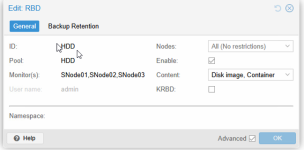
 but if I mount it specifying the Ceph Cluster it works flawless:

we have the follwing Infrastructure:
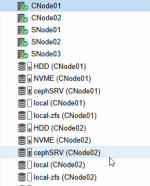
3 Proxmox Nodes configured as a storage cluster:
Ceph Network: connected in a ring using Fabrics
Public Network: 25GB Switch
Additionally 2 Proxmox Nodes for Computer also connected to the 25GB Switch so they can access the Ceph Cluster Storage.
That works without an issue for the virtual machines and everything is fine.
But mapping the Drives as an NBD is not possible and the Backup Solution Provider is telling us, that we need to ask Proxmox why. Does anyone have an idea?
Input is highly appreciated!
Greetings
Harald Corneliussen
I have an issue with my Ceph Network and a Backup Solution i would like to implement.
If i try to connect a Drive to NBD without specifying the CEPH Cluster It goes wrong with an error: “unable to get monitor info from DNS SRV with service name: ceph-mon
but if I mount it specifying the Ceph Cluster it works flawless:we have the follwing Infrastructure:
3 Proxmox Nodes configured as a storage cluster:
Ceph Network: connected in a ring using Fabrics
Public Network: 25GB Switch
Additionally 2 Proxmox Nodes for Computer also connected to the 25GB Switch so they can access the Ceph Cluster Storage.
That works without an issue for the virtual machines and everything is fine.
But mapping the Drives as an NBD is not possible and the Backup Solution Provider is telling us, that we need to ask Proxmox why. Does anyone have an idea?
Input is highly appreciated!
Greetings
Harald Corneliussen

