[SOLVED] Error /boot/ USB installation Proxmox 9.1

uniketou

New Member
Dec 12, 2024
25
6
3
Hello all,

I've build a brand new server and I want to install Proxmox 9.1.

I've prepared the USB stick but I got the error below : error : file '/boot/' not found
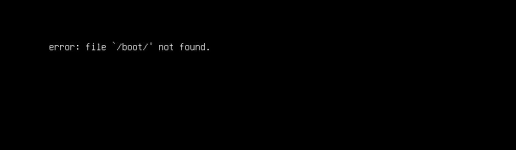
error.png

=> ISO Checksum is OK (downloaded twice)
=> USB configured with : Rufus (dd mode) or Etcher : same issue
=> tested with PROXMOX 9.0 : same issue
=> tested 2 USB stick : same issue
=> tested on different USB port : same issue
=> Secure Boot disabled

Installation is done via IPMI (no monitor connected).

Motherboard : AsRock Rack ROMED8-2T
RAM : 128Go ECC
CPU : EPYC 7713
Graphic : AMD RX 9700XT


Have you any idea ?


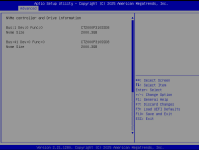
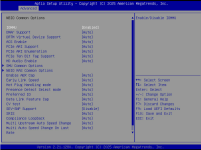
Below some BIOS screen :

- 3 SSDs
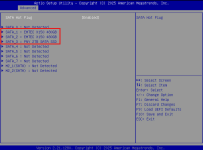
sata.png

- 2 Nvme :

nvme.png

- IOMMU Enabled :

iommu.png

- Boot menu (tried with 2 differents USB stick)
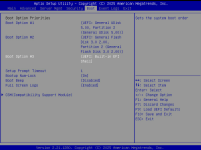
bootmenu.png
 
Last edited:
I think i got this message too when installing PVE 9.1 but after a second the Grub Boot screen showed up anyway. You could try nomodeset or hook up a display to your GPU or remove the GPU, install PVE and then reinstall the GPU. Not sure if IPMI works correctly when a discrete GPU is installed. Maybe the PVE installer outputs to the GPU instead of the integrated IPMI GPU?
 
  • Like
Reactions: uniketou
For nomodeset ; how to set it ? because I don't have access to proxmox (even the menu for the install is not displayed).

Or I'll test to connect a monitor on the GPU to see what happen.

Thanks !
 
Maybe there is a bios option to disable the dedicated GPU for now? Reenable when pve is installed. Or something that lets you select the primary GPU?
 
Thank you guys ! I found the solution to install via IPMI ! description below.

I've another issue. I've installed a NIC card : Realtek 8125B ; but proxmox didn't see it...

What do you suggest ?


Here the solution to install proxmox via IPMI :

1 - In the BIOS go to "Advanced" -> "CPU Configuration" and ensure SVM Mode (CPU virtualization) is set to "ENABLE"
2 - "Advanced" -> "AMD CBS" -> "NBIO Common Options" and enable the three following values:
set "IOMMU" to "Enabled"
set "ACS" to "Enabled"
set "PCIe ARI" to "Disabled"

3 - "Advanced" -> "AMD CBS" -> "CPU Common Options" and set "Global C-State Control" to "Disabled"
4 - Enable CSM
5 - "Advanced" -> "Chipset Configuration" > "Onboard/Ext VGA Select" is set to "Onboard"
 
  • Like
Reactions: MarkusKo and Onslow
Thank you for the tip ; I'll buy another card.

The realtek is not reconized in Proxmox :

lspci | grep Realtek => Nothing

lspci | grep -iE --color 'network|ethernet'
42:00.0 Ethernet controller: Intel Corporation Ethernet Controller X550 (rev 01)
42:00.1 Ethernet controller: Intel Corporation Ethernet Controller X550 (rev 01)
 
I've installed the new PCI card (Intel I225).
LEDs are blinking on the card ; but still not detected on Proxmox.

What I can do ?

Code:
root@pve:~# lspci | grep Ethernet
42:00.0 Ethernet controller: Intel Corporation Ethernet Controller X550 (rev 01)
42:00.1 Ethernet controller: Intel Corporation Ethernet Controller X550 (rev 01)


root@pve:~# lspci | grep Intel
42:00.0 Ethernet controller: Intel Corporation Ethernet Controller X550 (rev 01)
42:00.1 Ethernet controller: Intel Corporation Ethernet Controller X550 (rev 01)
 
My Bad...
I've installed the card on the PCIE2 : It's disabled because I use NVME, so normal...

I've moved the card to PCIE1, all is working correctly !

I thought the PCIE2 was from the upper...it's from the bottom.

Thank you for your help :)
 
  • Like
Reactions: MarkusKo