Hi,
i'm having trouble with the config of a VM.
My setup is proxmox on a Lenovo Thinkpad E540 (internal display only, lid permanetly closed, internal display off)
I installed a VM with debian 12 with KDE Plasma GUI.
I want to connect to this VM from my Windows 10 dual display setup and have a dual display full screen KDE.
I tried both "SPICE" and "Spice dual monitors" for display, but i can't get the second screen. i'm using VirtViewer v11.0-256 to connect.
Current config is "SPCIE (qxl,memory=128)"
I also reinstalled the VM several times with different spice display settings.
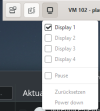
In VirtViewer, i see Display 1-4, but 2-4 are greyed out.
How can i get a dual display VM working with proxmox?
i'm having trouble with the config of a VM.
My setup is proxmox on a Lenovo Thinkpad E540 (internal display only, lid permanetly closed, internal display off)
I installed a VM with debian 12 with KDE Plasma GUI.
I want to connect to this VM from my Windows 10 dual display setup and have a dual display full screen KDE.
I tried both "SPICE" and "Spice dual monitors" for display, but i can't get the second screen. i'm using VirtViewer v11.0-256 to connect.
Current config is "SPCIE (qxl,memory=128)"
I also reinstalled the VM several times with different spice display settings.
In VirtViewer, i see Display 1-4, but 2-4 are greyed out.
How can i get a dual display VM working with proxmox?
| Kernel Version Linux 6.2.16-19-pve #1 SMP PREEMPT_DYNAMIC PMX 6.2.16-19 (2023-10-24T12:07Z) |
| PVE Manager Version pve-manager/8.0.9/fd1a0ae1b385cdcd |