

Hello,
So I acquired a DL380 Gen10 from a friend of mine. I formatted, configured raids, and set up proxmox according to some tutorials. In the process of expanding my raid, I came across a couple things I had questions about that hopefully I can get some assistance in answering.
1. Comparing the raids via the iLO with what's available under "Disks", I only see my HDD RAID5's(there are two of them, 1 was for the proxmox installation and the other is what was used to build out the VMs). There is another small set of SSDs in a RAID10 type that I can't locate in proxmox. Is there a reason for that?
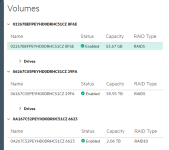
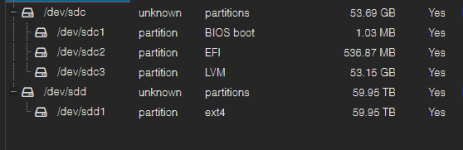
2. I've not been experiencing any issues with my VMs, but have noticed that my LVM is almost at max capacity and my LVM-Thin is showing 100% usage. Part of the purpose of this was to try and expand those drives, and create another storage share on one of my VMs. Is what is showing up normal? And if it's not and needs addressed, can I expand the storage based on taking away from the 59.95tb drive, or do I need to add additional storage to the 53.69gb by adding an additional drive and configuring the RAID?


3. Looking back on it now, I would have liked to have utilized the SSD raid for the proxmox installation and then utilized the full other raid for the VMs and such. Is there a way to "move" the installation to the do that with, or would I need to do a back up, offload the backups, then start a fresh installation again?
Thank you in advance for anyone that's capable of answering any of the questions. Just a father of 5 trying to set up some Minecraft and game servers for the kids(just started with PLEX as well).
So I acquired a DL380 Gen10 from a friend of mine. I formatted, configured raids, and set up proxmox according to some tutorials. In the process of expanding my raid, I came across a couple things I had questions about that hopefully I can get some assistance in answering.
1. Comparing the raids via the iLO with what's available under "Disks", I only see my HDD RAID5's(there are two of them, 1 was for the proxmox installation and the other is what was used to build out the VMs). There is another small set of SSDs in a RAID10 type that I can't locate in proxmox. Is there a reason for that?
2. I've not been experiencing any issues with my VMs, but have noticed that my LVM is almost at max capacity and my LVM-Thin is showing 100% usage. Part of the purpose of this was to try and expand those drives, and create another storage share on one of my VMs. Is what is showing up normal? And if it's not and needs addressed, can I expand the storage based on taking away from the 59.95tb drive, or do I need to add additional storage to the 53.69gb by adding an additional drive and configuring the RAID?
3. Looking back on it now, I would have liked to have utilized the SSD raid for the proxmox installation and then utilized the full other raid for the VMs and such. Is there a way to "move" the installation to the do that with, or would I need to do a back up, offload the backups, then start a fresh installation again?
Thank you in advance for anyone that's capable of answering any of the questions. Just a father of 5 trying to set up some Minecraft and game servers for the kids(just started with PLEX as well).