Dispite migrating VM they don't response

ArnOCP

Member
Aug 2, 2023
13
0
6
Hello everybody,
I have 3 PMX in my architecture, when i updtae one of the server i migrate the VM on others.
But even i do this, the migrated VM's are not accessibles during the reboot of one PMX, (by SSH, by https there are webservers...)
Anyone have an idea?
Regards,
 
Hi @ArnOCP

thanks for posting in the forum!

To better understand your infrastructure could you elaborate on how your VMs are configured? Are you using the SDN stack? Are the VMs configured to use HA?

Also please share a little details on your 3 nodes. Are these all the same make and model? What version of PVE are the servers running? pveversion -v
How are the servers connected (LACP?) to which kind of networking gear?

Does the problem also occur when the VMs are just migrated and the source node is not rebooted?

Yours sincerely,
Jonas
 
Hello j.theisen,
Thanks a lot for the reply.
Yes VM's are configured to use HA.
Yes the 3 nodes are the same models ans server (HPE)
Code:
proxmox-ve: 8.4.0 (running kernel: 6.8.12-28-pve)
pve-manager: 8.4.19 (running version: 8.4.19/a68fb383814bb1e6)
proxmox-kernel-helper: 8.1.4
pve-kernel-6.2: 8.0.5
proxmox-kernel-6.8: 6.8.12-29
proxmox-kernel-6.8.12-29-pve-signed: 6.8.12-29
proxmox-kernel-6.8.12-28-pve-signed: 6.8.12-28
proxmox-kernel-6.5.13-6-pve-signed: 6.5.13-6
proxmox-kernel-6.5: 6.5.13-6
proxmox-kernel-6.2.16-20-pve: 6.2.16-20
proxmox-kernel-6.2: 6.2.16-20
pve-kernel-6.2.16-3-pve: 6.2.16-3
ceph: 17.2.8-pve2
ceph-fuse: 17.2.8-pve2
corosync: 3.1.10-pve2~bpo12+1
criu: 3.17.1-2+deb12u2
glusterfs-client: 10.3-5
ifupdown2: 3.2.0-1+pmx11
intel-microcode: 3.20251111.1~deb12u1
ksm-control-daemon: 1.5-1
libjs-extjs: 7.0.0-5
libknet1: 1.30-pve2
libproxmox-acme-perl: 1.6.0
libproxmox-backup-qemu0: 1.5.2
libproxmox-rs-perl: 0.3.5
libpve-access-control: 8.2.3
libpve-apiclient-perl: 3.3.2
libpve-cluster-api-perl: 8.1.3
libpve-cluster-perl: 8.1.3
libpve-common-perl: 8.3.8
libpve-guest-common-perl: 5.2.2
libpve-http-server-perl: 5.2.2
libpve-network-perl: 0.11.3
libpve-rs-perl: 0.9.4
libpve-storage-perl: 8.3.8
libspice-server1: 0.15.1-1
lvm2: 2.03.16-2
lxc-pve: 6.0.0-2
lxcfs: 6.0.0-pve2
novnc-pve: 1.6.0-2.1
proxmox-backup-client: 3.4.7-1
proxmox-backup-file-restore: 3.4.7-1
proxmox-backup-restore-image: 0.7.0
proxmox-firewall: 0.7.1
proxmox-kernel-helper: 8.1.4
proxmox-mail-forward: 0.3.3
proxmox-mini-journalreader: 1.5
proxmox-offline-mirror-helper: 0.6.8
proxmox-widget-toolkit: 4.3.17
pve-cluster: 8.1.3
pve-container: 5.3.5
pve-docs: 8.4.2
pve-edk2-firmware: 4.2025.05-1~bpo12+1
pve-esxi-import-tools: 0.7.4
pve-firewall: 5.1.2
pve-firmware: 3.16-3
pve-ha-manager: 4.0.7
pve-i18n: 3.4.5
pve-qemu-kvm: 9.2.0-7
pve-xtermjs: 5.5.0-2
pve-zsync: 2.3.1
qemu-server: 8.4.8
smartmontools: 7.3-pve1
spiceterm: 3.3.1
swtpm: 0.8.0+pve1
vncterm: 1.8.2
zfsutils-linux: 2.2.9-pve1
The servers connected trhough RJ45 and a SAN is attached (ISCSI) to hosts the files of the WM's
Does the problem also occur when the VMs are just migrated and the source node is not rebooted?
The trouble is occure only when i reboot the node, if i not reboot the vm's are ok.
 

Attachments

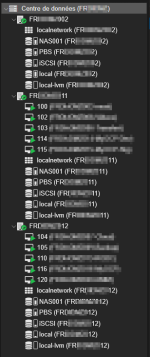
  • ProxmoxVirtualEnvironment.png
    ProxmoxVirtualEnvironment.png
    21.8 KB · Views: 2
Thank you for providing all that information!

Are all VMs on the cluster affected during a reboot or just the migrated ones?

What is the output of pvecm status

Can you please share the System log (in the Web UI select a node -> System -> System Log) of one of the nodes which are not rebooted from one of the incidents?

Yours sincerely
Jonas
 
Are all VMs on the cluster affected during a reboot or just the migrated ones?
Just the one's are migrated
What is the output of pvecm status
Code:
Cluster information
-------------------
Name:             FRxxxxxxx
Config Version:   5
Transport:        knet
Secure auth:      on

Quorum information
------------------
Date:             Tue Jun  2 11:27:19 2026
Quorum provider:  corosync_votequorum
Nodes:            3
Node ID:          0x00000002
Ring ID:          1.6e6
Quorate:          Yes

Votequorum information
----------------------
Expected votes:   3
Highest expected: 3
Total votes:      3
Quorum:           2
Flags:            Quorate

Membership information
----------------------
    Nodeid      Votes Name
0x00000001          1 10.x.x.100
0x00000002          1 10.x.x.99 (local)
0x00000003          1 10.x.x.98
 
Ok this looks good.

So just to clarify the problem:
You migrate the VMs to another node and the VMs are accessible. Then you reboot the source node of these VMs and the VMs become unresponsive via network. After the node comes back up, the VMs become accessible again. Correct?

Are you using the Firewall inside Proxmox?
What is your network configuration on the host level? Is there any form of masquerading or similar happening?

Are the VMs responsive via console after migration?

Can you please provide a system log of a reboot so we can check for irregularities there?

Yours sincerely
Jonas
 
You migrate the VMs to another node and the VMs are accessible. Then you reboot the source node of these VMs and the VMs become unresponsive via network. After the node comes back up, the VMs become accessible again. Correct?
Correct
Are you using the Firewall inside Proxmox?
No
Are the VMs responsive via console after migration?
yes, before the reboot of the "original" node

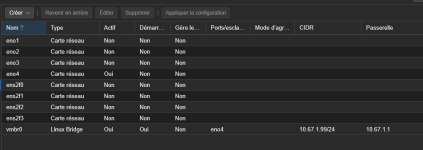
What is your network configuration on the host level? Is there any form of masquerading or similar happening?
sorry what do you mean? This is my network configuration via WebGUI1780395036875.png
 

Attachments

yes, before the reboot of the "original" node
Does this mean, during the reboot the VMs are also unresponsive through the console?
sorry what do you mean? This is my network configuration via WebGUI
This is perfect thank you!

Thanks for providing the logs!
It seems though that there is some form of Ceph involved here. Can you please provide the outputs of the following commands so we can assess the configuration of the storage:
Code:
cat /etc/pve/storage.cfg
ceph -s
pveceph pool ls
cat /etc/ceph/ceph.conf
ceph osd df tree

Yours sincerely
Jonas
 
Hello here are the output:

Code:
cat /etc/pve/storage.cfg

dir: local
        path /var/lib/vz
        content iso,vztmpl,backup
        prune-backups keep-last=5
        shared 0

lvmthin: local-lvm
        thinpool data
        vgname pve
        content rootdir,images

cifs: NAS001
        path /mnt/pve/NAS001
        server 10.X.X.ZZ
        share proxmox
        content iso,backup,images
        nodes 002,011,012
        prune-backups keep-all=1
        username pmx

pbs: PBS
        datastore NAS
        server 10.X.X.ZZ
        content backup
        fingerprint 1f:f4:55:b9:7a:1a:db:20:67:93:f6:0f:03:f7:d0:72:67:07:2b:24:87:3e:18:fd:8a:5a:fc:04:c1:d7:55:33
        prune-backups keep-all=1
        username BKP_PBS@pbs

rbd: iSCSI
        content rootdir,images
        krbd 0
        pool iSCSI[//CODE]

[CODE]ceph -s

 cluster:
    id:     818658a2-d2fd-4142-bb96-576a4c21c5f8
    health: HEALTH_WARN
            1/3 mons down, quorum 011,012
            Degraded data redundancy: 22/751642 objects degraded (0.003%), 13 pgs degraded, 160 pgs undersized
            160 pgs not deep-scrubbed in time
            160 pgs not scrubbed in time
            3 daemons have recently crashed

  services:
    mon: 3 daemons, quorum 011,012 (age 18h), out of quorum: 002
    mgr: 012(active, since 18h), standbys: 002, 011
    mds: 1/1 daemons up, 1 standby
    osd: 2 osds: 2 up (since 18h), 2 in (since 18h)

  data:
    volumes: 1/1 healthy
    pools:   4 pools, 289 pgs
    objects: 375.81k objects, 1.4 TiB
    usage:   2.4 TiB used, 6.4 TiB / 8.7 TiB avail
    pgs:     22/751642 objects degraded (0.003%)
             147 active+undersized
             129 active+clean
             13  active+undersized+degraded

  io:
    client:   2.7 KiB/s rd, 331 KiB/s wr, 0 op/s rd, 21 op/s wr


Code:
pveceph pool ls

┌─────────────────┬──────┬──────────┬────────┬─────────────┬────────────────┬───────────────────┬──────────────────────────┬───────────────────────────┬─────────────────┬─────────────────────
│ Name            │ Size │ Min Size │ PG Num │ min. PG Num │ Optimal PG Num │ PG Autoscale Mode │ PG Autoscale Target Size │ PG Autoscale Target Ratio │ Crush Rule Name │               %-Used
╞═════════════════╪══════╪══════════╪════════╪═════════════╪════════════════╪═══════════════════╪══════════════════════════╪═══════════════════════════╪═════════════════╪═════════════════════
│ .mgr            │    2 │        2 │      1 │           1 │              1 │ on                │                          │                           │ replicated_rule │ 5.44331396667985e-06
├─────────────────┼──────┼──────────┼────────┼─────────────┼────────────────┼───────────────────┼──────────────────────────┼───────────────────────────┼─────────────────┼─────────────────────
│ cephfs_data     │    3 │        2 │    128 │             │             32 │ on                │                          │                           │ replicated_rule │                    0
├─────────────────┼──────┼──────────┼────────┼─────────────┼────────────────┼───────────────────┼──────────────────────────┼───────────────────────────┼─────────────────┼─────────────────────
│ cephfs_metadata │    3 │        2 │     32 │          16 │             16 │ on                │                          │                           │ replicated_rule │ 6.79099088074508e-08
├─────────────────┼──────┼──────────┼────────┼─────────────┼────────────────┼───────────────────┼──────────────────────────┼───────────────────────────┼─────────────────┼─────────────────────
│ iSCSI           │    2 │        2 │    128 │             │             32 │ on                │                          │                           │ replicated_rule │     0.28290593624115
└─────────────────┴──────┴──────────┴────────┴─────────────┴────────────────┴───────────────────┴──────────────────────────┴───────────────────────────┴─────────────────┴─────────────────────
Code:
cat /etc/ceph/ceph.conf

[global]
        auth_client_required = cephx
        auth_cluster_required = cephx
        auth_service_required = cephx
        cluster_network = 10.X.X.XX/24
        fsid = 818658a2-d2fd-4142-bb96-576a4c21c5f8
        mon_allow_pool_delete = true
        mon_host = 10.6X.X.XX 10.X.X.XY 10.X.X.XZ
        mon_max_pg_per_osd = 300
        ms_bind_ipv4 = true
        ms_bind_ipv6 = false
        osd_pool_default_min_size = 2
        osd_pool_default_size = 2
        public_network = 10.X.X.XX/24

[client]
        keyring = /etc/pve/priv/$cluster.$name.keyring

[client.crash]
        keyring = /etc/pve/ceph/$cluster.$name.keyring

[mds]
        keyring = /var/lib/ceph/mds/ceph-$id/keyring

[mds.011]
        host = 011
        mds_standby_for_name = pve

[mds.012]
        host = 012
        mds_standby_for_name = pve

[mon.002]
        public_addr = 10.X.X.XZ

[mon.011]
        public_addr = 10.X.X.XX

[mon.012]
        public_addr = 10.X.X.XY

Code:
ceph osd df tree

ID  CLASS  WEIGHT   REWEIGHT  SIZE     RAW USE  DATA     OMAP    META     AVAIL    %USE   VAR   PGS  STATUS  TYPE NAME
-1         8.72400         -  8.7 TiB  2.4 TiB  2.3 TiB  42 KiB  9.8 GiB  6.4 TiB  26.96  1.00    -          root default
-3         4.36200         -  4.4 TiB  1.2 TiB  1.2 TiB  21 KiB  4.9 GiB  3.2 TiB  26.95  1.00    -              host 011
 1    hdd  4.36200   1.00000  4.4 TiB  1.2 TiB  1.2 TiB  21 KiB  4.9 GiB  3.2 TiB  26.95  1.00  289      up          osd.1
-5         4.36200         -  4.4 TiB  1.2 TiB  1.2 TiB  21 KiB  4.9 GiB  3.2 TiB  26.96  1.00    -              host 012
 2    hdd  4.36200   1.00000  4.4 TiB  1.2 TiB  1.2 TiB  21 KiB  4.9 GiB  3.2 TiB  26.96  1.00  289      up          osd.2
                       TOTAL  8.7 TiB  2.4 TiB  2.3 TiB  43 KiB  9.8 GiB  6.4 TiB  26.96
MIN/MAX VAR: 1.00/1.00  STDDEV: 0
Regards,
 
Perfect, thank you!

So the VMs freezing in this scenario is expected.
Ceph is configured with only 2 OSDs in total and the pool min_size is also set to 2. As soon as one of the OSDs goes down either because of a defect or a node shutdown, the Ceph pool will pause all I/O traffic due to a lack of replicas.
CAVE: Do NOT set the min_size to 1 ! This will likely cause data loss or corruption. See [1]

As per the documentation, Ceph is meant to use local HBA-attached disks as storage and not iSCSI or RAID backed storage [2]. This will also likely cause problems.
Please consider alternatives such as LVM on top of the SAN storage. See [3] for guidance.

If you have any further questions, please feel free to reach out!

Yours sincerely
Jonas

[1] https://pve.proxmox.com/wiki/Deploy_Hyper-Converged_Ceph_Cluster#pve_ceph_pools
[2] https://pve.proxmox.com/wiki/Deploy_Hyper-Converged_Ceph_Cluster#pve_ceph_recommendation_raid
[3] https://pve.proxmox.com/wiki/Migrate_to_Proxmox_VE#Storage_boxes_(SAN/NAS)